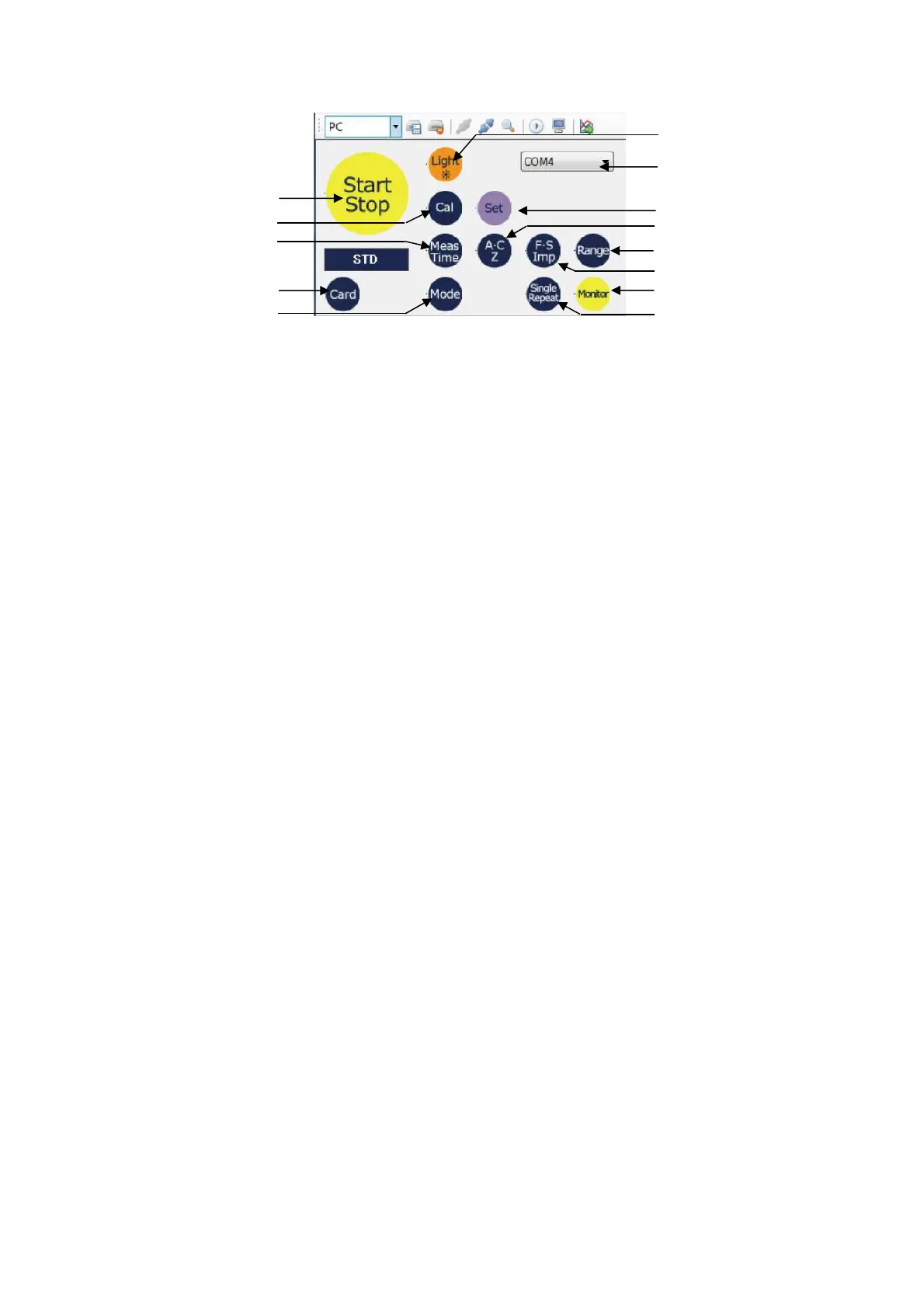
3.4.2 Remote Control Panel
① COM port selection
pull-down menu : All the COM ports available for the PC is indicated.
Select 1 (one) COM port to connect.
② Start/Stop : Start/Stop remote control measurement. Click the button to start
the measurement. Click again to stop. Other buttons cannot be
used during the measurement.
③ Card : Set the SD card type recognized by the TYPE 6236. With each
click of the button, the display is changed as follows. 【STD】→
【Octave】→【FFT】→【RSR】 Even if the card type is set (changed),
card type display on the TYPE 6238 is not changed.
④ Light : Light up the backlight of the display of the TYPE 6236.
Click the button again to turn off the light.
⑤ Cal : Perform calibration of the TYPE 6238. Click again the button to
stop the calibration.
⑥ Set : Reflect information set by the Data Management Software.
Setting of the TYPE 6238 is not changed unless this button is clicked.
⑦ Meas.Time : Set measurement time. With each click of the button, measurement
time is changed as follows.
***→1s→3s→5s→10s→1m→5m→10m→15m→30m→1h→8h→12h
→24h
⑧ A・C,Z : Set filter. With each click of the button, filter is change as
follows. A→C→Z
⑨ F・S,Imp : Set time constant. With each click of the button, time constant will
be changed as follows. Fast→Slow→Impulse
⑩ Range : Set measurement range. With each click of the button, range is
changed as follows. 130dB→120dB→110dB→100dB→90dB →80dB
⑪ Mode : Set measurement mode/analysis range Measurement mode/analysis
range is changed depending on the SC card type set by the SD card
type button.
For 【STD】 : Normal→Latm5→LAIeq
For 【Octave】 : 1/1→1/3
For 【FFT】 : LIN→MAX→INST
⑫ Single,Repeat : Set measurement interval.
With each click of the button, measurement interval is changed as
follows. Single→ Repeat
⑬ Monitor : Start/stop remote control monitoring.
Click the button to start the monitoring. Click again to stop.
①
②
⑤
⑦
③
⑪
④
⑥
⑧
⑨
⑩
⑬
⑫



 To Next Page