9. Display of measurement data in the optional program cards
Procedure to display measurement data in the Measurement data display area is the same as
that described in Para. 4 “Display of measurement data in the memory card”.
9.1 Display of measurement data in 1/1-1/3 Octave Real-time Analysis Card
9.1.1 Display of measurement data
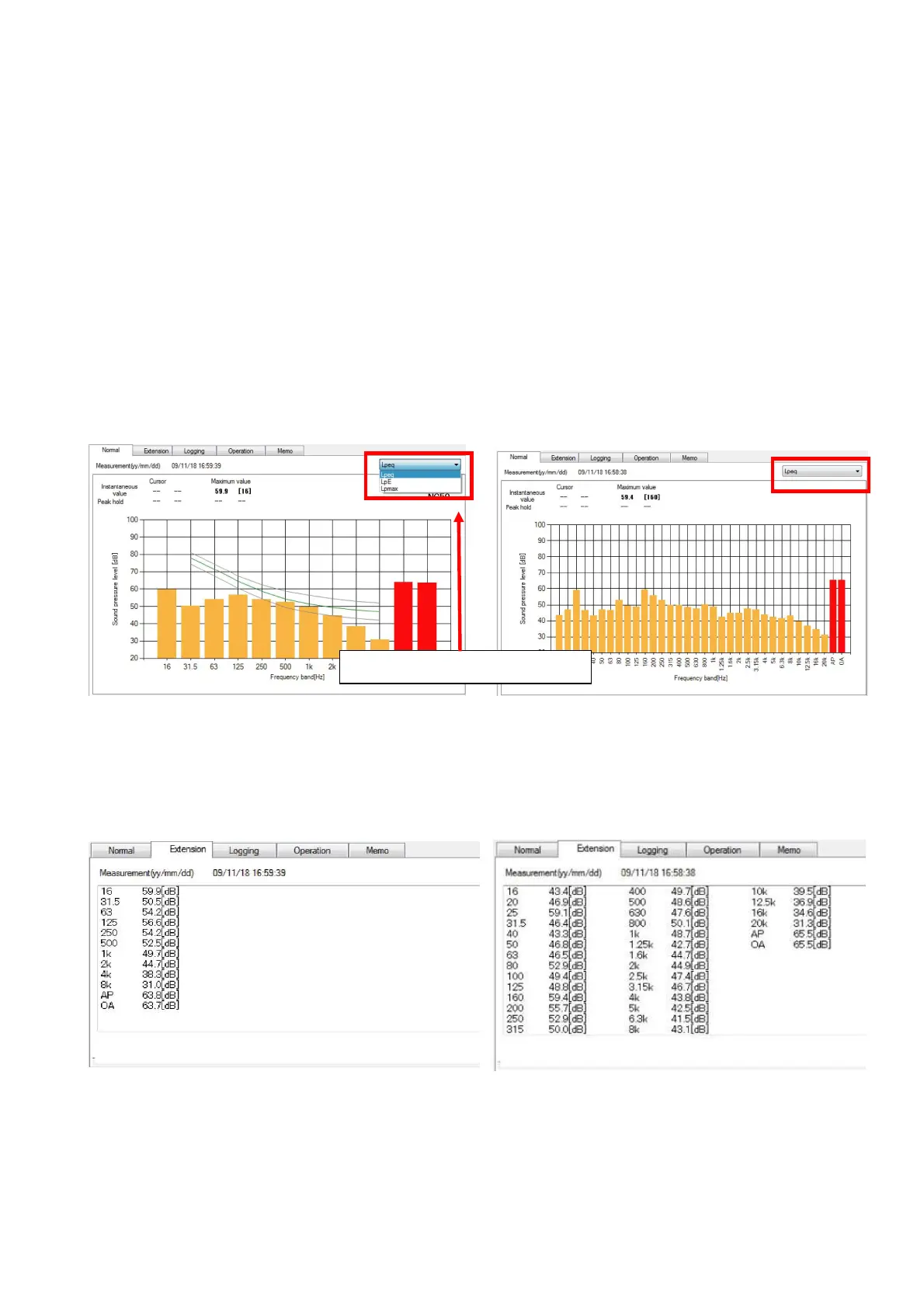
Display Normal Panel to see the measurement data.
Calculation result for certain measurement mode will be displayed.
To display calculation result of other measurement mode, select desired measurement
mode from the combo box on the upper right corner of the panel.
If the graph is clicked by the mouse, such point (measurement date) becomes a cursor and
red line will move. If the measurement data is for 1/1 Octave Real-time Analysis and Z
(Flat) characteristic, NC curve and NC value will be displayed.
【1/1 Octave Real-time Analysis 【1/3 Octave Real-time Analysis
measurement data】 measurement data】
To display frequency values of each band for the desired measurement mode, select Extension
Panel. Numerical values on the Extension Panel are data for the measurement mode selected on
the Normal Pane.
【1/1 Octave Real-time Analysis 【1/3 Octave Real-time Analysis
measurement data】 measurement data】
Select measurement mode



 To Next Page