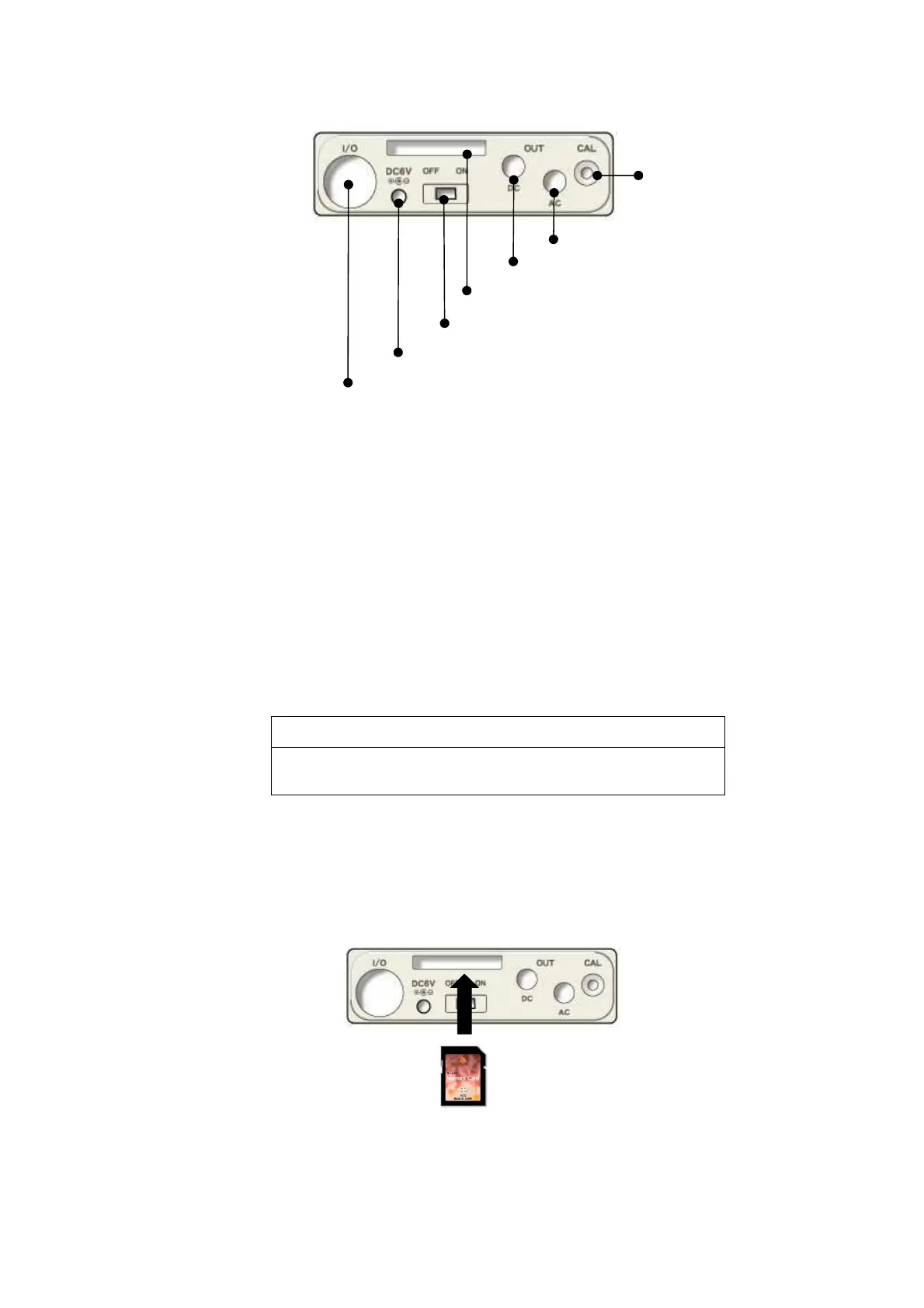
Side view of the main body
AC power adaptor connector
By using the optional AC adaptor, AC100V is available for the measurement.
Please do not use any other power supplies than specified AC adaptor. It may cause
breakdown or malfunction.
AC/DC out connector
AC: outputs frequency-weighted AC signal.
DC: outputs DC level signal .
External Input/Output connector
Input or output terminal for control signal or measurement data, which can be connected to
a printer, level recorder, or personal computer.
Card(SD Card) slot
The slot for memory card(SD card) or optional program card.
NOTE
Please watch out for the card slot portion w
it in hand. The card may jump out.
Inserting and detaching the card
1. Insert the card into the card slot on the side panel.
Press softly the card into the slot until it comes to the end, watching for the direction of the
card.
2. Press the card again for detaching it. The card comes off by itself.
AC power adaptor connector
Side panel
Calibration potentiometer
AC OUT connector
DC OUT connector
POWER switch
External Input/Output connector
Card (SD Card)slot



 To Next Page