Copyright
©
2005 ACTIA - How to Use SmarTach
®
- Basic Functions - 15
English
3.6 First Level Displays
There are eight different displays at this level:
• Four main displays that are permanently displayed when you
are not executing any particular action.
• Four information displays, showing the most useful
information.
3.6.1 How to Select a Main Display
After having inserted your card and selected your current
activity, you can select a main display. This display will
automatically appear again once an operation is completed.
1. To go from one display to another, press or .
2. Four different main displays can be permanently displayed,
each providing various types of information.
3. Waiting a few seconds without any action on the keyboard,
SmarTach
®
will automatically set the current display as
default permanent Main Display.
Information about Refer to
Driver activities
- The vehicle is stopped.
- The vehicle is moving.
Example 1
Example 1 bis
Partial mileage Example 2
Total mileage Example 3
Vehicle speed Example 4
Table 7
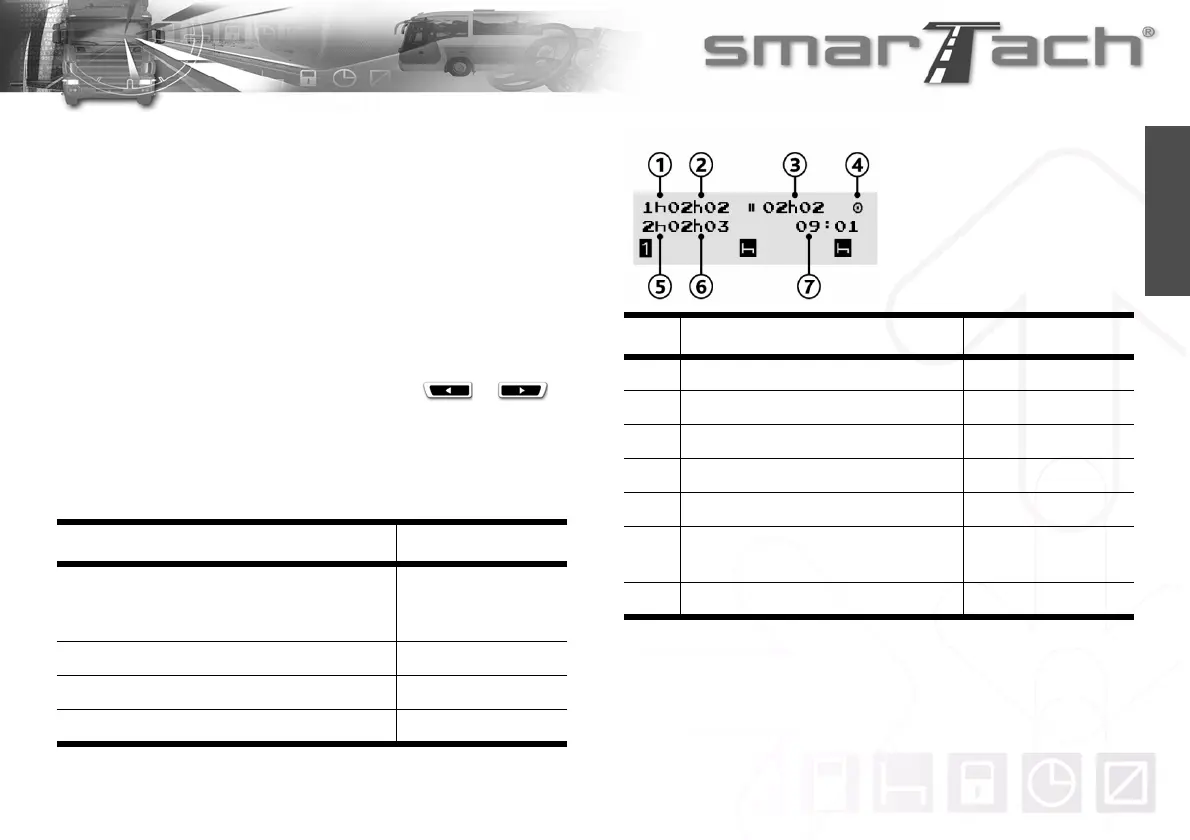
No Description In example 1
1 Your current activity as driver Break/Rest
2 Duration of your current activity as driver 2h and 2min
3 Cumulative break time 2h and 2min
4SmarTach
®
mode of operation Operational mode
5 Your current activity as co-driver Break/Rest
6
Duration of your current activity as co-
driver
2h and 3min
7 Local time 09:01
Table 8
Example 1
Driver activities
(The vehicle is stopped)



 To Next Page