Copyright
©
2005 ACTIA - How to Use SmarTach
®
- Advanced Functions - 29
English
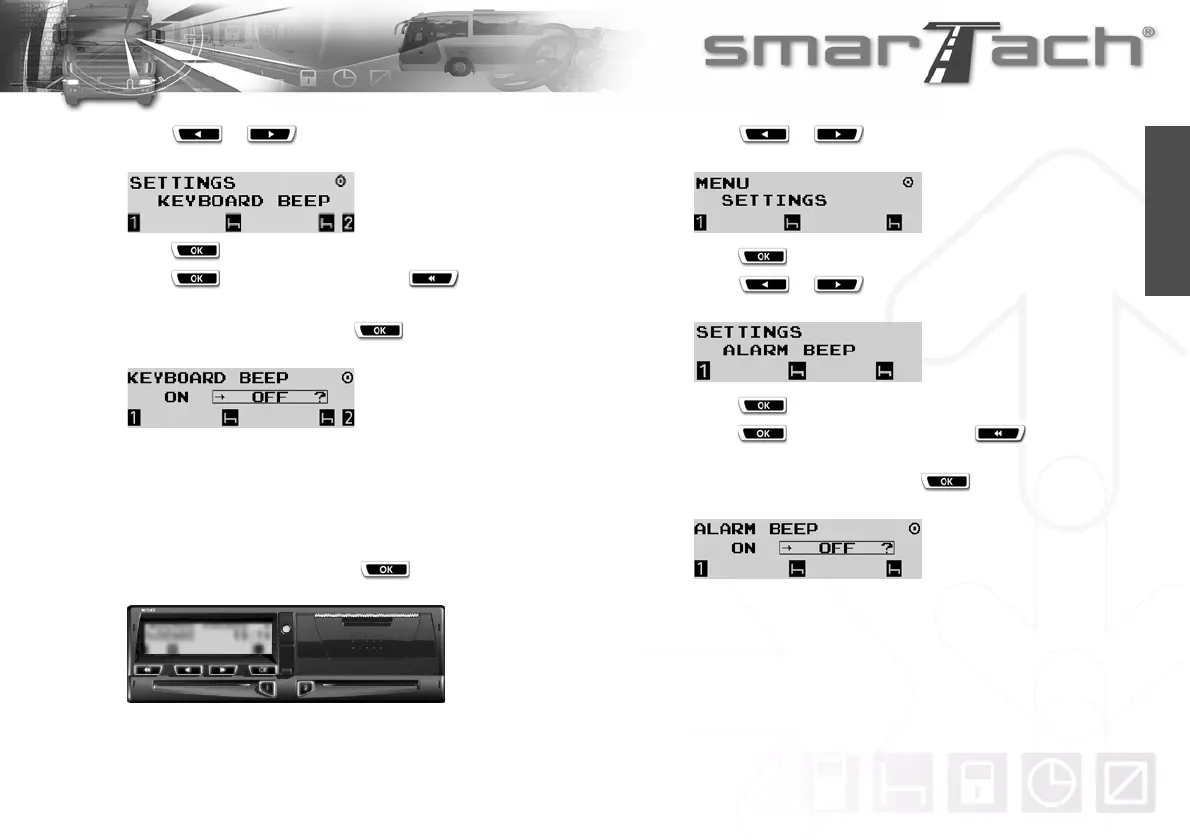
4. Press or as many times as necessary to go to
KEYBOARD BEEP.
5. Press to select KEYBOARD BEEP.
6. Press to validate the change or to exit without
change.
In the following example, press to deactivate the
keyboard beep.
7. The change is taken into account.
8. The last selected main display appears.
4.1.6 Warning Beep
To activate or deactivate the warning beep, proceed as follows:
1. In the first level of menus, press to go to the second
level.
2. Press or as many times as necessary to go to
SETTINGS.
3. Press to select SETTINGS.
4. Press or as many times as necessary to go to
ALARM BEEP.
5. Press to select ALARM BEEP.
6. Press to validate the change or to exit without
change.
In the following example, press to deactivate the
warning beep.
7. The change is taken into account.
8. The last selected main display appears.



 To Next Page