26 - How to Use SmarTach
®
- Advanced Functions - Copyright
©
2005 ACTIA
English
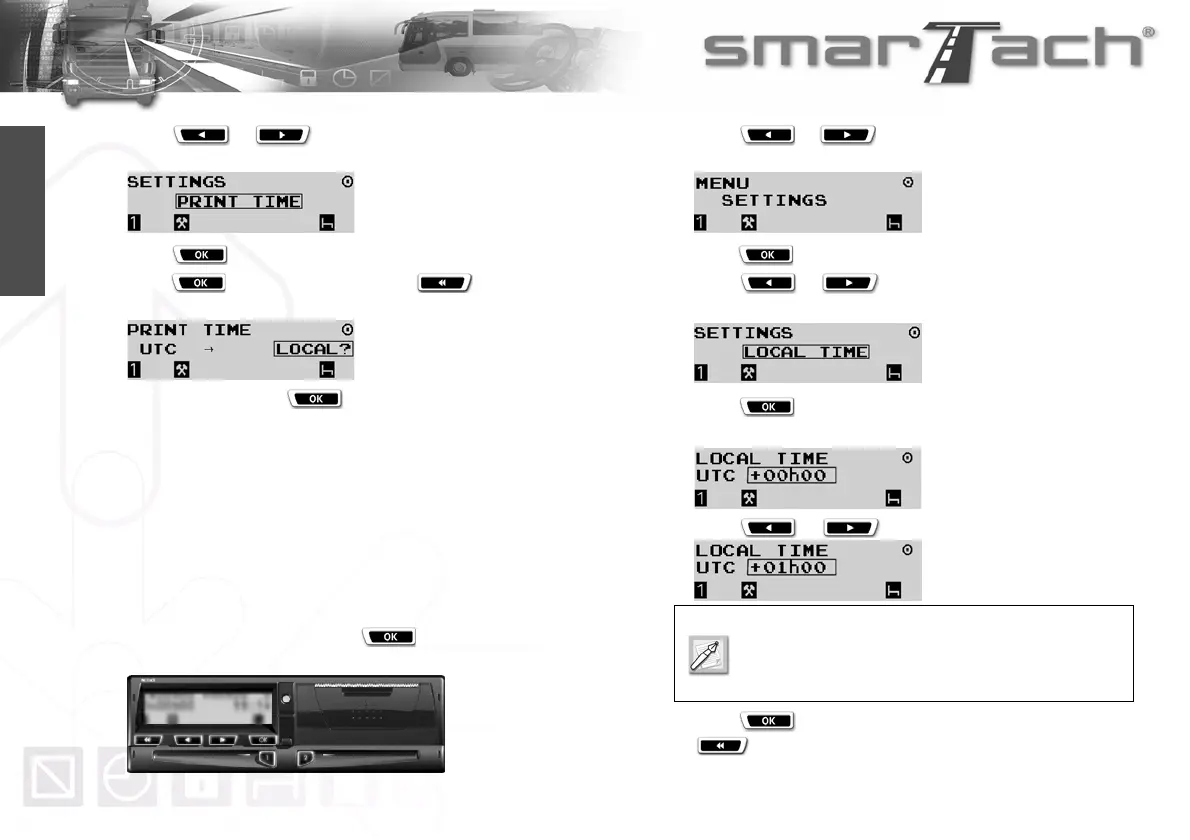
4. Press or as many times as necessary to go
to PRINT TIME.
5. Press to select PRINT TIME.
6. Press to validate the change or to exit
without change.
In this example, press to choose printing in local time
reference.
7. The adjustment is taken into account.
8. The last selected main display appears.
4.1.2 Local Hour/UTC Time
You may set the difference between UTC time and local time,
unless the workshop has deactivated this function.
To set the difference between UTC time and local time, proceed
as follows:
1. In the first level of menus, press to go to the second
level.
2. Press or as many times as necessary to go
to SETTINGS.
3. Press to select SETTINGS.
4. Press or as many times as necessary to go
to LOCAL TIME.
5. Press to select LOCAL TIME.
6. The difference between local time and UTC time is displayed.
7. Press or to set the difference.
8. Press to validate the change (+01h00 in this case) or
to exit without change.
Local time must be set according to UTC time by
steps of plus or minus 30 minutes.
Limits are -23h30 and +23h30.



 To Next Page