Copyright
©
2005 ACTIA - How to Use SmarTach
®
- Advanced Functions - 41
English
7. Press to close the condition.
SmarTach
®
shows you the date and time at which the Out of
Scope condition was opened.
8. Press to confirm closing or to stay in Out of
Scope condition.
4.5.2 Ferry/Train
During a journey, when your vehicle is transported by ferry or by
train, you must declare a Ferry/Train condition.
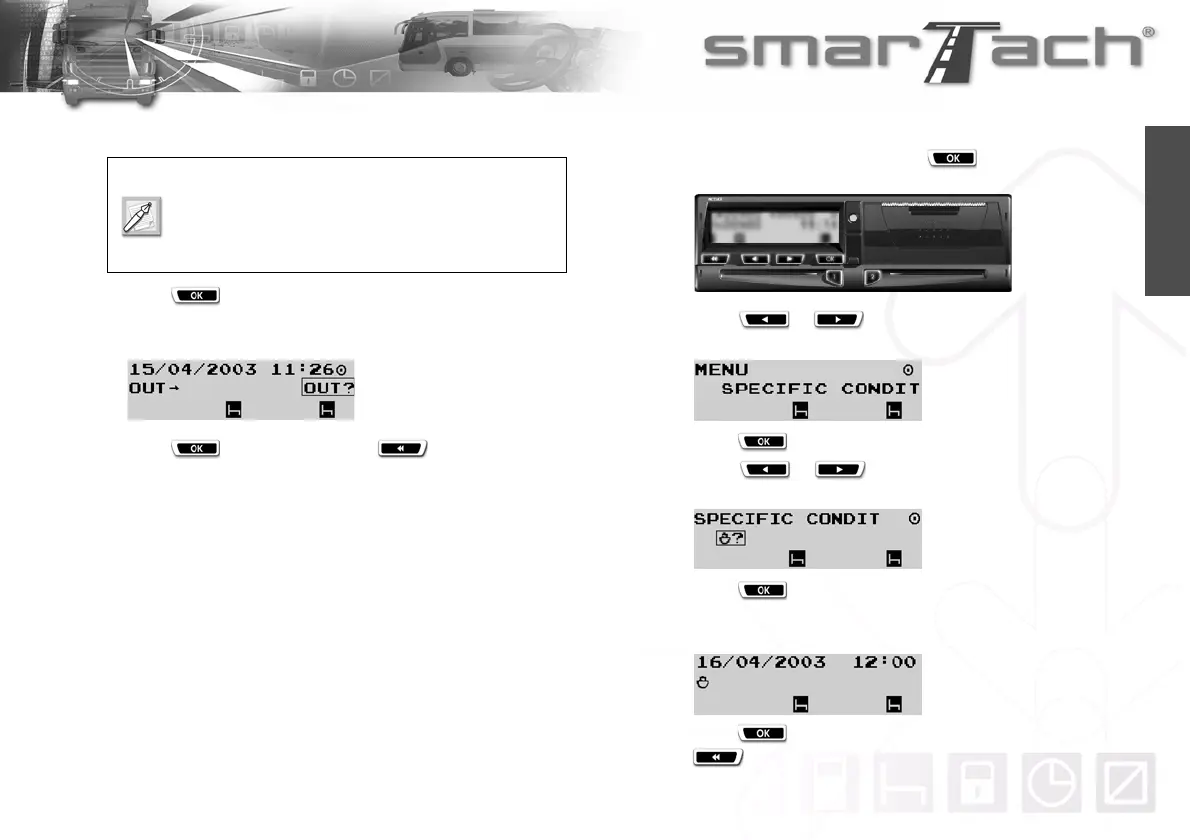
To declare Ferry/Train condition, proceed as follows:
1. In the first level of menus, press to go to the second
level.
2. Press or as many times as necessary to go to
SPECIFIC CONDIT.
3. Press to select SPECIFIC CONDIT.
4. Press or as many times as necessary to
select
¹?.
5. Press to declare the Ferry/Train condition.
SmarTach
®
shows you the date and time at which the Ferry/
Train condition was declared.
6. Press to confirm the Ferry/Train condition declared or
to cancel.
When this condition is open:
the second level of menus is not available,
insertion or withdrawal of any card closes it.



 To Next Page