Copyright
©
2005 ACTIA - How to Use SmarTach
®
- Advanced Functions - 27
English
9. Local time adjustment is taken into account.
10. The last selected main display appears.
In the following example, local time has been moved forward
by one hour.
4.1.3 UTC Time
SmarTach
®
must be on time. You can adjust SmarTach
®
UTC
time under the following conditions:
• UTC time can be adjusted by a maximum of one minute.
• Only one adjustment can be made within 7 days. If you
try to adjust UTC time in between, a message notifies
you that it is not possible.
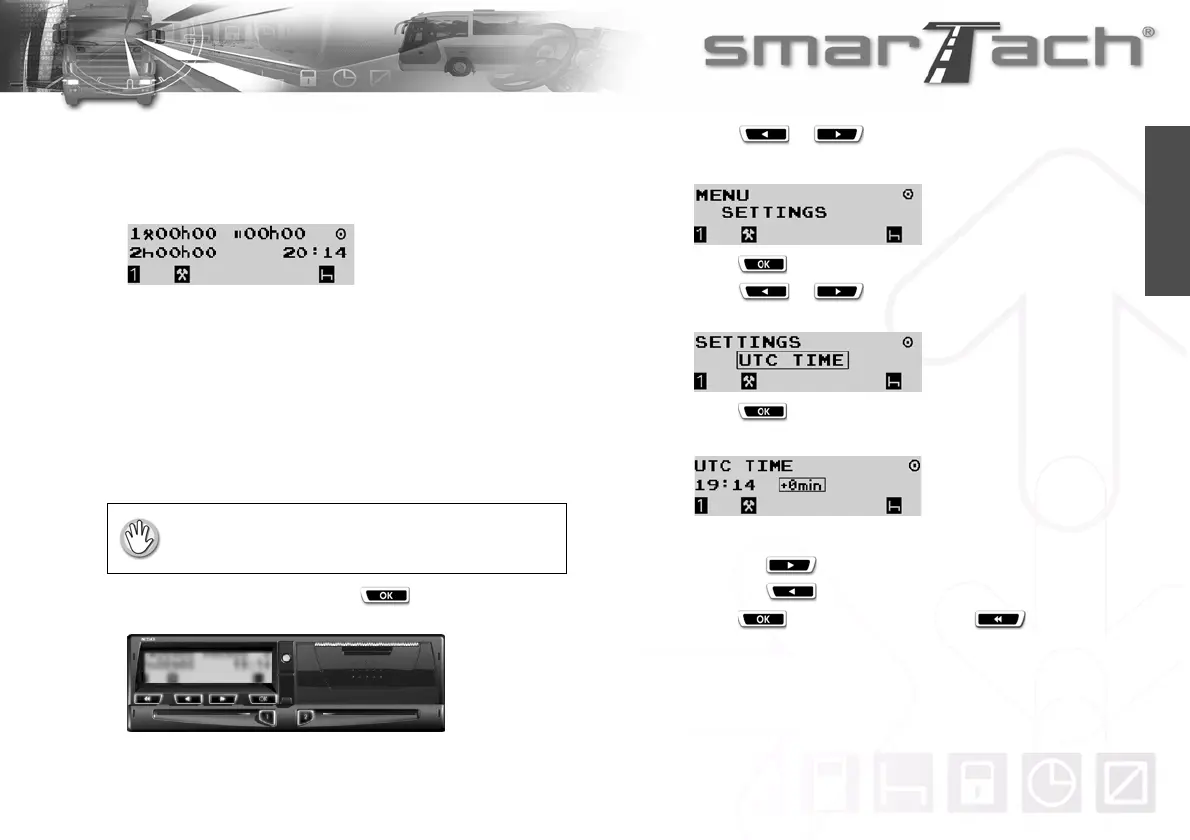
To adjust UTC time, proceed as follows:
1. In the first level of menus, press to go to the second
level.
2. Press or as many times as necessary to go to
SETTINGS.
3. Press to select SETTINGS.
4. Press or as many times as necessary to go to
UTC TIME.
5. Press to select UTC TIME.
6. UTC time and the initial adjustment (+0min) are displayed.
7. To modify UTC time:
• press to set the internal clock forward +1min.
• press to set the internal clock back -1min.
8. Press to validate the change or to exit without
change.
UTC time must not have been adjusted within the
7 previous days.



 To Next Page