40 - How to Use SmarTach
®
- Advanced Functions - Copyright
©
2005 ACTIA
English
4.5 How to Declare Specific Conditions
4.5.1 Out of Scope
You can open an Out of Scope condition when your activities as
driver are not covered by EEC Regulation No. 3820/85. You
must close it when this regulation applies again.
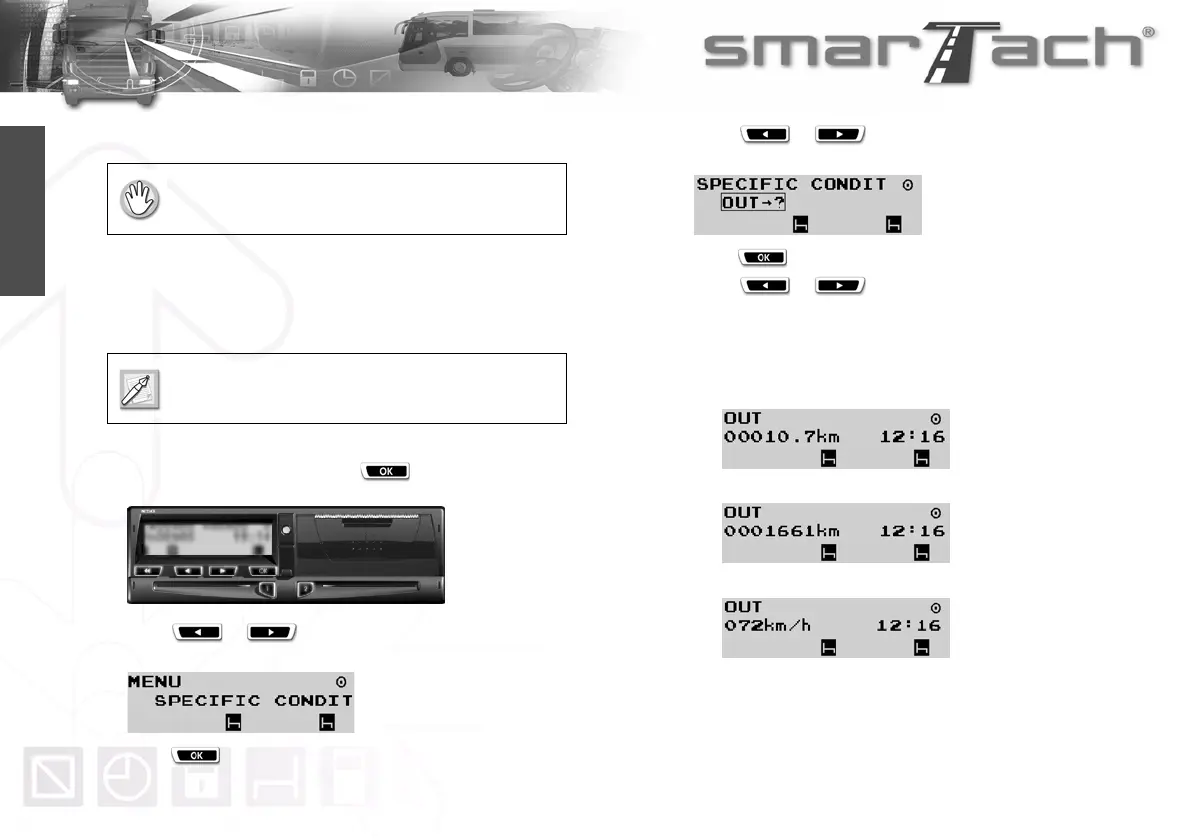
To declare Out of Scope condition, proceed as follows:
1. In the first level of menus, press to go to the second
level.
2. Press or as many times as necessary to go to
SPECIFIC CONDIT.
3. Press to select SPECIFIC CONDIT.
4. Press or as many times as necessary to
select OUT.
5. Press to declare Out of Scope condition.
6. Press or as many times as necessary to
change the main display you want to display by default.
Only the three following main displays are available when this
condition is open:
• Tripmeter:
• Total mileage:
• Vehicle speed:
The vehicle must be stationary.
Events and faults are managed as if this condition
were not open, except for events related to driving.



 To Next Page