Copyright
©
2005 ACTIA - How to Use SmarTach
®
- Advanced Functions - 51
English
8. SmarTach
®
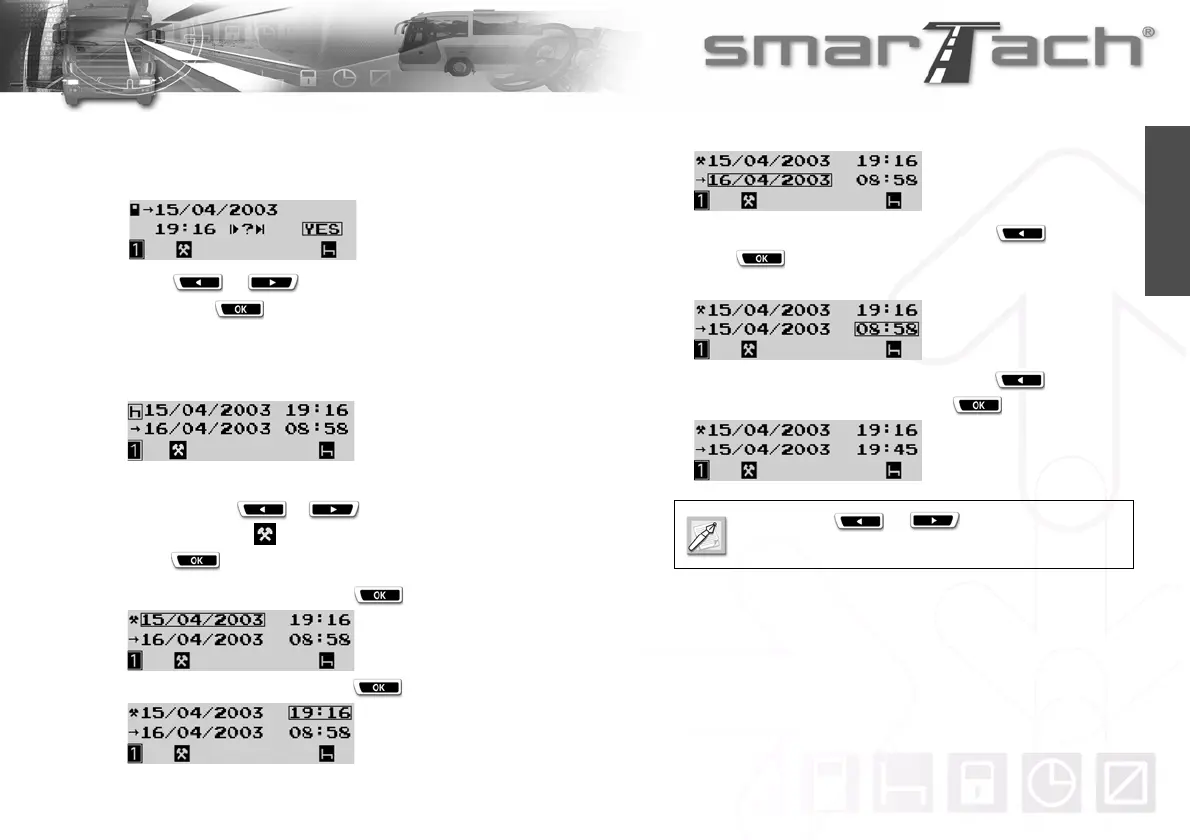
displays the end date and time of the last activity
stored in your card and asks you if it corresponds to the end
of the previous daily work period.
Press or to select NO.
Then, press to confirm that you have performed other
activities after that time.
9. The activity entry display appears showing the period for
which you can enter activites.
You want to enter a work period from 19:16 to 19:45.
To do so, press or as many times as necessary
to select WORK .
Press .
10. To confirm the start date, press .
11. To confirm the start time, press .
12. SmarTach
®
asks you to define the end date.
In this case, to select the end date, press and then
press .
13. SmarTach
®
asks you to define the end time.
In this case, to select the end time, press as many
times as necessary, and then press .
Hold down or to select time more
rapidly.



 To Next Page