54 - How to Use SmarTach
®
- Advanced Functions - Copyright
©
2005 ACTIA
English
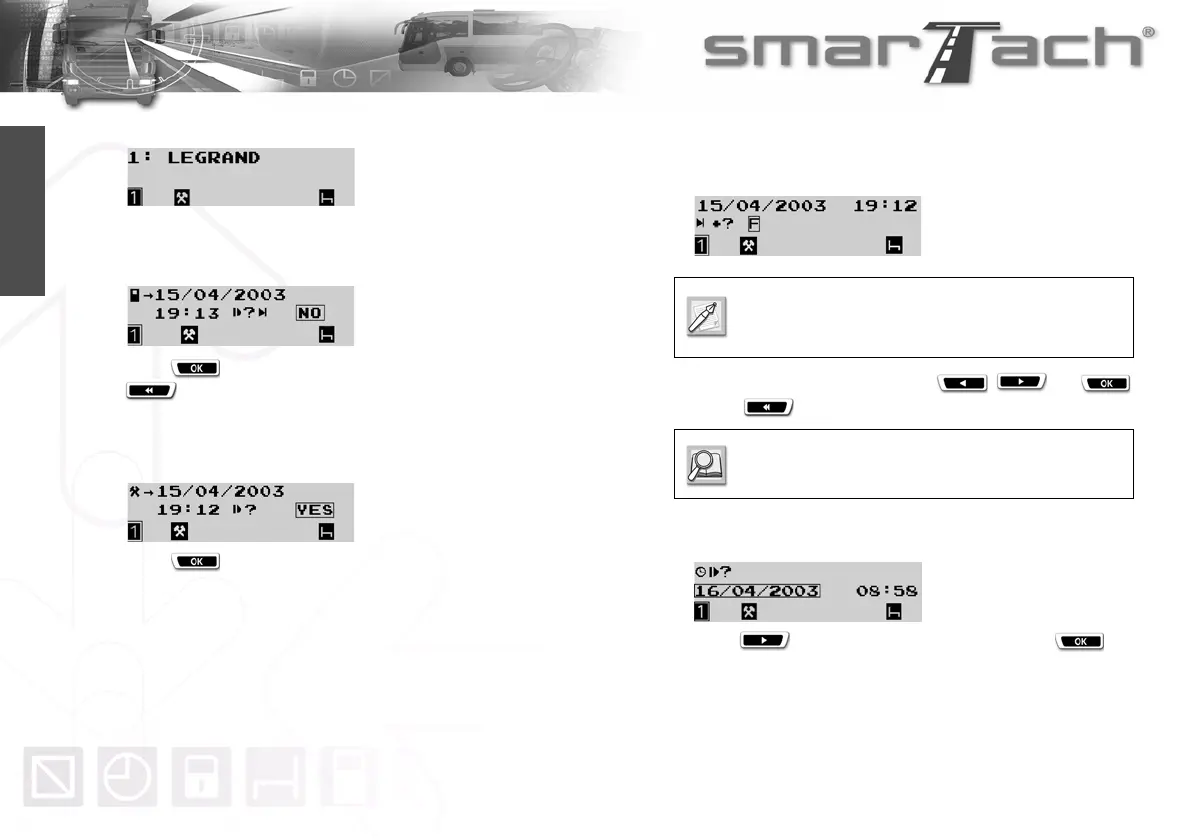
6. After a moment, your name appears.
7. SmarTach
®
displays the date and time of the last card
withdrawal and asks you if it is still the same daily work
period.
Press to indicate that the work period has changed or
to exit.
8. SmarTach
®
displays the end date and time of the last activity
stored in your card and asks you if it corresponds to the end
of the previous daily work period.
Press to select YES.
9. SmarTach
®
displays the date and time when your previous
daily work period ended, and asks you to enter the
corresponding location.
Choose the current location using and
or use to exit this question.
10. SmarTach
®
prompts you to enter the date on which you are
starting your current daily work period.
Press to select the correct date and press .
You will only have to specify this location if it was
not entered when your driver card was last
withdrawn.
Refer to Section 6.8 List of Countries and
Regions.



 To Next Page