Installation Steps
61179641L4-5B 3-7
Mid-mount
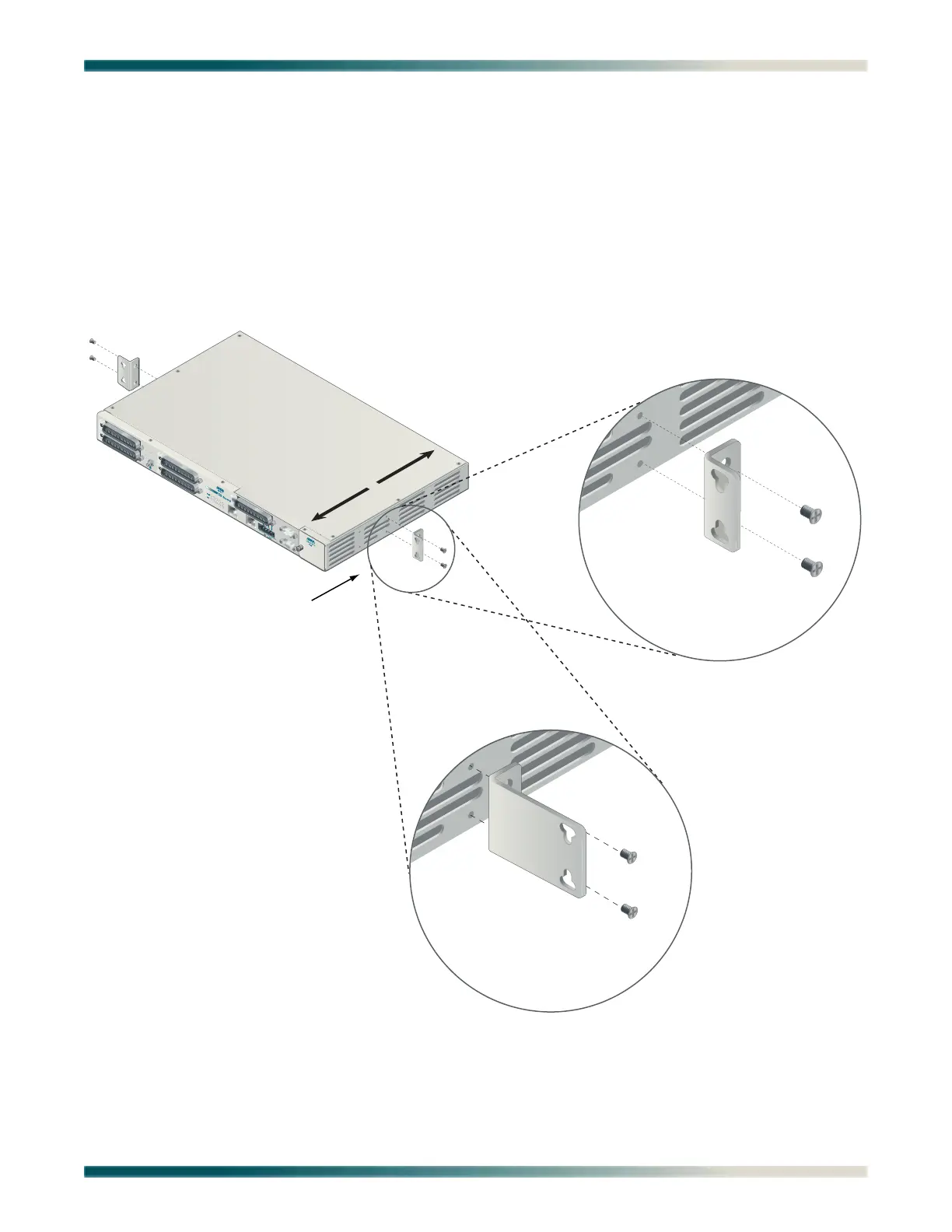
For mid-mount systems, the Total Access 1248 must be mounted from the front of the rack,
with mounting brackets in the mid-mounting orientation (see Figure 3-3). For mid-mounting a
Total Access 1248 in the rack, use a #2 phillips-head screwdriver and attach the mounting
brackets to the rear screw holes with the flanges containing the slotted rack-mounting holes
facing the front of the Total Access 1248.
Using four screws appropriate for the mounting rack and the appropriate screwdriver, secure
the Total Access 1248 in place on the rack.
Figure 3-3. Mid-mount Orientation
1
2
3
4
T1/E1
5
6
7
8
FRONT
BACK
Mid-mount Orientation
19-inch Mounting Brackets
23-inch Mounting Brackets


 To Next Page
 Loading...