FIRST-TIME USE
4-15
Using the utility menus
As an exercise in the use of the utility menus we shall perform the operation of selecting an
alternative frequency standard.
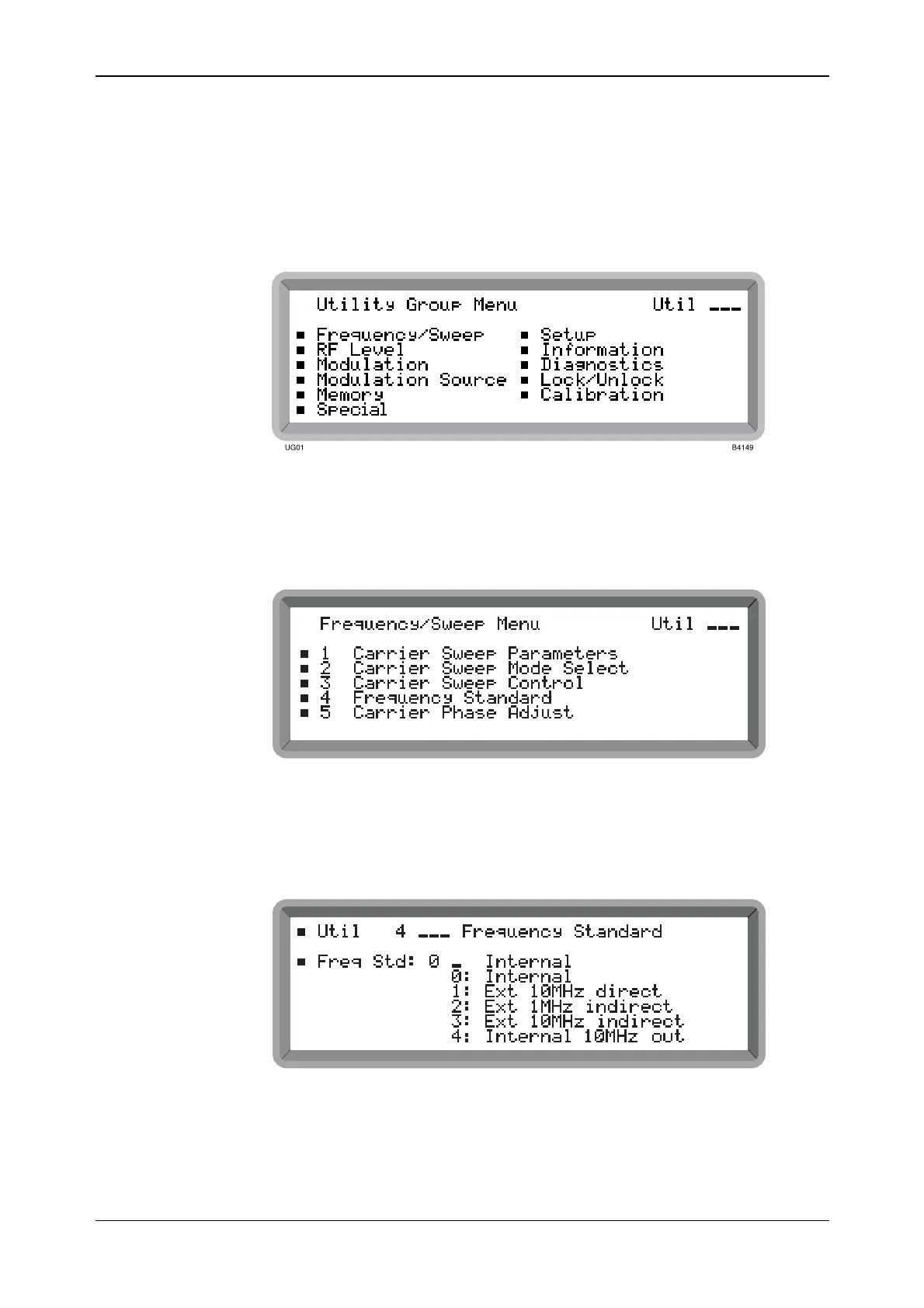
(1) Press [CARR FREQ] followed by [MENU] to display the Utility Group Menu shown in
Fig. 4-9. This is the top level menu of a 3-tier menu chain. Since the [CARR FREQ]
function key preceded the [MENU] key, the required Frequency/Sweep group is already
highlighted on the menu.
Fig. 4-9 Utility group menu
(2) Use the [NEXT] and [PREV] keys to move around the menu.
(3) Highlight Frequency/Sweep again and press [SELECT]. This causes the 2nd-level
Frequency/Sweep Menu shown in Fig. 4-10 to be displayed.
B2034UMFS01
Fig. 4-10 Frequency/sweep menu
(4) Highlight utility 4 Frequency Standard and press [SELECT]. This displays the 3rd-level
menu used for internal and external standard selection shown in Fig. 4-11. A flashing
cursor awaiting entry is shown against the current selection.
B2356UT004
Fig. 4-11 Frequency standard menu



 To Next Page