Settings
44
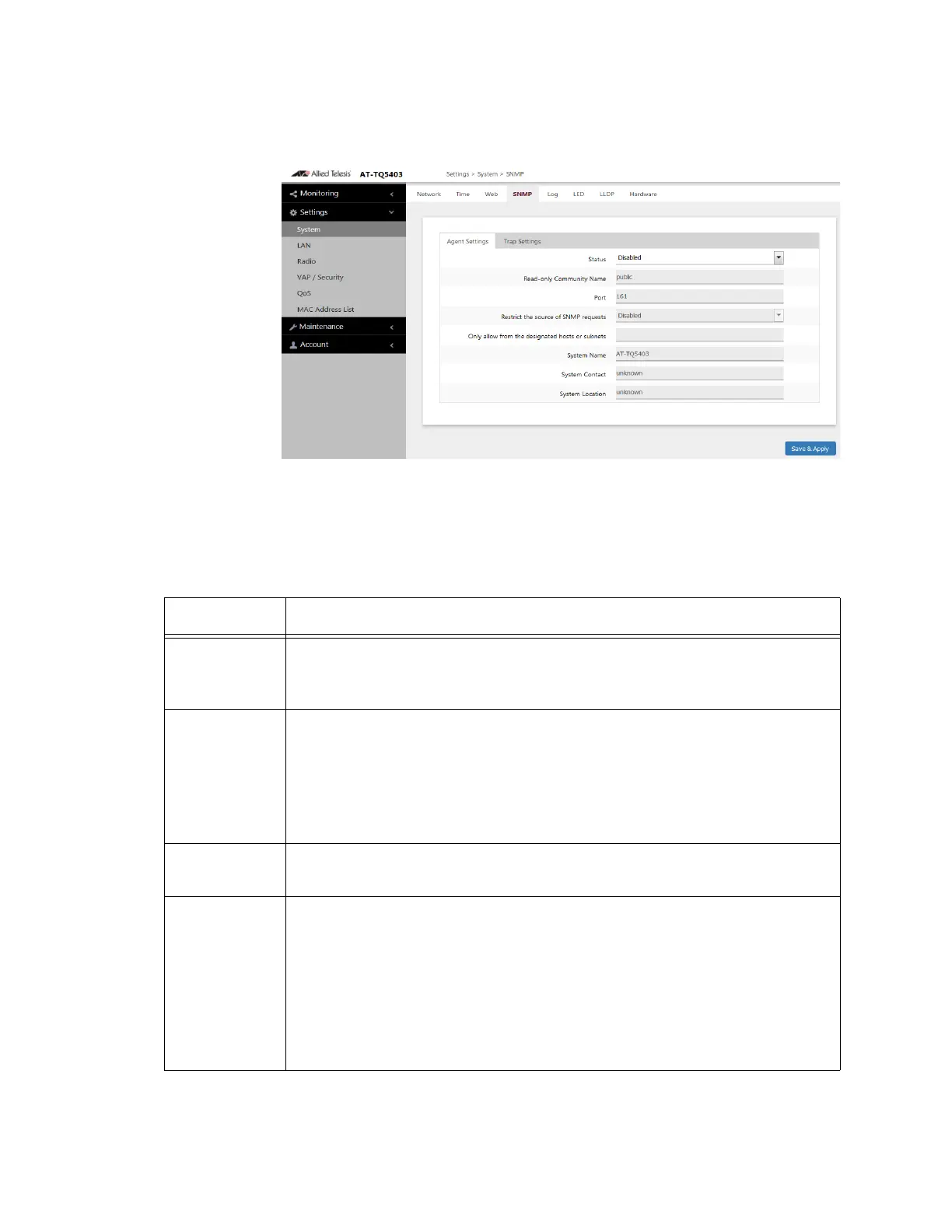
SNMP In the SNMP screen, you can enable or disable the SNMP agent and
configure the SNMP parameters. Refer to Figure 18.
Figure 18. Settings > System > SNMP > Agent Settings
The fields are defined in Table 16 for the Settings > System > SNMP >
Agent Settings window.
Table 16. Settings > System > SNMP > Agent Settings
Item Name Description
Status Select "Enabled" to activate the SNMP agent,
Select "Disabled" to deactivate the SNMP agent.
The default is "Disabled".
Read-only
Community
Name
Set community name of read authority as 1 to 256 characters. The
default name is "public".
You can use half-width alphanumeric symbols other than the following
six types:
"" (Double quote), '' (single quote), '¥' or '/' (Yen sign or backslash), '&',
'<', '>'
Port Sets SNMP UDP port number from 1 to 65535.
The default is "161".
Restrict the
Source of
SNMP
Requests
Select "Enable" to restrict hosts or subnets that perform SNMP
operations.
NOTE: When "Enable" is selected, you need to set the following field:
"Only allow from the designated hosts or subnets".
Select "Disable" to un-restrict hosts or subnets that perform SNMP
operations.
The default is "Disable".



 To Next Page
 Loading...




