2–2 Chapter 2: Getting Started
Cyclone V Hard IP for PCI Express November 2011 Altera Corporation
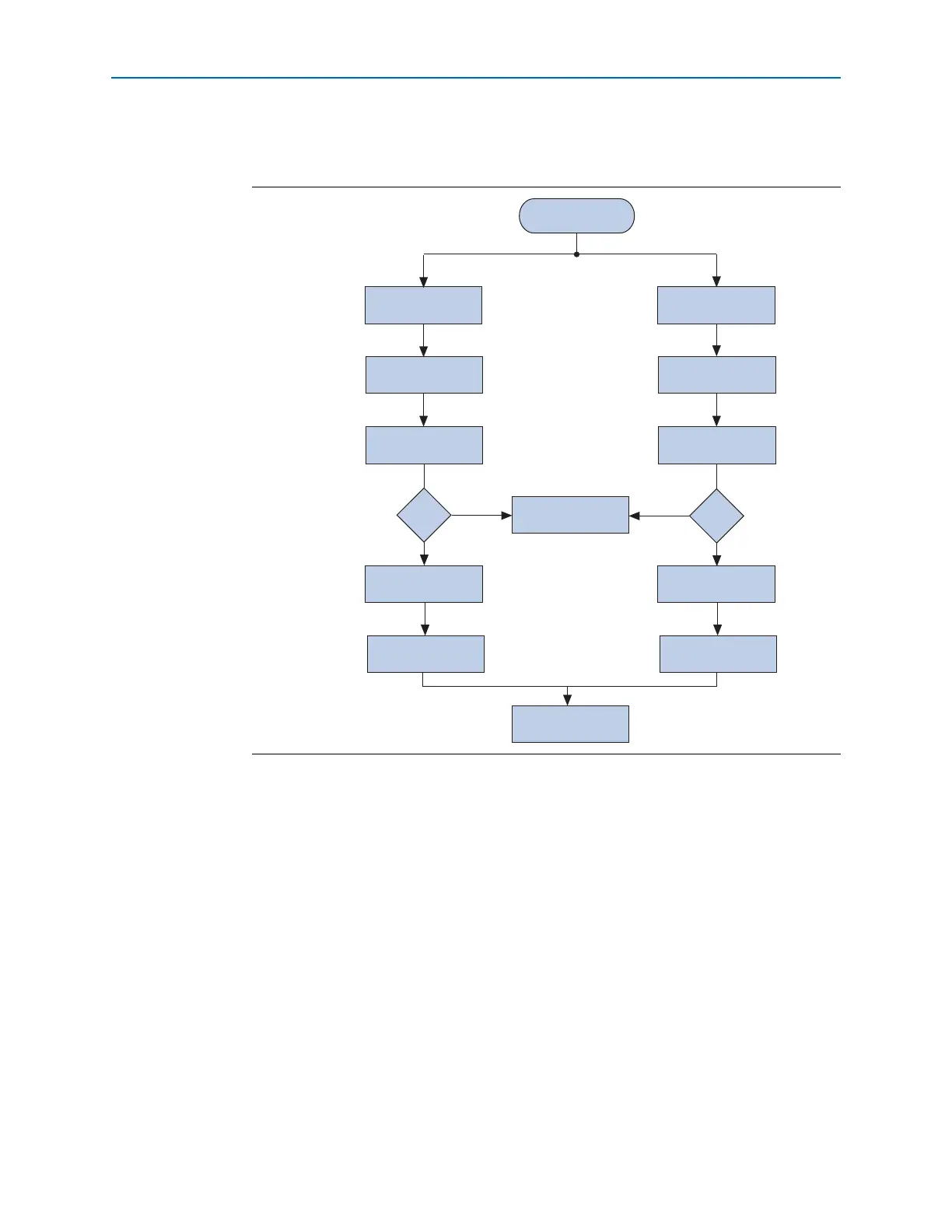
Figure 2–1 illustrates the steps necessary to customize the Cyclone V Hard IP for PCI
Express and run the example design.
The following sections provide step-by-step instructions for both design flows.
Steps 1 to 3 are different for each design flow and are described separately. Step 4 is
identical for both flows and is described once. You can also skip Step 4 and proceed
directly to Quartus II compilation. Step 5 and 6 are different for the two design flows
and are described separately. Step 7 is the same for both flows and is described once.
You can begin by selecting one of these two design flows:
■ MegaWizard Plug-In Manager Design Flow
■ Qsys Design Flow
Figure 2–1. MegaWizard Plug-In Manager and Qsys Design Flows
Select Design Flow
Customize the
Hard IP for PCIe
Qsys Flow
MegaWizard
Flow
Complete Qsys System
Perform ModelSim
Simulation
Create Quartus II Project
Add Quartus IP File (.qip)
Create Quartus II Project
Generate the Simulation
Model in Qsys
Generate the Simulation
Model in Qsys
Compile the Design for the
Qsys Design Flow
Modify Example Design
to Meet Your Requirements
Compile the Design for the
MegaWizard Design Flow
Add Quartus IP File (.qip)
to Quartus II Project
Customize the
Hard IP for PCIe
Step 1
Step 2
Step 3
Step 4
Step 5
Step 6
Step 7
Ye s
No
Simulating?
Ye s
No
Simulating?



 To Next Page