2–16 Chapter 2: Getting Started
Qsys Design Flow
Cyclone V Hard IP for PCI Express November 2011 Altera Corporation
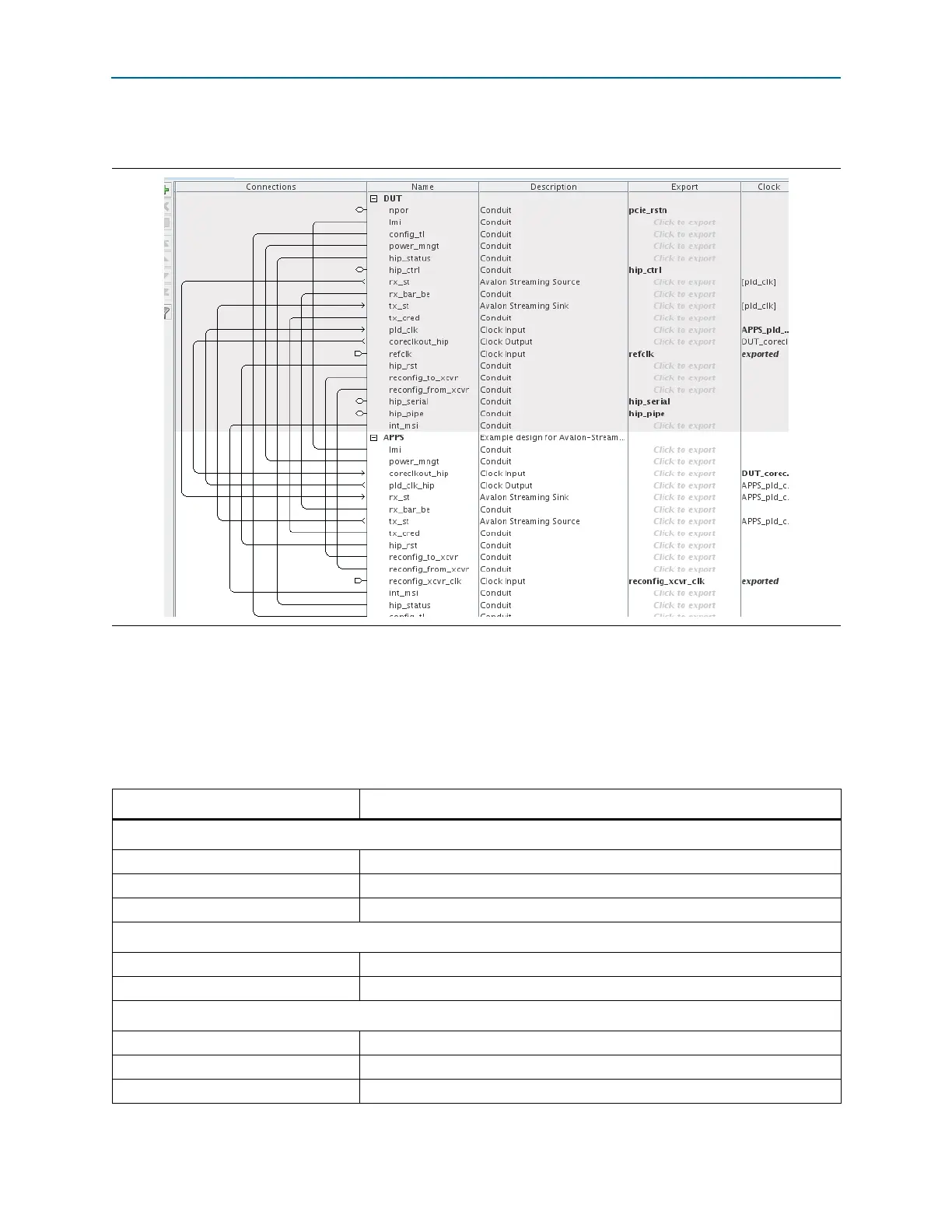
Figure 2–6 illustrates the complete Qsys system.
Generating the Simulation Model Using Qsys
Follow these steps to generate a simulation model that you can include in your own
PCI Express testbench.
1. On the Qsys Generation tab, specify the parameters listed in Table 2–18.
Figure 2–6. Complete Gen1 ×4 Endpoint (DUT) Connected to Example Design (APPS)
Table 2–18. Parameters to Specify on the Generation Tab in Qsys (Part 1 of 2)
Parameter Value
Simulation
Create simulation model Verilog
Create testbench Qsys system
(1)
Standard, BFMs for standard Avalon interfaces or None
Create testbench simulation model
(1)
Verilog or None
Synthesis
Create HDL design files for synthesis Turn on this option
Create block symbol file (.bsf) Turn on this option
Output Directory
Path pcie_qsys/pcie_de_gen1_x4_ast64
Simulation pcie_qsys/pcie_de_gen1_x4_ast64/simulation
Testbench pcie_qsys/pcie_de_gen1_x4_ast64/testbench



 To Next Page