CHAPTER 2: INSTALLATION AND SETUP
LW500A/LW600A PULSED Nd:YAG LASER
2-2 990-539
Section II: Installation
Removing the Oscillator Hold-down Brackets
Oscillator hold-down brackets are provided on the laser to protect the oscillator against vibration and
shock during transportation. These brackets should be removed before operation.
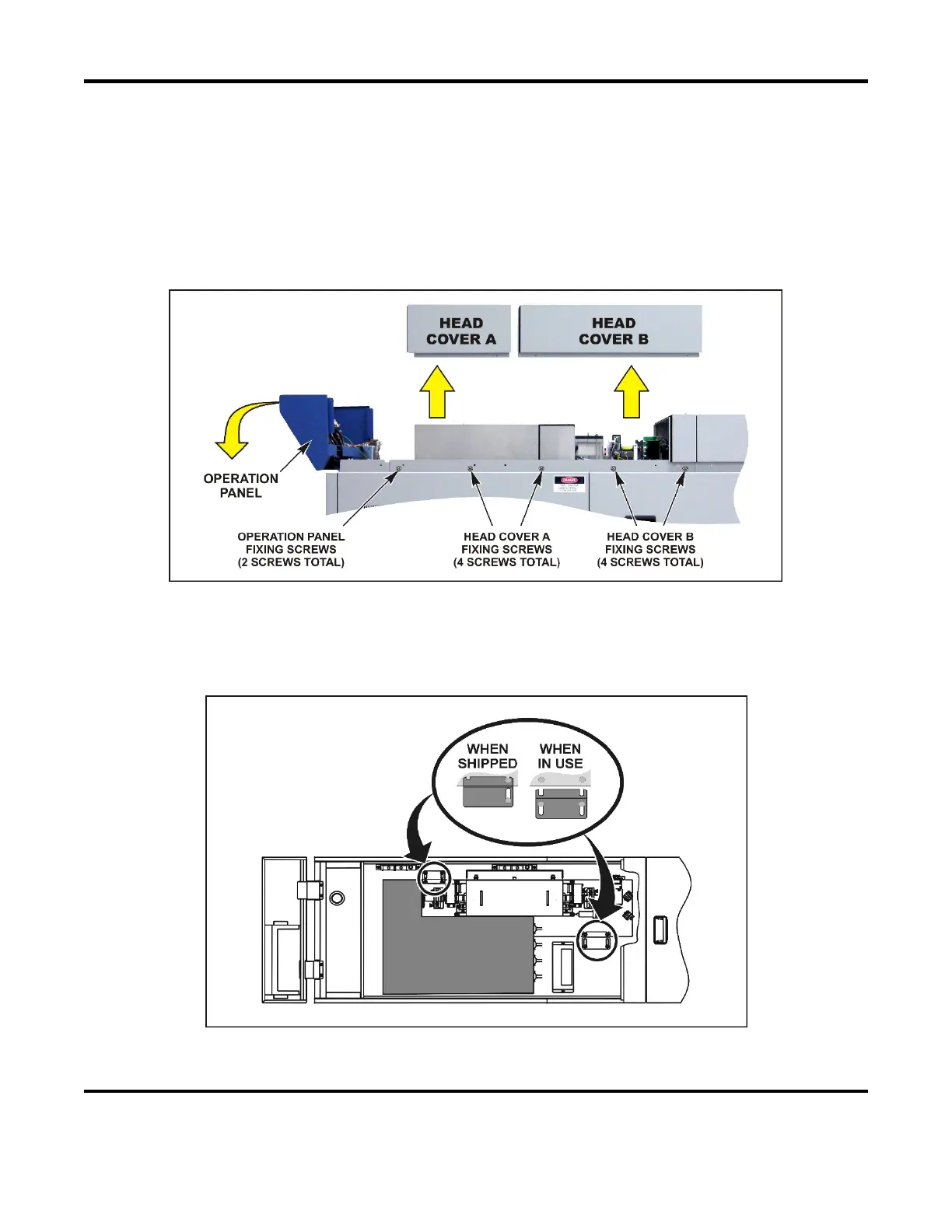
1. Remove the Operation Panel holding screws on both sides of the laser, and tilt the Operation
Panel forward as shown.
2. Remove all Head Cover holding screws, then pull both Head Covers up as shown to remove.
3. Loosen the screws to disengage the hold-down brackets from the oscillator base. The oscillator
is supported with rubber legs to absorb slight vibrations. Do not subject the Laser to shock or
strong vibrations.
NOTE: When transporting the Laser after it has been installed, secure the oscillator with the
hold-down brackets as it was when shipped.



 To Next Page