CHAPTER 3: PROGRAMMING FUNCTIONS
LW500A/LW600A PULSED Nd:YAG LASER
3-26 990-539
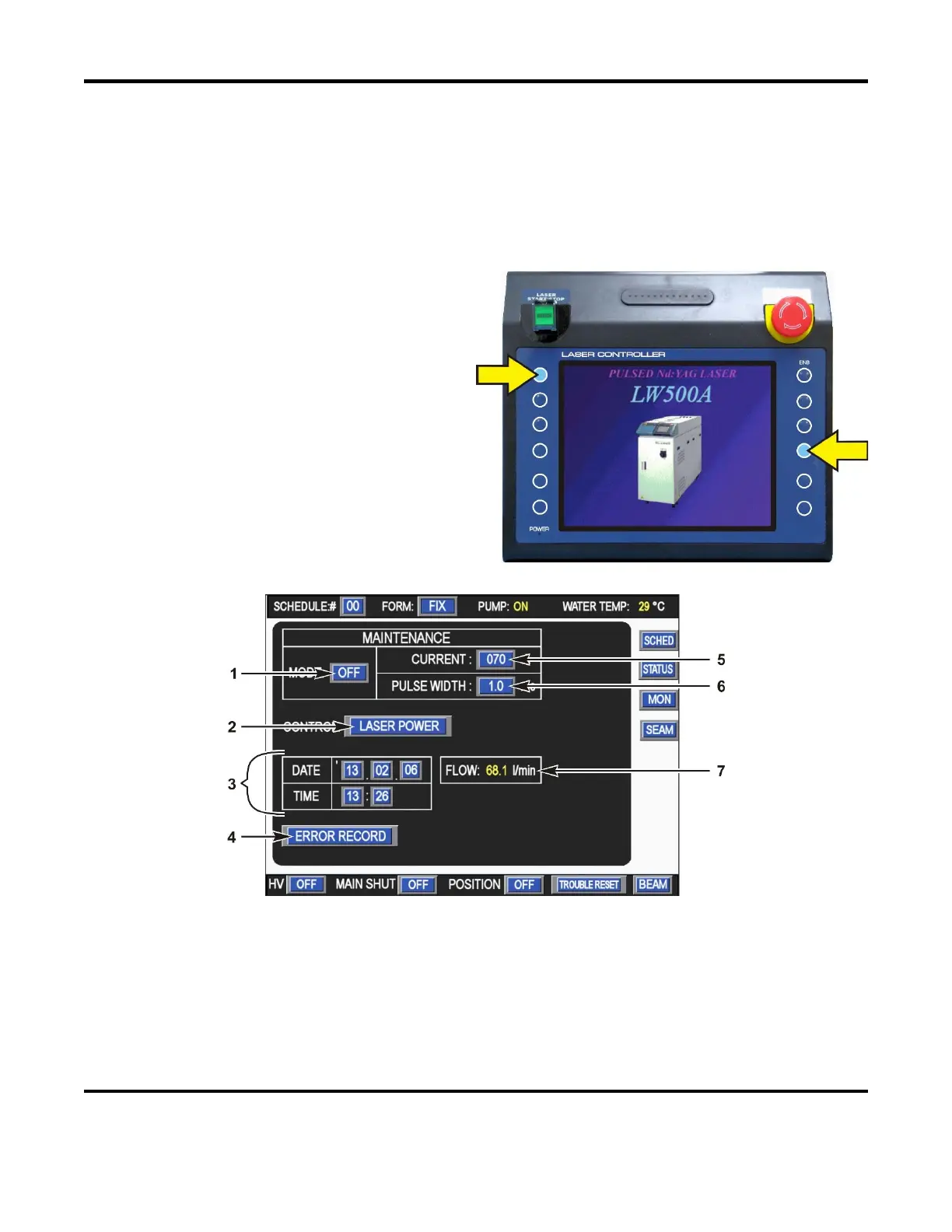
Section IV. Maintenance Mode Screen
MAINTENANCE MODE Screen
The Maintenance Mode Screen is used for maintenance functions such as, checking the status and
alignment of the Laser. This screen is not typically used by the laser operator. For information on the
Maintenance Screen contents, please consult with Amada Miyachi America.
CAUTION: An incorrect setting in this screen
may make the Laser inoperable.
1. To access the MAINTENANCE screen,
press and hold the two buttons shown on
the right.
2. When the Maintenance screen appears,
release the two buttons.
NOTE: The Control key switch must be
turned ON.
1. MODE
To aid in laser alignment, turn Maintenance Mode ON. While in Maintenance Mode, the Program
Box is the only way of controlling the laser. When Maintenance Mode is
ON, all fields in the
Maintenance Mode screen become active.



 To Next Page