CHAPTER 5: MAINTENANCE
LW500A/LW600A PULSED Nd:YAG LASER
5-14 990-539
Cooler Maintenance -- Draining the Primary Cooling Water
Drain the water when marked with a “• ” on the following occasions:
Maintenance work Draining
Replacing Ion-Exchange resin refill Not necessary
Replacing Ion-Exchange Cartridge Not necessary
Replacing water filter Not necessary
Replacing secondary cooling water Not necessary
Shift and transportation
●
Long period of non-use
●
Required Items
Clean bucket or similar container
Flat-blade screwdriver
1. Disconnect the two externally connected
hoses to drain the water. If you splash
water on the equipment, wipe it off with
a clean cloth.
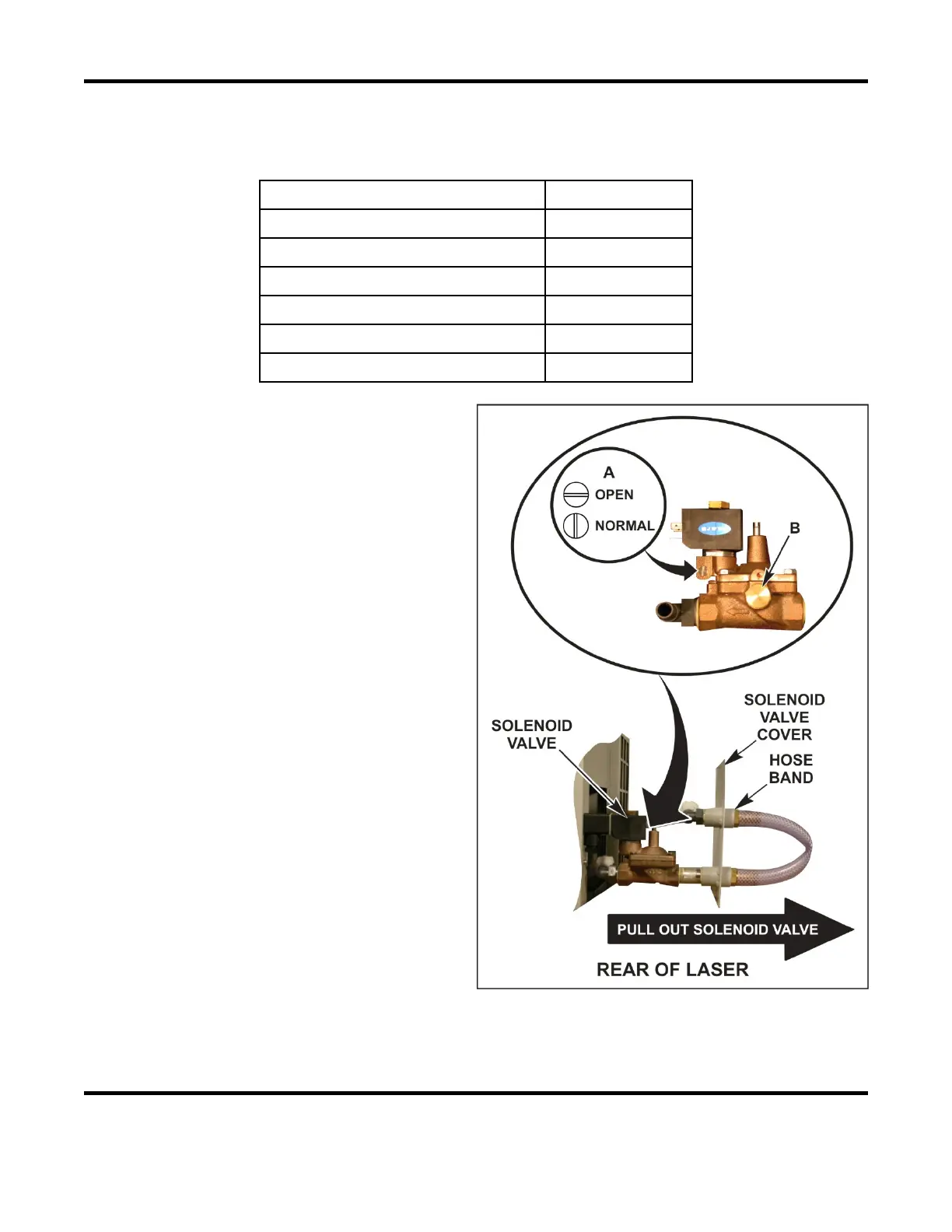
2. Open the solenoid valve cover on the
back of the Laser and pull out the
solenoid valve.
3. Open the solenoid valve. Push and turn
screw A shown at right to the “Open”
(horizontal) position with a flat-blade
screwdriver.
4. Remove the valve plug (
B).
5. Blow clean compressed air (42 psi or 294
kPa maximum) into the pipes to drain the
water.
6. Return the valve plug B. Return screw A
to “Normal” position (vertical).
7. Return the solenoid valve cover.
8. Connect a small piece of hose between
the cooling water inlet and outlet and
secure each end with a hose band to keep
dirt out of the laser.



 To Next Page