CHAPTER 3: PROGRAMMING FUNCTIONS
LW500A/LW600A PULSED Nd:YAG LASER
3-16 990-539
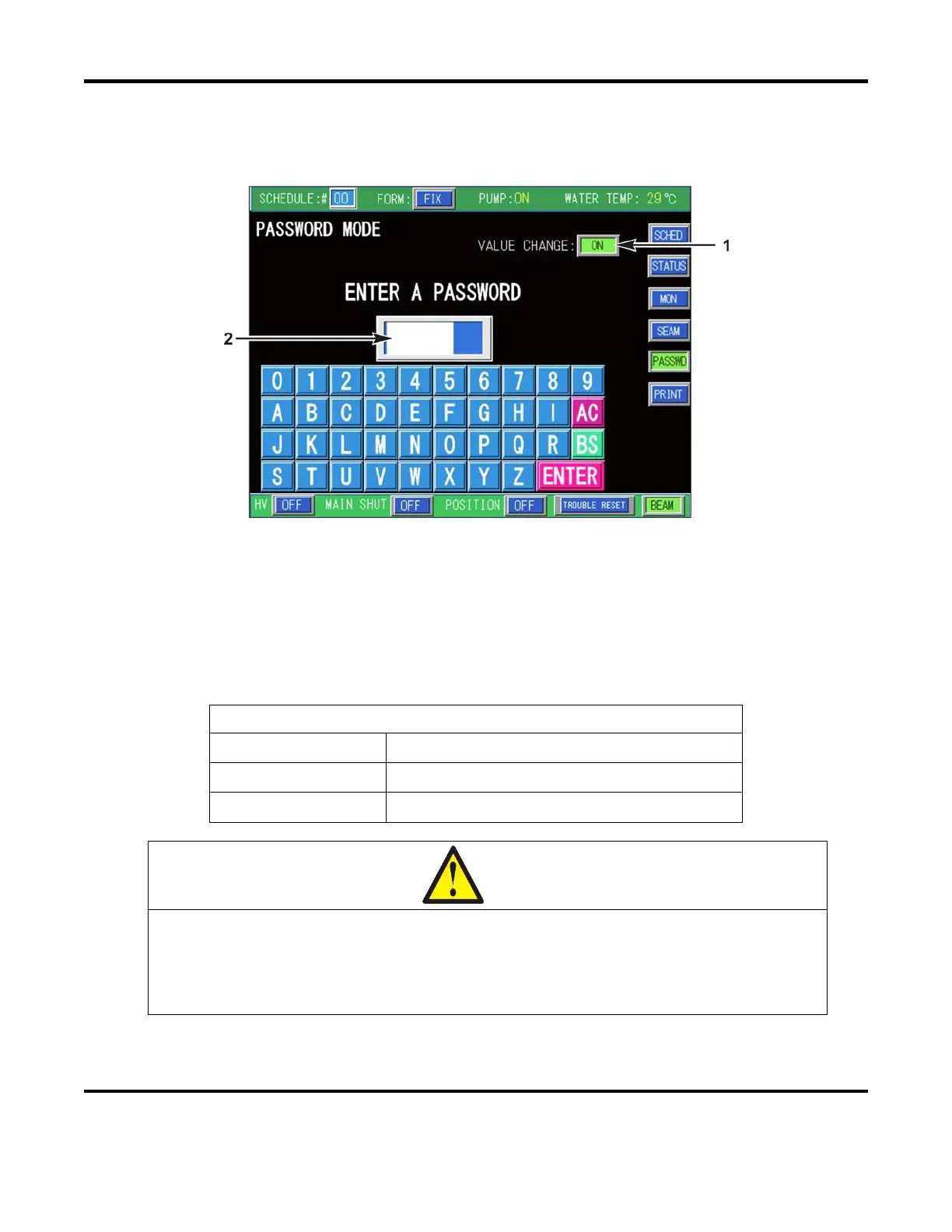
PASSWORD MODE SCREEN
The Password Mode screen is used to prevent unauthorized users from changing laser parameters. Select
the PASSWD button (from any menu screen) to access the PASSWORD MODE SCREEN.
1. VALUE CHANGE – In order to change the Password, the VALUE CHANGE field must be ON. In
addition the Laser Control keyswitch must also be ON.
2. ENTER A PASSWORD
– This is the field used to enter a new password. Use the keypad to enter
a password (any combination of four letters and/or numbers). The characters will auto-fill from
left to right. Press ENTER after the password has been entered. The initial (factory-set) password
is REDS and must be entered in order to make any password changes.
DESCRIPTION OF KEYPAD
AC (All Clear)
Press this key to clear all characters.
BS (Backspace)
Press this key clears the last character entered.
ENTER
Press this key to enter the password.
CAUTION
Write the password down for future reference. The Laser is not capable of displaying
the set password. If a password is forgotten, the back-up battery must be removed
from the Main PCB (with Laser power OFF) and allow enough time for the memory
capacitor to fully discharge (up to 3 hours). All Schedule data will be erased!



 To Next Page