CHAPTER 3: PROGRAMMING FUNCTIONS
LW500A/LW600A PULSED Nd:YAG LASER
3-22 990-539
Section III. Initialization Screen
INITIALIZE Screen
The INITIALIZE Screen is primarily used for RS-
485 communication settings, maintenance and
configuration functions.
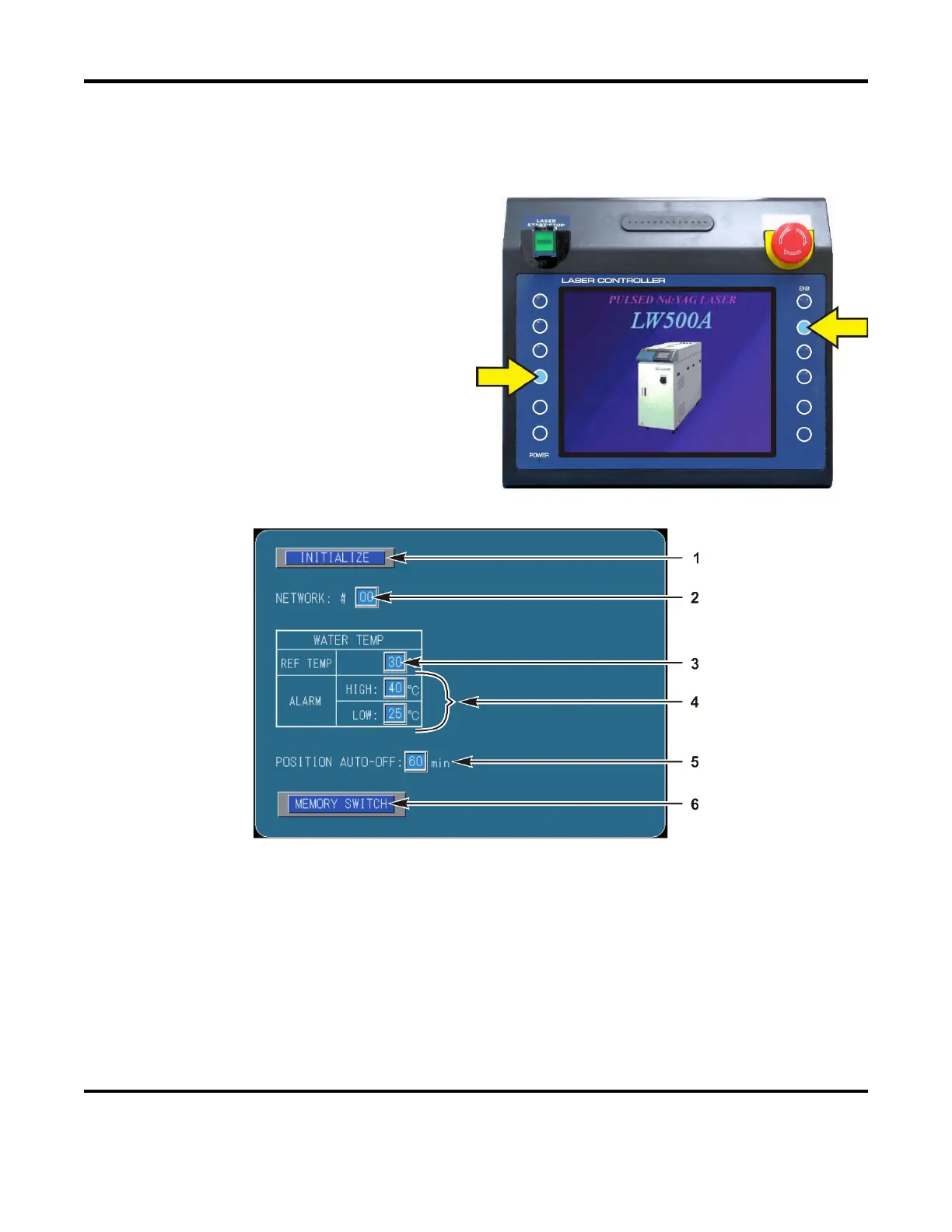
1. To access the INITIALIZE screen, turn the
keyswitch and main power switch to the
OFF position.
2. Turn the Laser ON. When the screen on
the right appears, press and hold the two
buttons shown on the right to access the
INITIALIZE screen.
3. When the Initialization screen appears,
release the two buttons.
1. INITIALIZE – Select to restore the laser factory default settings. When this option is selected
ALL schedule data will be erased. Record or save the Schedule Data before Initializing the Laser
to avoid having to re-create all Schedule data. Choose
INITIALIZE when the Main PCB is re-
programmed or replaced, or after the back-up battery on the Main PCB is replaced.
2. NETWORK:#
– This field is used to select the device (Laser) number for the optional RS-485
communications function. When connecting multiple Lasers together, each Laser needs a unique
NETWORK ID number. The factory default setting for all Lasers is 00.



 To Next Page