CHAPTER 3: PROGRAMMING FUNCTIONS
LW500A/LW600A PULSED Nd:YAG LASER
3-6 990-539
Section II. How to Use the LCD Screens
SCHEDULE Screen
The Laser is capable of processing two types of
[FORM]
outputs:
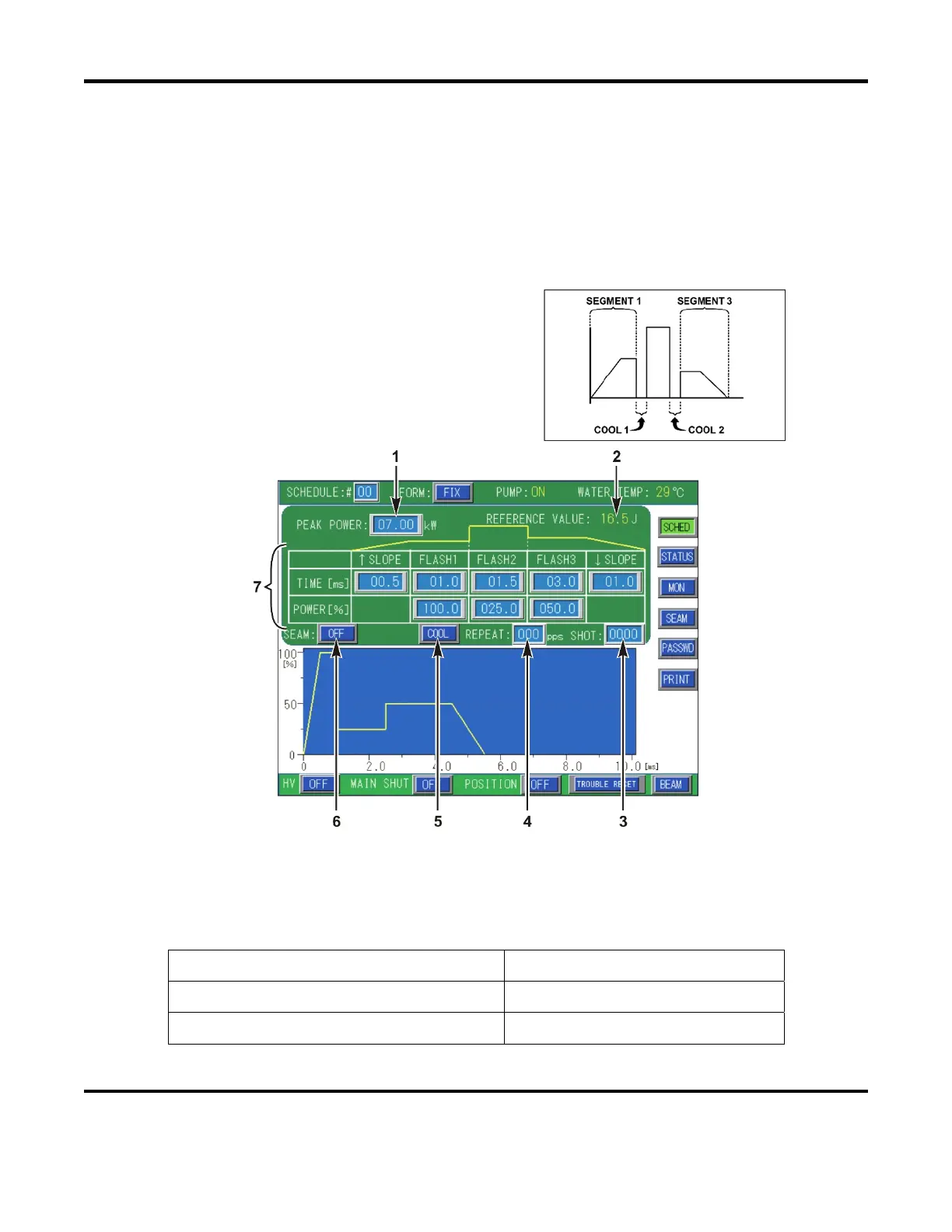
[FIX] Output – Defines a laser output process over three time segments.
[FLEX] Output – Defines a laser output process over twenty discrete points.
[FORM: FIX] Function
The majority of all laser processing can be
completed using the [FORM: FIX] output mode.
The Laser output can be defined over three time
segments, including a power ramp UP/DOWN
feature in segments 1 and 3 as shown on the right.
1. PEAK POWER:
– Sets the reference value of the Peak Power laser output. The actual programmed
laser output is set as a percentage of this Peak Power value. The maximum Peak Power output setting
of the laser output varies depending on the model number of the laser.
Example:
PEAK
4.00 kW x 50% = 2.0kW
Laser Model Maximum Peak Setting
LW600A(E) / ML-2650B(-CE) 10.0 kW (≤ 10mS)
LW500A(E) / ML-2651B(-CE) 8.0 kW (≤ 10mS)



 To Next Page