CHAPTER 3: PROGRAMMING FUNCTIONS
LW500A/LW600A PULSED Nd:YAG LASER
3-14 990-539
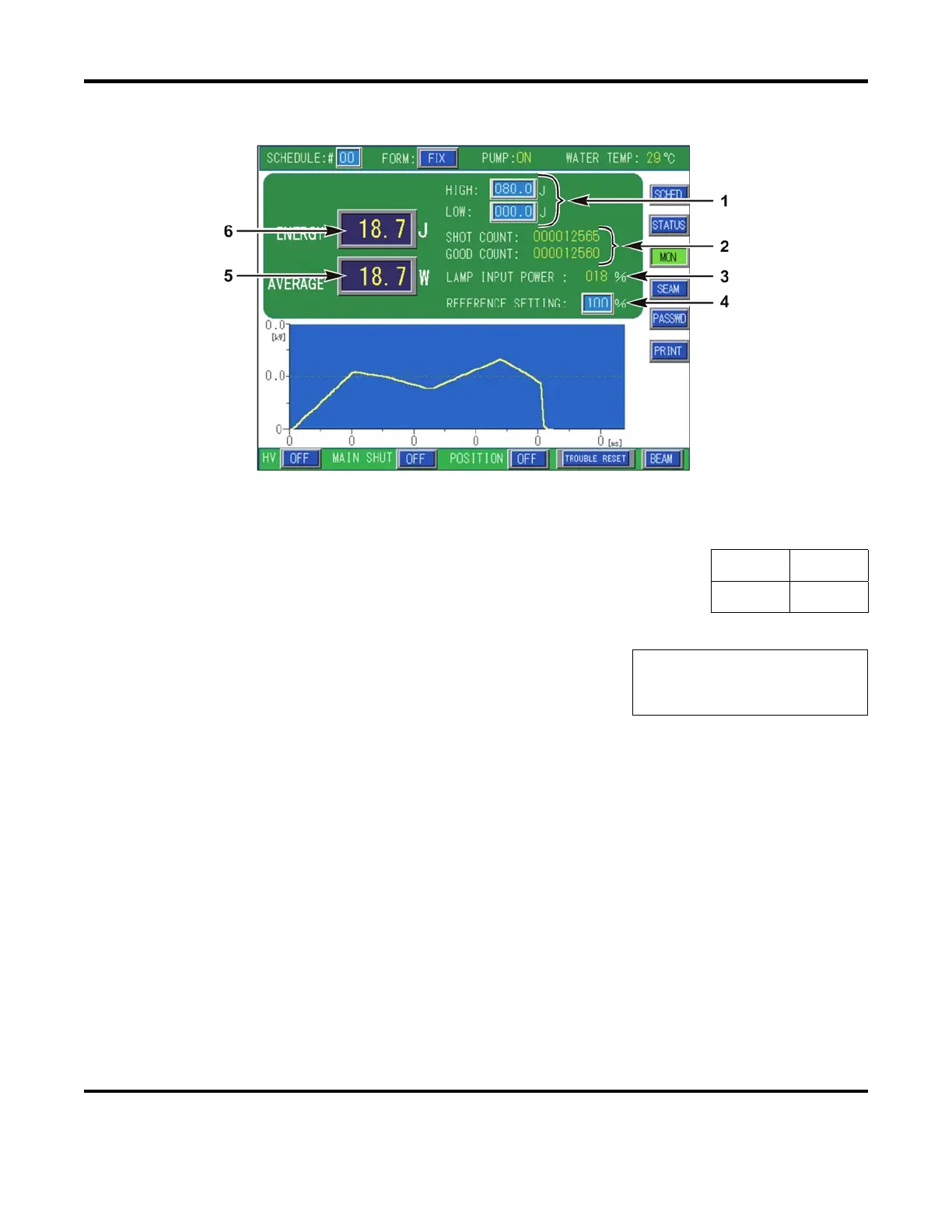
POWER MONITOR Screen
1. HIGH / LOW Alarm Limits – To aid in critical welding processes, a HIGH / LOW energy output
monitor is provided. Set the allowable energy range for the selected
schedule. If the measured output energy falls outside of this range, an
Error Code will display on the LCD screen and the Laser will stop firing.
HIGH
000.0J
LOW
000.0J
2. SHOT COUNT / GOOD COUNT
SHOT COUNT
displays the total number of times the laser was
fired. The shot count can be reset to 000000000 on the
STATUS screen.
SHOT COUNT
123456789
GOOD COUNT
123456789
GOOD COUNT shows the number of Good shots that were fired. A Good shot count means that
the measured output energy was within the acceptable range set by the HIGH / LOW alarm limits.
Depending on the firmware revision, the option to not count “ramp-up/down pulses while in
SEAM mode is possible. Refer to Section III, Initialization Screen of this chapter for more
information. The good count can be reset to
000000000 on the STATUS screen.
3. LAMP INPUT POWER – Displays the ratio of the flashlamp input power to the output capacity of
the Discharge Unit. A value of 100% means that the Discharge Unit is producing the maximum
amount of designed output power. As a flashlamp ages, it requires more power to flash. In
normal operation, Power Feedback automatically draws the power required from the Discharge
Unit to maintain a constant output, thereby compensating for an aging flashlamp.



 To Next Page