LW500A/LW600A PULSED Nd:YAG LASER
990-539 3-1
CHAPTER 3
PROGRAMMING FUNCTIONS
Section I. Touch Screen
About the LCD Screens
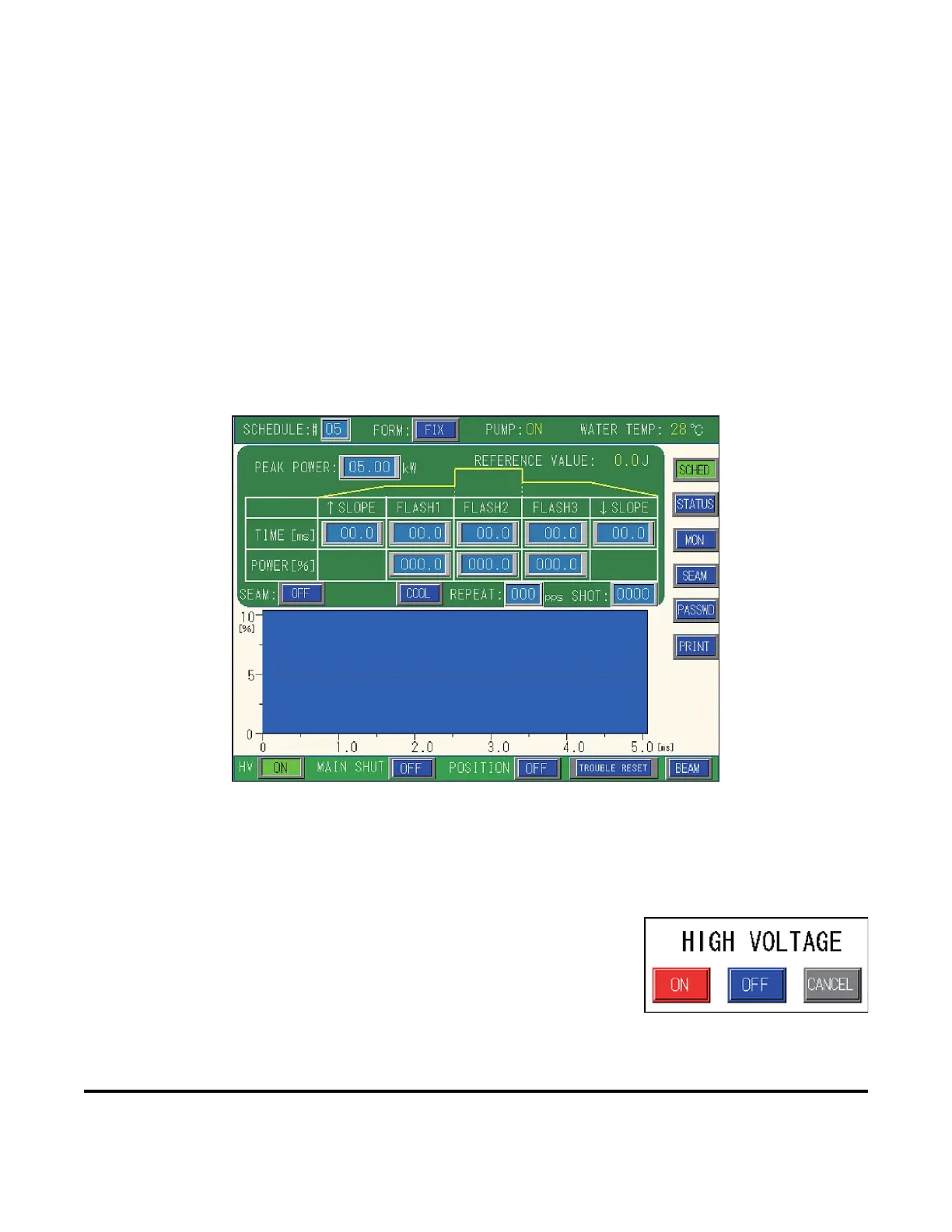
Complete control of the Laser is achieved through the use of the Laser Controller Touch Screen. For the
rest of this manual the Laser Controller Touch Screen will be referred to simply as “the Touch Screen.”
There are six main menu screens. Access to each menu screen is achieved by selecting the appropriate
button on the right side of the Touch Screen.
How to Use the Touch Screen
The Touch Screen on the LW500A/600A operates by simply touching the screen with your finger.
Blue or Green Buttons
The
ON/OFF buttons change color depending on their status. When ON, these buttons appear green, when
OFF, they appear blue.
Example: If you press the HV button (lower left on the screen above), a
op-up screen shown on the right will appear with the options ON, OFF,
or CANCEL. If you press OFF, the HV button will turn blue. If you press
ON, the button appears green. If you press CANCEL, the High Voltage
setting will remain the same (no change).
NOTE: Some ON/OFF buttons do not have pop-up screens.


 To Next Page