CHAPTER 3: PROGRAMMING FUNCTIONS
LW500A/LW600A PULSED Nd:YAG LASER
3-18 990-539
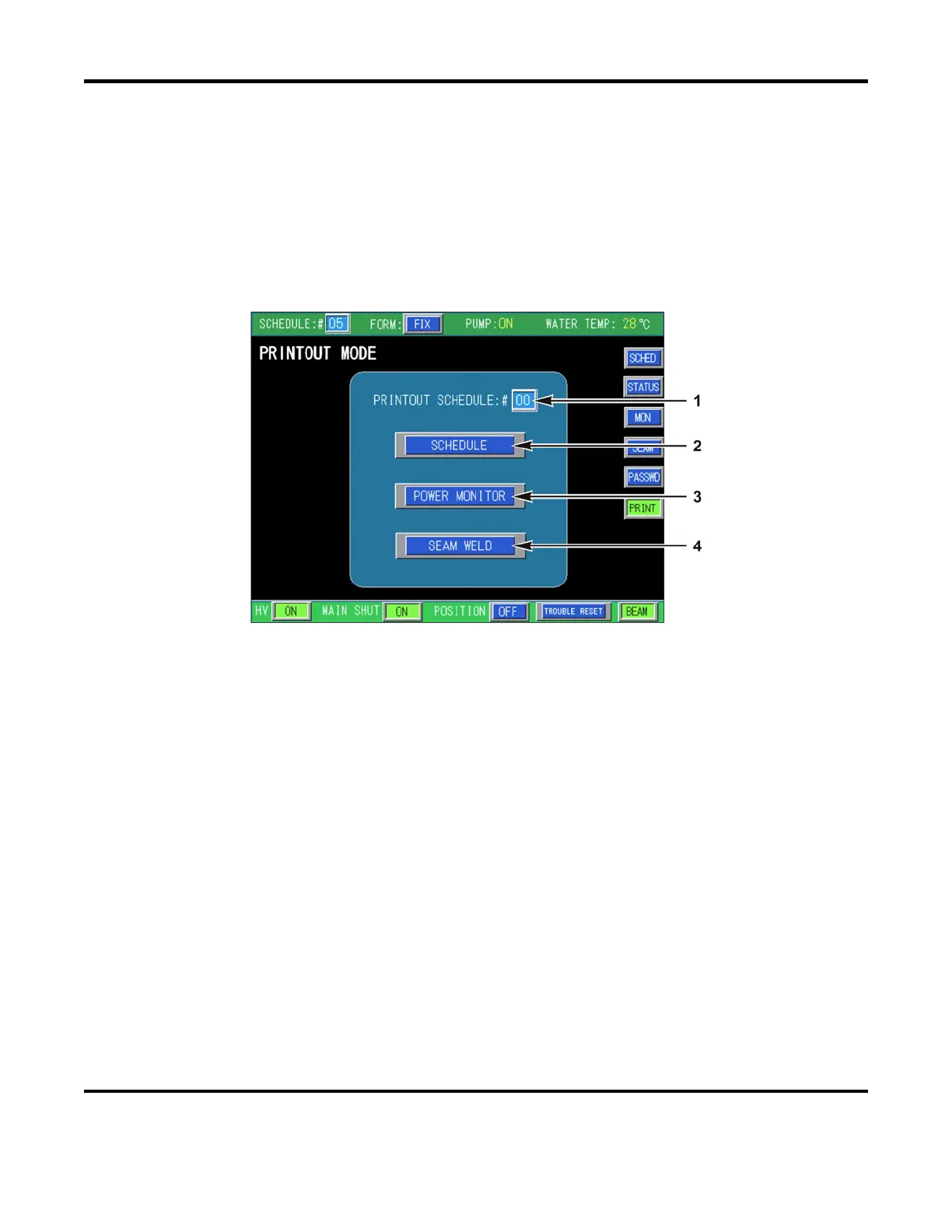
PRINTOUT MODE SCREEN
You can print out and view the welding conditions of each schedule using the PRINTOUT MODE screen.
When activated, the conditions are sent to both RS-485 connectors for printout. The output print protocol
is designed for use with a serial printer. Best results are achieved using a Sanei Electric Inc., BL2-
58SNWJC printer. Due to differences in printer protocols, the generated output may differ from the
examples shown on the following pages. The welding conditions are also displayed on the screen in the
event a printer is unavailable.
Select the PRINT button (from any menu screen) to access the PRINTOUT MODE SCREEN
1. SCHEDULE: # – When selected a numeric keypad will appear. Enter the Schedule number of
the Schedule you want details from, then press ENT. The setting range is 00 to 31.
2. SCHEDULE
– The settings and measurement results of the SCHEDULE screen will print for the
specified SCHEDULE #.
3. POWER MONITOR
– The settings and measurement results of the MONITOR screen will print for
the specified SCHEDULE #.
4. SEAM WELD
– The settings from the SEAM screen will print for the specified SCHEDULE #.


 To Next Page