7.4 Automatic Measurement Commands
7-107
7
Remote Commands
Response <string>=<STRING RESPONSE DATA>
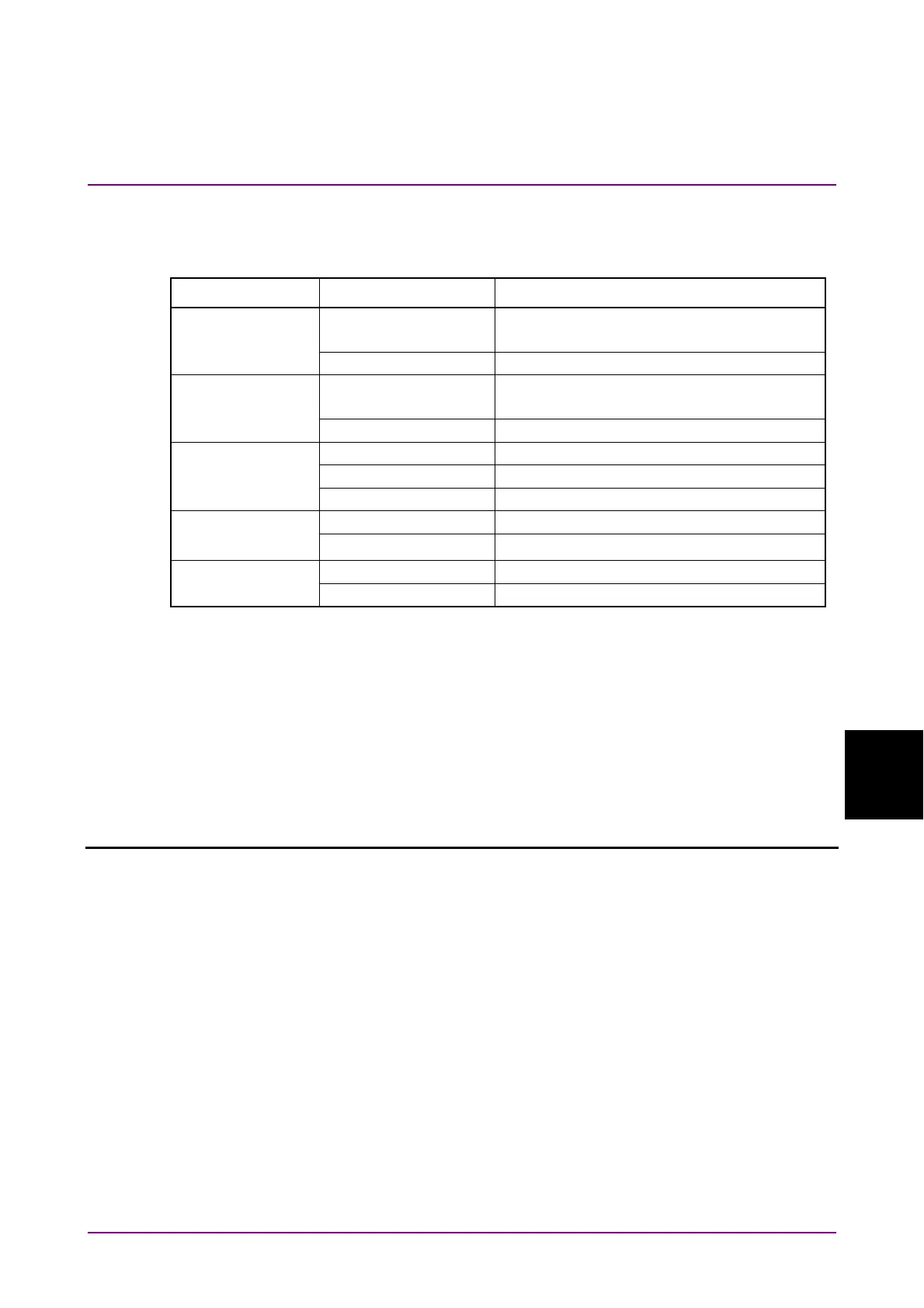
Table 7.4.4.3-5 Response Format
Form Format Description
Form1
Phase-BER type
"XXXX.XX,
Y.YYYYE-YYY"
XXXX.XX: Phase (mUI or PS)
Y.YYYYE-YYY: Error Rate
"-------,-------" When no data corresponds to the query.
Form2
Histogram type
"XXXX.XX,
Y.YYYYE-YYY"
XXXX.XX: Phase (mUI or PS)
Y.YYYYE-YYY: Error Count
"-------,-------" When no data corresponds to the query.
Form3
Fraction type 1
"X.XXXXE-XXX" When 0.0000E–016 to 1.0000E000
"--------" When no data corresponds to the query.
"< 1.0E-199" When E–199 or less
Form4
Fraction type 2
"XXXX.XX" When –9999.99 to 9999.99
"--------" When no data corresponds to the query.
Form5
Integer type
"XXXX" When 0 to 9999
"----" When no data corresponds to the query.
Function Queries the Phase vs. BER measurement result.
Example To query the Phase vs. BER the measurement result for the 10th time:
> :CALCulate:DATA:BATHtub? "BATH:10"
< "0,1.2345E–003","20,1.2345E–004","40,1.2345E–005",
"60,1.2345E–006"
Compatibility Incompatible with existing models.
:CALCulate:DATA:BATHtub:STATus?
Response <string>=<STRING RESPONSE DATA>
"" When no alarm exists.
"Sync Loss" Sync. Loss
"Clock Loss" Clock Loss
"Out of range" Out of range
"Illegal Error" Illegal Error
"Clock Missmatch" Clock Missmatch
"Meas. Threshold exceeded" Number of errors exceeds the target rate
Note:
If two or more alarms have occurred, the one with the highest
priority is returned:
Illegal Error > Clock Loss > Sync Loss > Out or range
Function Queries the Q measurement status.
Example > :CALCulate:DATA:BATHtub:STATus?
< "Sync Loss"















 To Next Page