EasyManua.ls Logo

Arturia SPARK - Compressor Parameters

Arturia SPARK
94 pages
Print Icon
To Next Page IconTo Next Page
To Previous Page IconTo Previous Page
Loading...
ARTURIA SPARK CREATIVE DRUM MACHINE USER’S MANUAL
52
1
Bypass all effects
2
Close FX window
3
Bypass FX1/FX2 for one instrument /channel-Aux-Master insert
4
Change/Remove FX (Inst./Channel, Aux or Master insert)
5
Load a factory FX preset
6
Set Dry/Wet mix (Inst./Channel, Aux or Master insert)
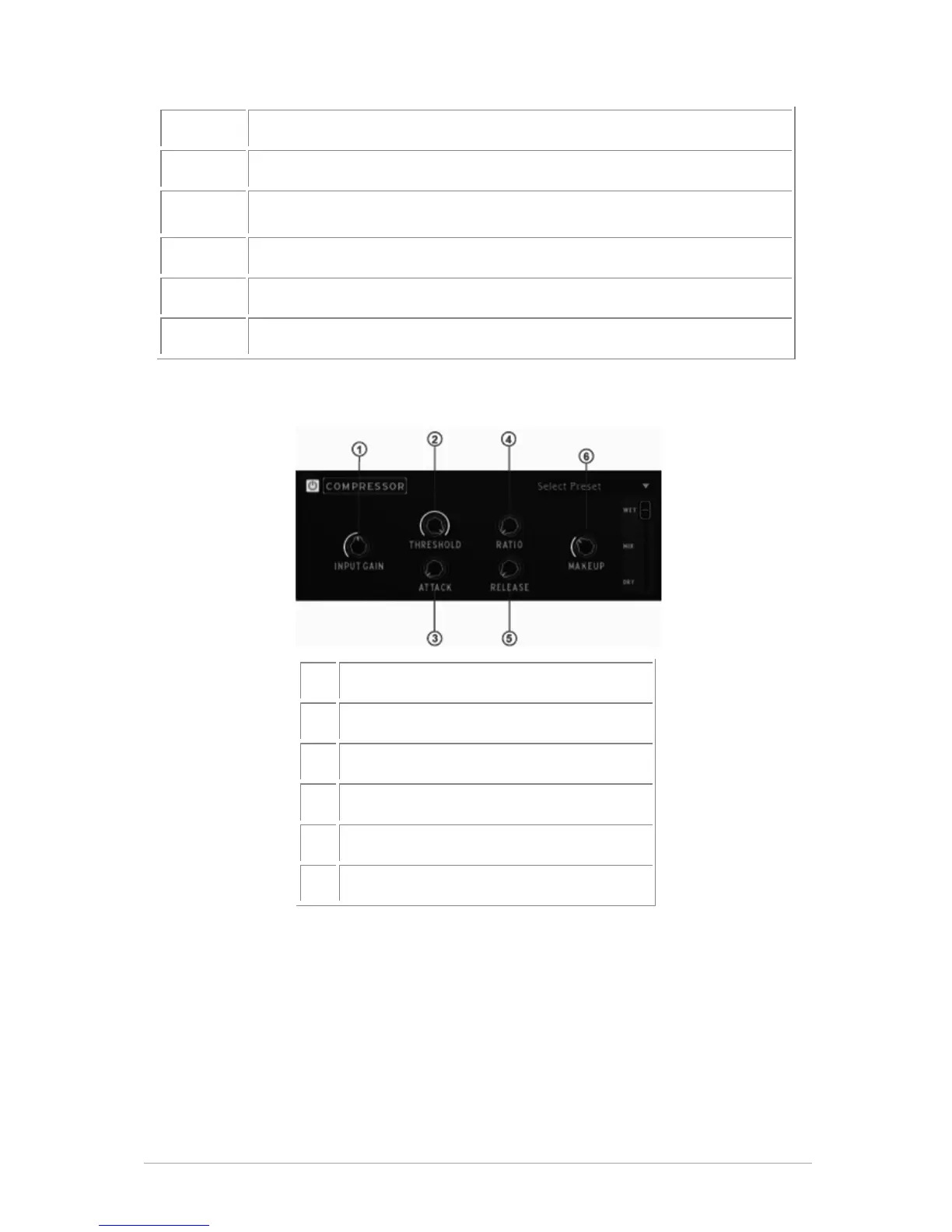
Compressor parameters
1
Change Input gain
2
Change Threshold
3
Change Attack
4
Change Ratio
5
Change Release
6
Change Makeup
A compressor evens out differences in gain by reducing dynamics (difference in volume
between quiet sounds and loud sounds). This effect is often used to ‘fatten’ a sound by
making every individual element of the sound closer to the same volume. Every time a
sound goes over a certain volume (Threshold), it is reduced by a specified amount
(Ratio). Attack and Release determine how quickly the reduction is added and how
quickly it disappears. Makeup boosts the compressed signal’s level.


Table of Contents

Related product manuals