ARTURIA – SPARK CREATIVE DRUM MACHINE – USER’S MANUAL
5.4.6 The Song Panel
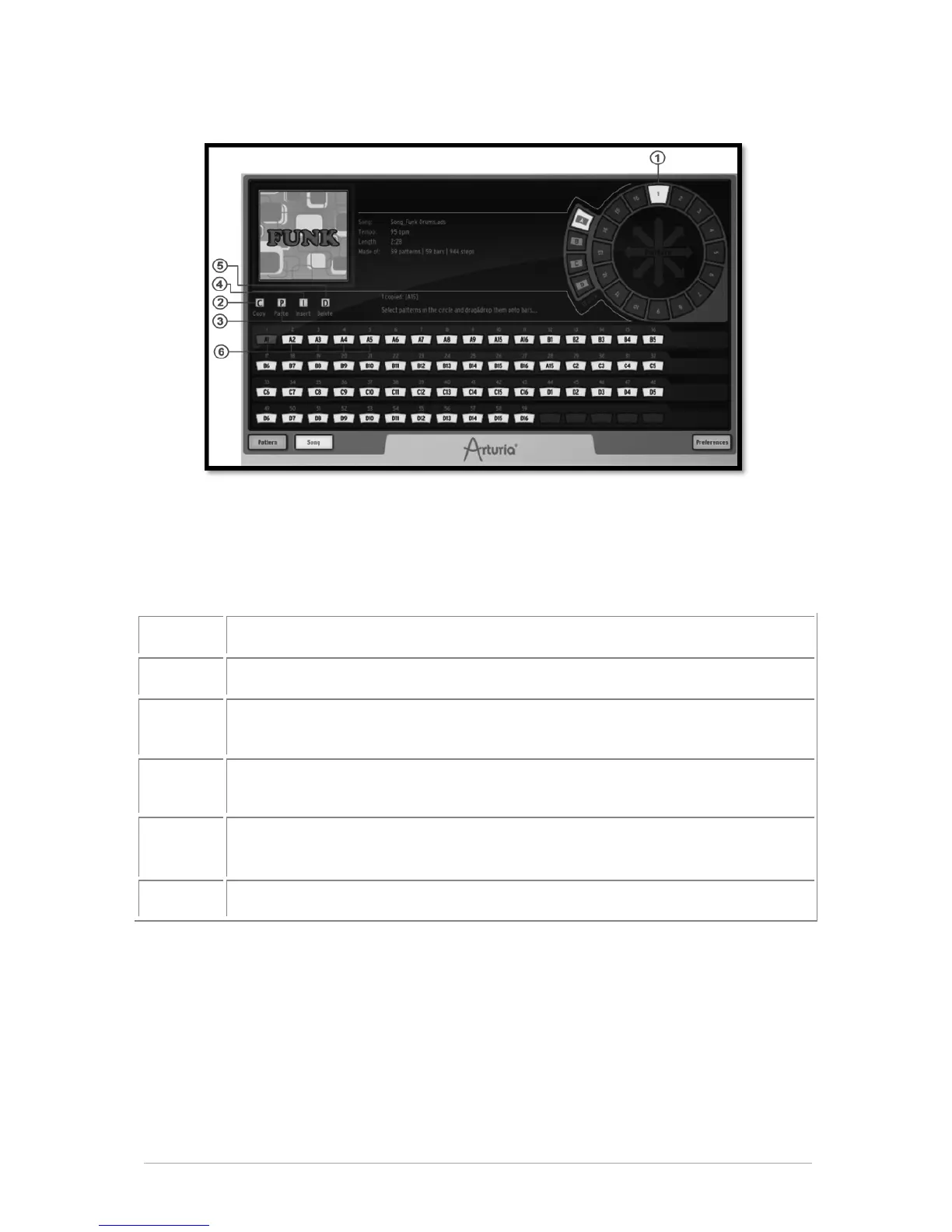
The song panel allows you to chain all your patterns to create a Song.
As we have seen before, a song is an editable ordered sequence of several patterns that
defines the structure of your song.
SPARK allows songs made of 64 patterns maximum.
The Song panel will allow you to organize your patterns in sequences to make your song.
Click and drag a pattern from one bank into a song slot.
Select song slot and click "copy" button [C] to copy into SPARK clipboard.
Click on destination slot then click on paste [P]. If you have copied 3 slots,
the 3 slots located at your paste location will be replaced.
If bars are copied into clipboard, click on a slot where you want to insert
selection and click [Insert]
Once slots are selected you can click on [Delete] to delete them. This will
shift back all the slots that were located after the last deleted bar.
Song slots are numbered from 1 to 64. Click to select.
5.4.7 The Song slots
The Song plays chained patterns from the first one to the 64
th
.
The song is organized in 64 slots; each slot can receive a pattern. But your song can be
any number of patterns with a maximum of 64.
5.4.7.1 How to copy patterns to song slots.
To copy a pattern to a song slot, click on a pattern in the pattern wheel and drag it to a
song slot.



 To Next Page