The time signature is a notational convention used in musical notation to specify how
many beats are in each measure and which note value constitutes one beat.
Time signatures consist of two numerals, one stacked above the other: the lower
numeral indicates the note value that represents one beat (the "beat unit").
The upper numeral indicates how many such beats there are in a bar.
For instance, 4/4 means four quarter-note (quarter note) beats; 3/8 means three
eighth-note (quaver) beats, etc.
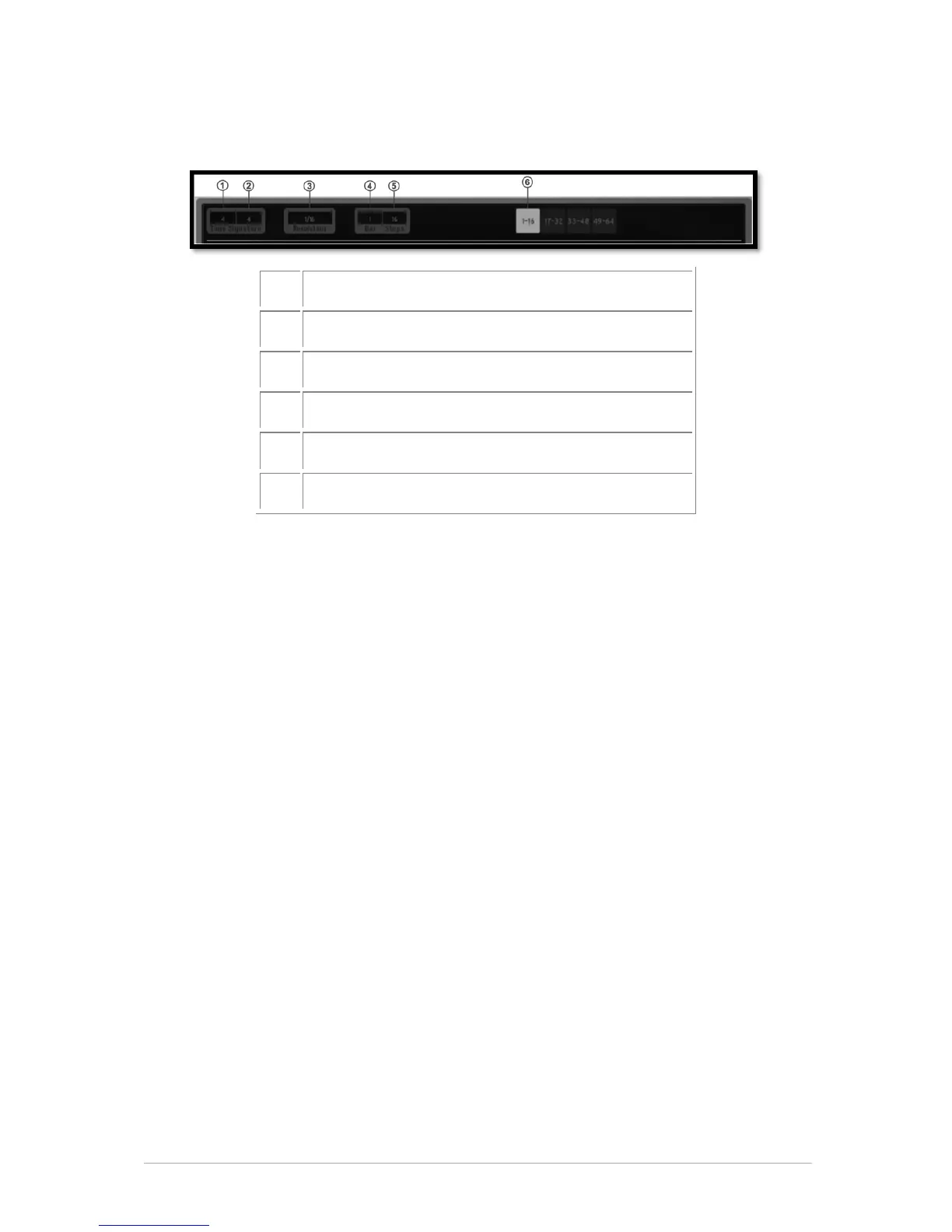
1. Click to change the upper part of the time signature of the current pattern. This
defines the number of notes (units) in one bar: Setting the signature to 4/4 means that
there 4 quarter notes in a bar, if signature is 3/4 (waltz) it means there are 3 quarter
notes in a bar.
2. Click to change the lower part of the time signature of the current pattern. This
defines the note value (unit): 1=whole - 2=half note - 4=quarter note - 8=eighth note.
3. Click to change the Step resolution. The step resolution is the value of one step:
1/16=sixteenth note - 1/8=eighth note - 1/4=a quarter note, etc. A pattern has from 1
to a maximum of 64 steps.
4. Click to change the number of bars in the current pattern.
5. Click to change the total number of steps in the current pattern. The number of
steps is automatically calculated by Spark using the step resolution, the number of bars
in the pattern, and the time signature. But you can adjust it if you want to work with
your own bar calculation.
6. Click to display Step 1 to 16 in the current pattern.


 To Next Page