EasyManua.ls Logo

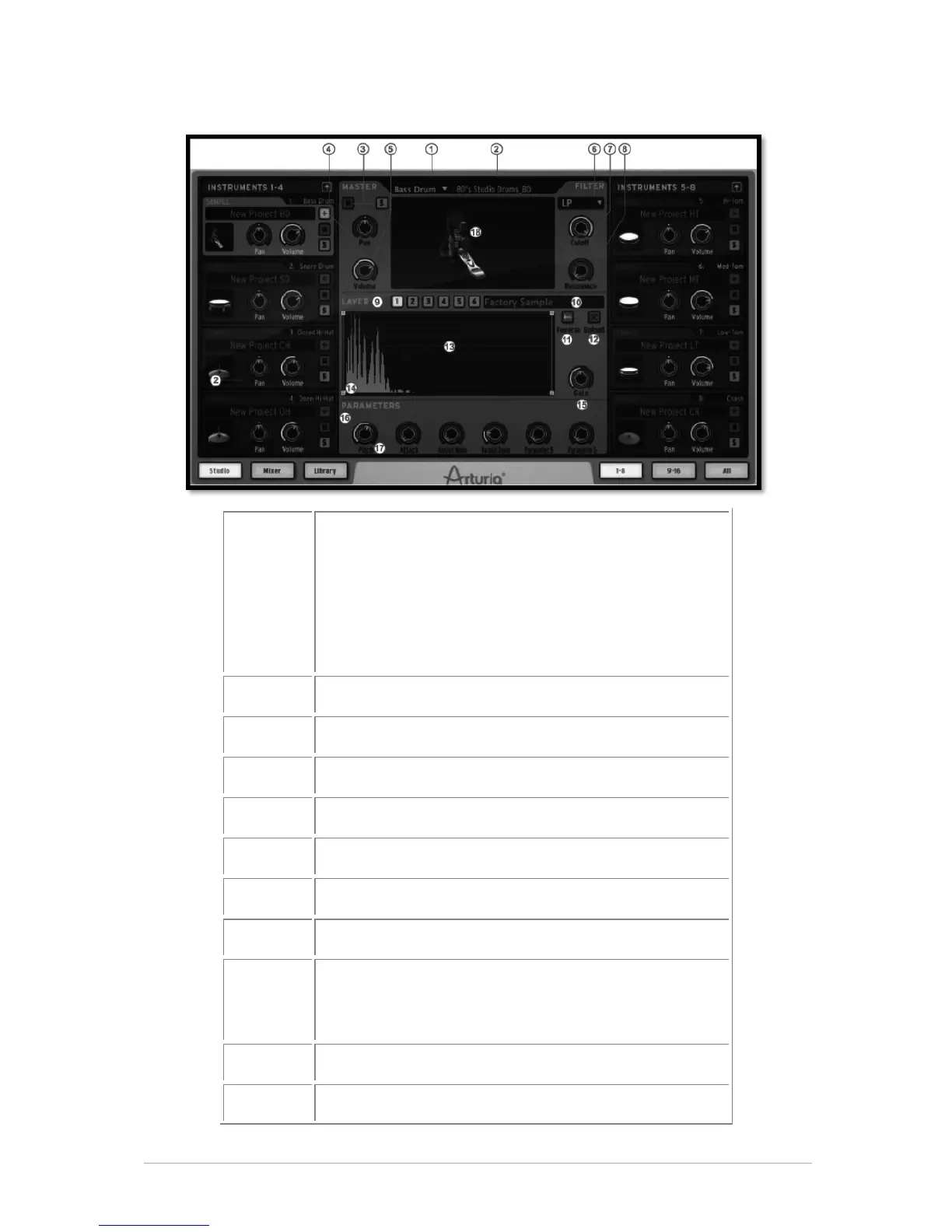
Arturia SPARK - Instrument Edit Window

Arturia SPARK
94 pages
Print Icon
To Next Page IconTo Next Page
To Previous Page IconTo Previous Page
Loading...
ARTURIA SPARK CREATIVE DRUM MACHINE USER’S MANUAL
47
5.3.1.1 Instrument Edit Window
1
Change instrument type. You may also drag and drop
an audio file here (and also directly onto an
instrument pad).
When dragging and dropping onto pads: if the current
instrument is sample based it will replace the previous
sample with the new one. If the current instrument is not
sample based, a menu will appear asking if you’d like to
change the instrument type.

2
Rename instrument.
3
Turn Mute on (M) / Turn solo on (S).
4
Set pan.
5
Set volume.
6
Change filter type on instrument.
7
Cutoff filter knob.
8
Resonance filter knob.
9
Sample layer display for each layer - Numbered 1 to
6
(For Sample type instruments only)
10
Load new sample.
11
Set reverse mode on sample.

Table of Contents

Related product manuals