ARTURIA – SPARK CREATIVE DRUM MACHINE – USER’S MANUAL
5.4.4 The Sequencer
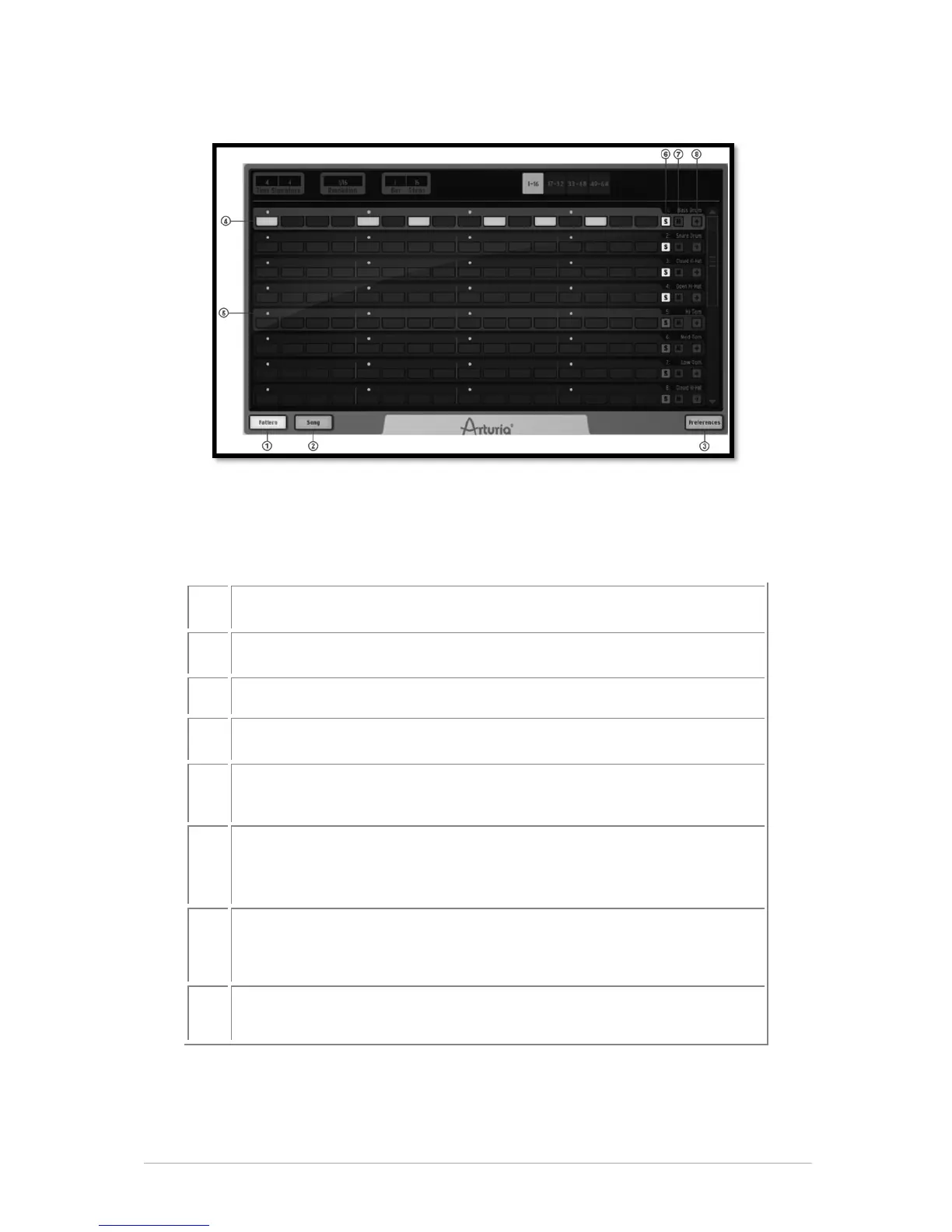
The Pattern panel shows 8 instrument tracks out of the 16 available. To see the next 8
tracks, use the scroll bar.
The picture above shows the pattern panel with a time signature of 4/4, hence 1 bar of 4
quarter notes (each quarter note subdivided into 4 1/16 note steps)- which adds up to
16 1/16 note steps.
Click to display the Pattern panel
Click to display the Song panel
Click to display the preferences panel
Set Step on/off on one track in the current pattern
Select a track in the current pattern. (Hover above the track until it
lights up, then click).
Set Solo on/off on one sequencer track in the current pattern. (The
solo button in the center panel will flash to indicate that a solo has
been set from another panel (studio, mixer or sequencer)).
Set Mute on/off on one sequencer track in the current pattern. (The
Mute button in the center panel will flash to indicate that a mute has
been set from another panel (studio, mixer or sequencer)).
Click to open or close the Automation editor for one track in the
current pattern.
5.4.4.1 How to select a track
To select a track, move your cursor over the track. When the track lights up, click to
select.



 To Next Page