Using the Compounder
Operator Manual for the Baxter ExactaMix 2400 Compounder
Page 92 53007410 Rev. C
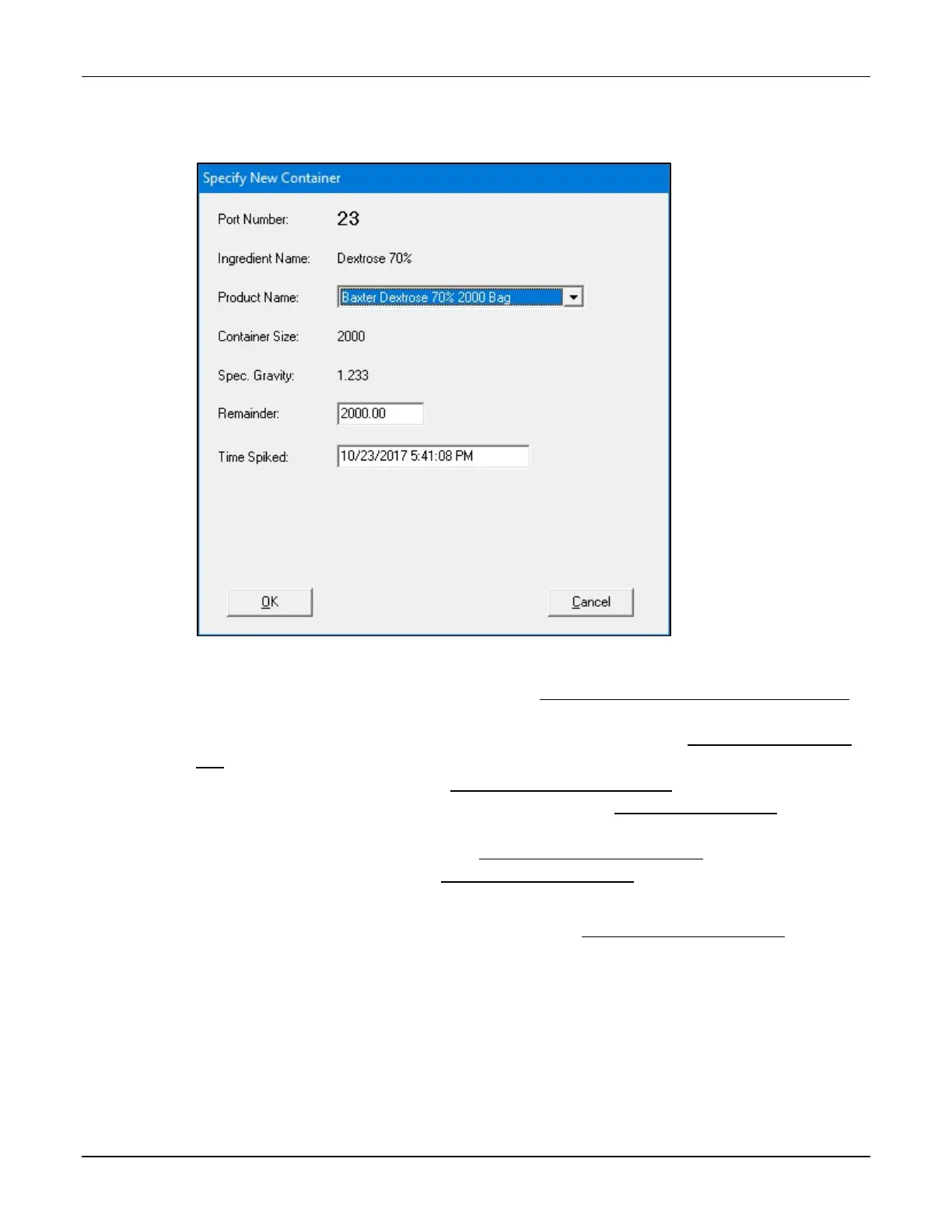
3. At the Specify New Container window:
a. Select the Product Name.
b. Tap OK.
Specify New Container window
4. Attach the new ingredient and inlet. Refer to Attaching the New Ingredients and Inlets
on Page 48.
5. If you have already attached the patient bag, remove it. Refer to Removing the Patient
Bag on Page 90.
6. Attach a calibration bag. Refer to Attaching the Calibration Bag on Page 73.
7. Prime and verify the new inlet and ingredient. Refer to Priming and Verifying on
Page 58.
8. Remove the calibration bag. Refer to Removing the Calibration Bag on Page 73.
9. Attach the patient bag. Refer to Attaching the Patient Bag on Page 85.
NOTE: You can reattach the original patient bag.
10. Continue with compounding the solution. Refer to Compounding the Solution on
Page 86.
NOTE: The formula is not unloaded from the pump screen.



 To Next Page