Features
Operator Manual for the Baxter ExactaMix 2400 Compounder
Page 16 53007410 Rev. C
Every time the rotor pumps an uninterrupted delivery of 175 mL or more of water, the
compounder automatically performs a calibration of the rotor movement. Automatic
calibration maintains the rotor’s accuracy and reduces the need for manual adjustments.
Gravimetric Verification
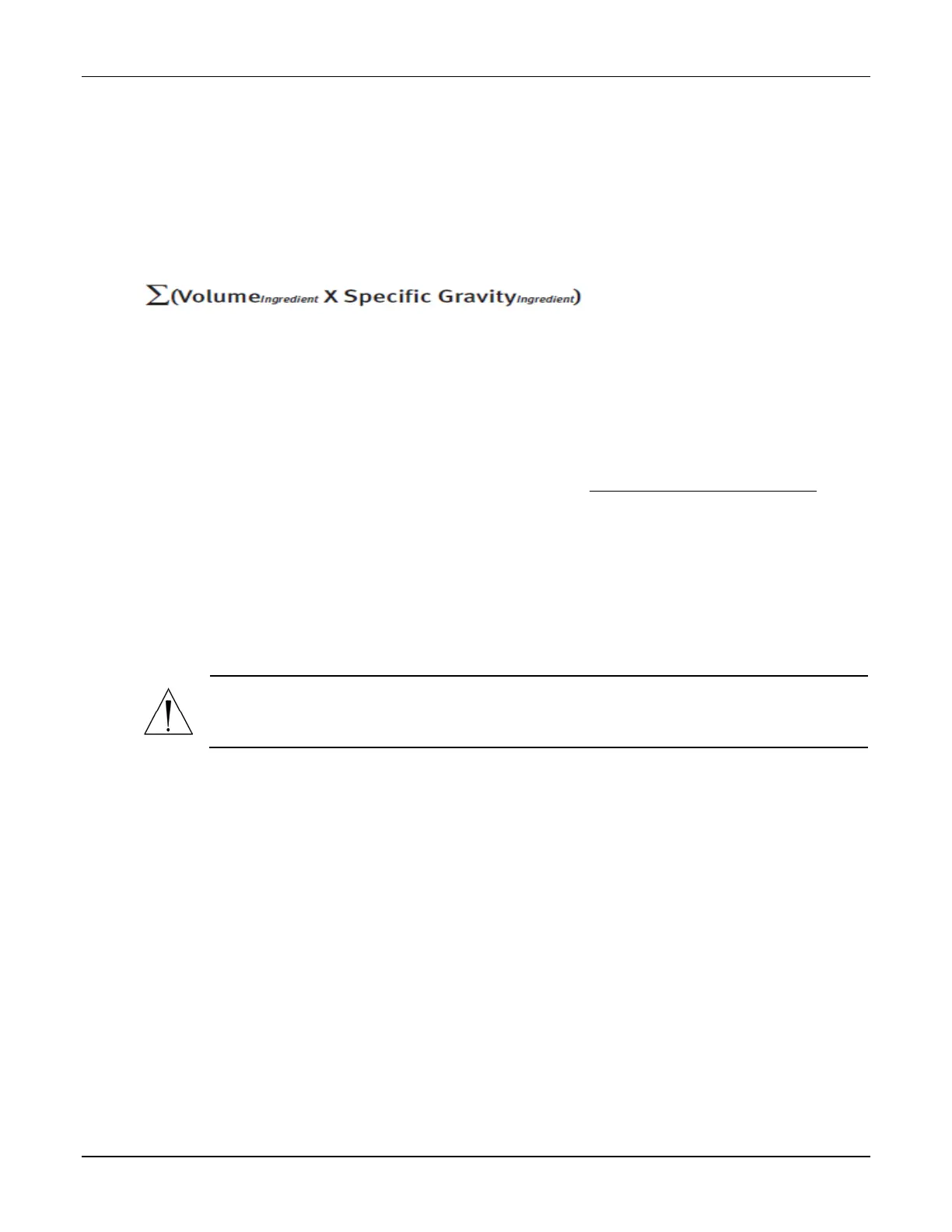
The compounder provides feedback about its delivery accuracy by weighing the finished
solution and comparing that weight to the theoretical weight of a perfectly compounded
solution. This theoretical weight is computed by this formula:
PRINTING OPTIONS
The printer is used for printing reports and creating labels for inlets and source containers.
The printer can use standard 8.5 x 11 in. (21.6 x 28 cm) for reports and Avery® label sheets
(70x25,4mm) (or comparable sheets) for inlet flags.
For using A4 paper, in the Options window, change the reports directory path to C:\Program
Files\Baxter\Exacta-Mix 2400\Reports\A4. Refer to section Setting Up Directories Option on
page 121.
You can connect the printer to a:
• USB port on the display
• USB port on the order-entry computer, for use on a network
• Network via an Ethernet cable
The compounder software includes the printer drivers.
CAUTION
Use only Baxter-authorized printers with the compounder. Installing other printer
drivers on the compounder voids the compounder’s warranty.



 To Next Page