Using the Compounder
Operator Manual for the Baxter ExactaMix 2400 Compounder
53007410 Rev. C Page 83
Selecting a Saved Formula
Some facilities may use this method to select a saved formula, which has already been loaded
onto the compounder through scanning a barcode or direct entry.
IMPORTANT! This function requires that formulas can be loaded without scanning barcodes.
For more information, refer to Barcode Reader on Page 120.
1. At the menu screen, tap Compound > Select Formula.
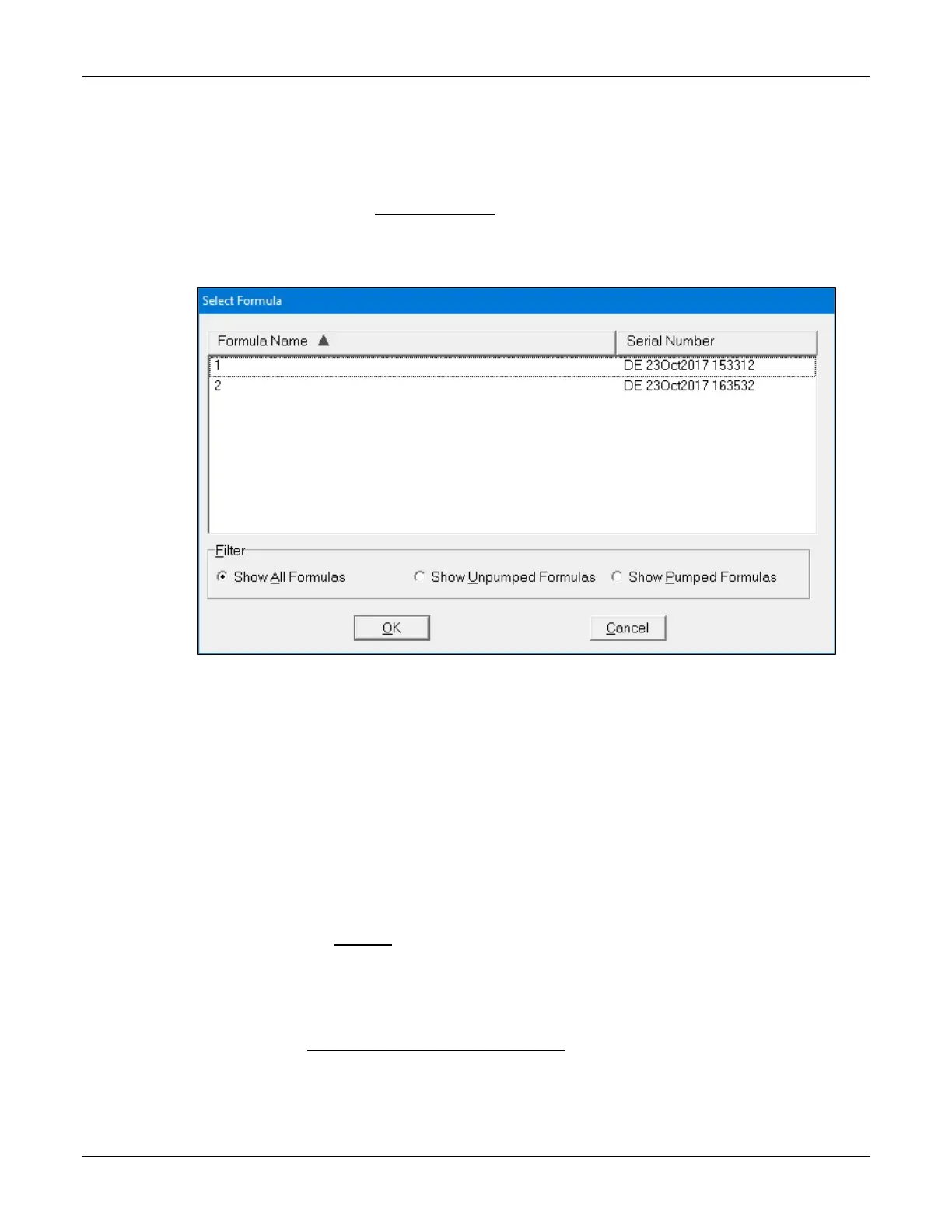
The Select Formula window appears.
Select Formula window
2. At the Select Formula window, tap one of these filter options:
• Show All Formulas to view all the formulas that are stored
• Show Unpumped Formulas to view all the formulas that have not been used for
compounding
• Show Pumped Formulas to view all the formulas that have been used for
compounding
Tip! Baxter recommends selecting only Show Unpumped Formulas.
NOTE: You can tap Formula Name to sort by name or tap Serial Number to sort by
number. Formulas are stored for a specified time period. To set up the storage of
formulas, refer to Storage on Page 114.
3. Select a formula.
4. Tap OK.
The formula is loaded and appears on the pump screen.
5. Continue with Fulfilling the Order (Basic Process) on Page 84.



 To Next Page