Setting Up the Compounder
Operator Manual for the Baxter ExactaMix 2400 Compounder
Page 70 53007410 Rev. C
CAUTION
A calibration bag must be used during all priming/verifying and Universal
Ingredient flushes.
2. If a calibration bag is not already attached, attach it. Refer to Attaching the Calibration
Bag on Page 73.
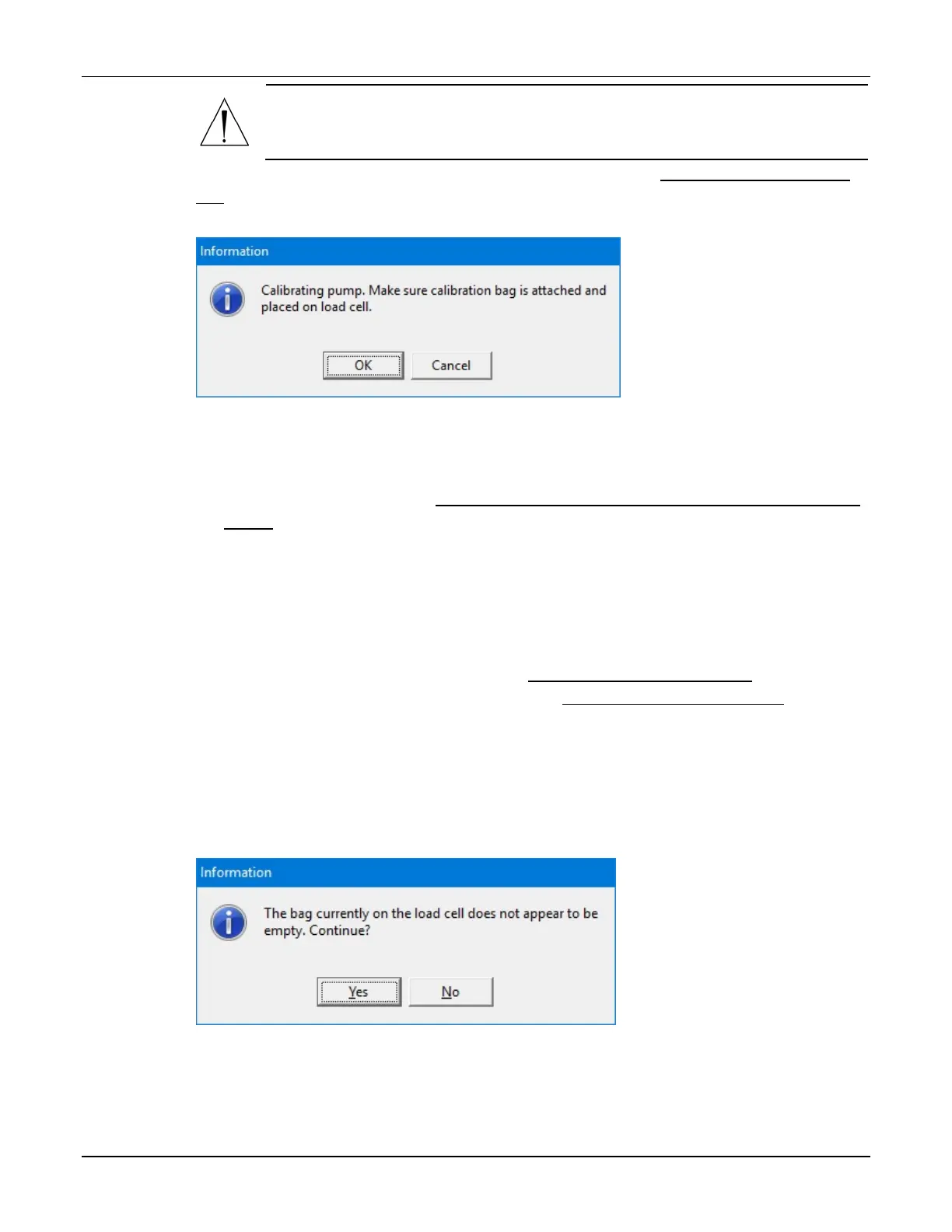
3. At the Calibrating pump message, tap OK.
Message
4. If the Bag currently on the load cell does not appear to be empty message appears,
visually check the contents of the bag.
• If the bag is empty, refer to The bag currently on the load cell does not appear to be
empty on Page 203.
• If the bag contains fluid, continue with the next step.
5. Check whether the bag has space for an additional 200 mL of fluid.
• If the bag does not have space:
a. Tap No.
b. At the Operation Cancelled message, tap OK.
c. Remove the calibration bag. Refer to Removing the Calibration Bag on Page 73.
d. Attach an empty calibration bag. Refer to Attaching the Calibration Bag on
Page 73.
e. Return to Step 1.
• If the bag has space, tap Yes.
IMPORTANT! It is acceptable to calibrate the pump when the calibration bag
contains fluid. However, the calibration procedure is the only time you should tap
Yes at this message. Never tap Yes when compounding a solution into a patient bag.
Message



 To Next Page