5-7
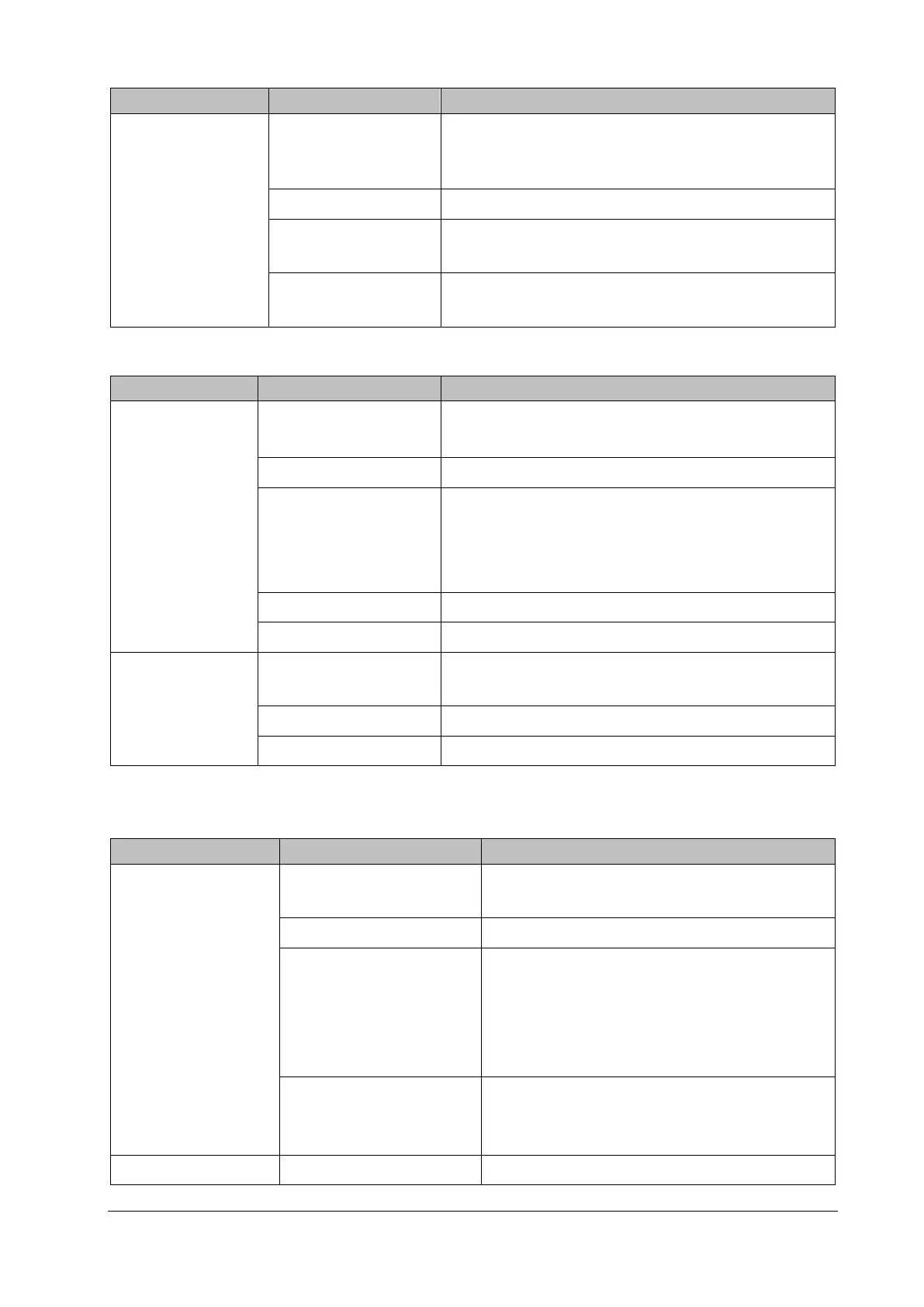
Failure Description Possible Cause Troubleshooting
the alarm LED is
normal
maintenance password→Alarm>>, and then in the popup
menu, set
Minimum Alarm Volume to a proper value. Select
Alarm→Setup, and set the alarm volume to a proper value.
Speaker failure Replace the speaker.
Cable defective or
improperly connected
Verify the cable connecting the speaker to the main control
board is properly connected.
Main control board
failure
Replace the main control board.
5.6.5 Recorder Failures
Failure Description Possible Cause Troubleshooting
No printout
Recorder module disabled
Verify the recorder status LED is lit.
If it is lit, recover its function in "Factory Maintenance".
Printing paper jam Reinstall the paper roll properly.
Cable defective or
improperly connected
Verify the cable connecting the recorder and the main
control board is properly connected.
Verify the connecting cables and connectors are not
damaged.
Recorder failure Replace the recorder.
Main control board failure Replace the main control board.
Poor printing effect
Printing paper thermal
coating failure
Replace the printing paper.
Thermal head dirty Clean the thermal head.
Recorder failure Replace the recorder.
5.6.6 Output Interface Failures
Failure Description Possible Cause Troubleshooting
No output for the nurse
call signal
Internal module rack COM
board defective
Replace the internal module rack COM board.
Main control board defective Replace the main control board.
Cable defective or improperly
connected
Verify the cable connecting the main control
board to the internal module rack COM board is
connected reliably.
Verify the connecting cables and connectors are
not damaged.
Logic exception of the
internal module rack COM
board
Upgrade the logic of the internal module rack COM
board.
USB Device Unusable. Main control board failure Replace the main control board.



 To Next Page