4-26
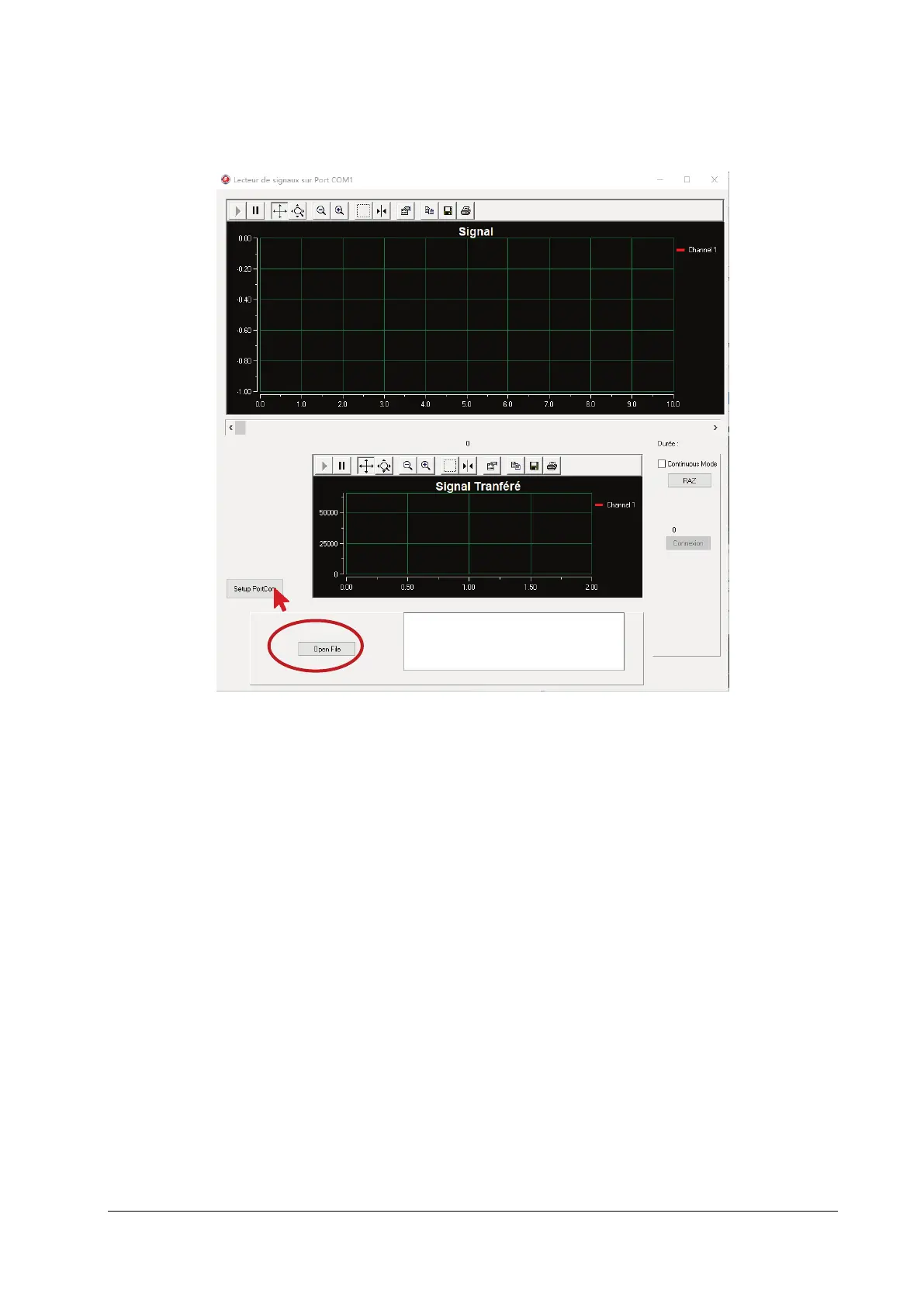
the SimuEcgMindray software. The main interface is displayed, as shown in the following figure. Click Setup
PortCom for parameter configuration. Set the port; for other parameters, use the default settings. For information
about the port, go to Device Manager → Ports (COM & LPT) → USB Serial Port.
4. After parameter configuration, input the file of the corresponding ANI value: Click Open File on the main interface
(as shown in the red circle in the above figure), and select \\ G-897-000275-00\waveform data file\ SIGNAL_ANI_60
(ANI value is 60).
5. Running: Click Connexion on the main interface of the upper computer to complete running. After three minutes,
observe the ANI parameter value (ANIi and ANIm) displayed on the monitor interface. If the ANI parameter value is
within the range of [57,63], the ANI module is functional.
4.5 Nurse Call Relay Performance Test
Tools required:
Multimeter
1. Connect the nurse call cable to the Nurse Call Connector of the patient monitor.
2. Enter Demo mode. Then, select Main Menu→Maintenance >>→enter the required password→Alarm to access
the Nurse Call setup menu.
3. In Nurse Call menu, select all options of Alarm Priority and Alarm Type. and set Contact Type to Normally
Open.



 To Next Page