114
Alphabets
Large view of the Display
⦁
touch icon 3
⦁
select desired alphabet
►
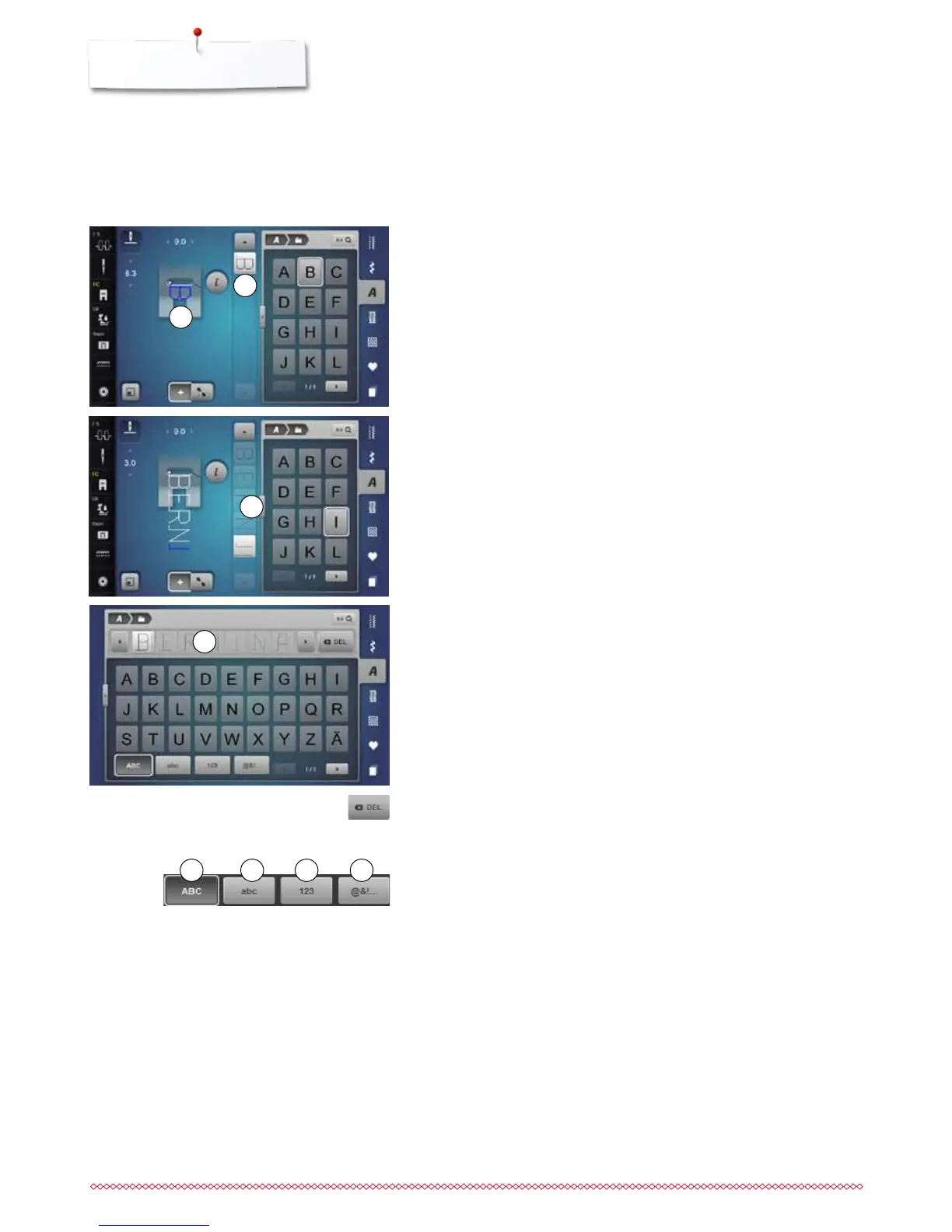
the Display showing the keyboard is opened
►
the «ABC»-icon (upper case) is active automatically
⦁
select desired lettering
⦁
by scrolling at the bottom on the right in the Display more lettering can be
viewed
►
letters appear in the text bar 4
Corrections
⦁
touch the «Delete»-icon
►
the entered text is deleted from right to left
⦁
touch «Combi mode»-icon
⦁
touch the icon with the desired letter
►
the letter appears in the Stitch Altering Area 1 and in the Editing Area 2
►
the cursor is below the letter
Selecting the next letter
⦁
touch the required icon
►
the next letter appears in the Stitch Altering Area and in the Editing Area
Individual letters and rows of the same letter of the same alphabet are sewn in
single mode.
Letters for names, addresses, words, etc. are combined and sewn in combi
mode.
Combining characters
1
2
3
4
5 6 7 8
5 «ABC» upper case (Standard)
6 «abc» lower case
7 «123» numbers
8 «@?!» special characters



 To Next Page