48
Setup Program
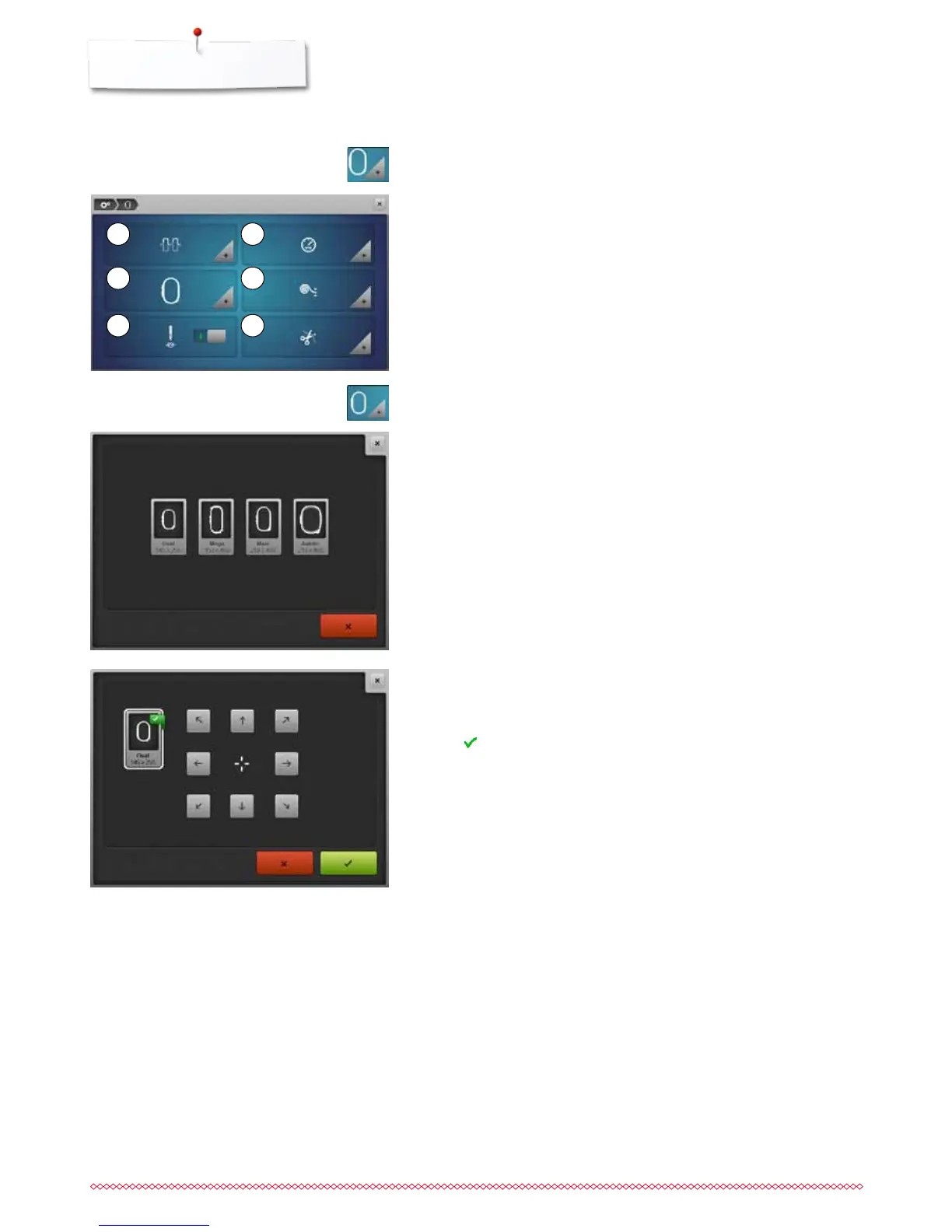
Embroidery settings
1 Altering Upper thread tension
2 Altering Embroidery speed control
3 Calibrating the hoop
4 Fabric Thickness
5 Activating or deactiving securing stitches
6 Automatic cut
The settings for the upper thread tension 1 and embroidery speed 2 can be
adjusted in the same way like the settings for sewing (see page 45).
⦁
touch the desired icon
The hoop calibration adjusts the needle to the center of the hoop. Adjustments
can only be done if the embroidery module is attached.
⦁
select the required hoop and follow the instructions on the Display
⦁
place embroidery template into the embroidery hoop
►
the hoop is checked and the needle positioned to the center
⦁
if the needle is not positioned exactly in the center of the embroidery
template, it has to be centered by using the arrow icons
⦁
touch icon
►
the calibration is saved
⦁
touch «Embroidery settings»-icon
Calibrating the hoop
⦁
touch «Embroidery hoop»-icon
1
3
5
2
4
6



 To Next Page