38
Functions - Display
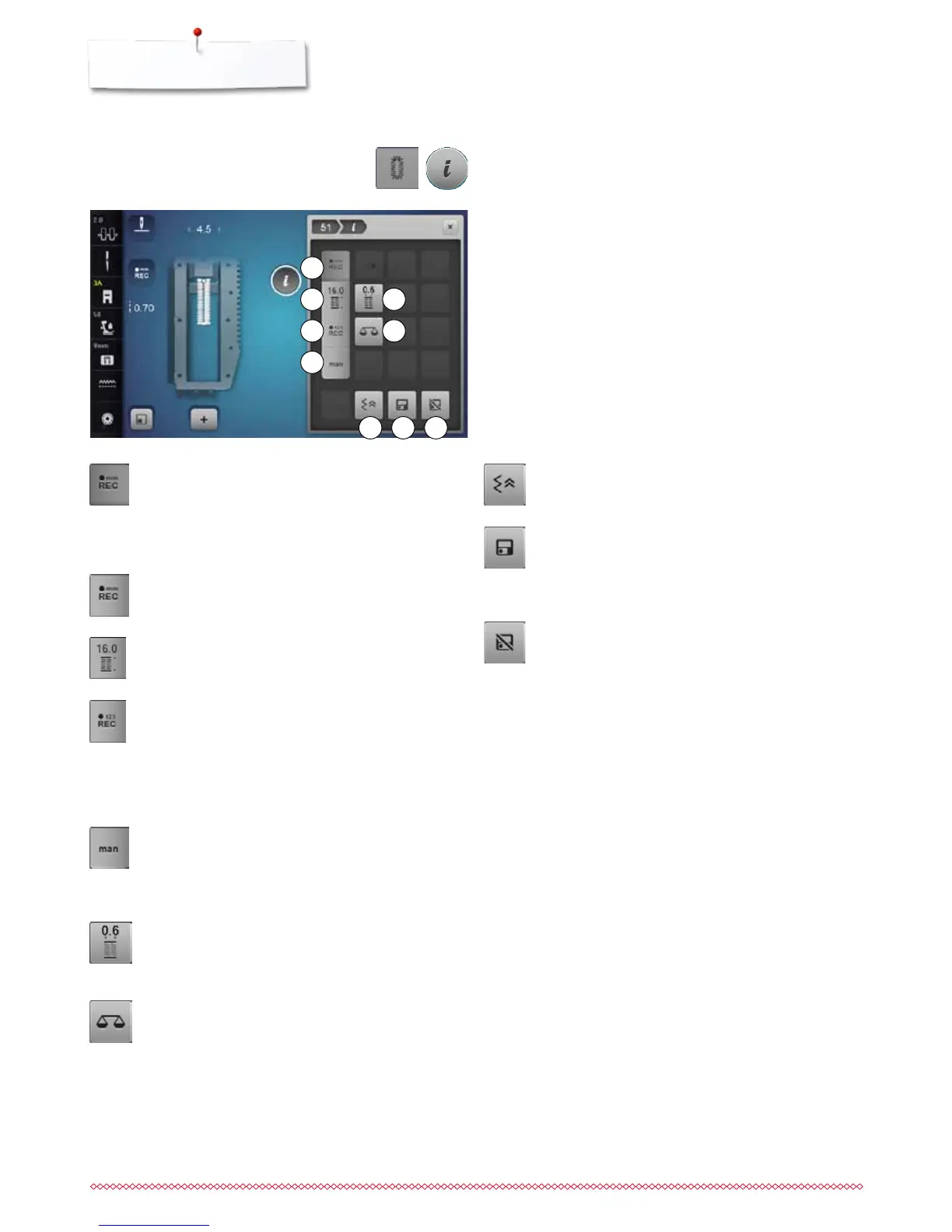
Altering the buttonhole
1 Programming the buttonhole length
2 Buttonhole length direct entry
3 Stitch counter buttonhole
4 Manual buttonhole
5 Buttonhole slit width
6 Balance
7 Backstepping
8 Personal memory permanent
9 Back to basic setting
⦁
press the «Buttonhole»-button
⦁
select the buttonhole
⦁
touch «i»-icon
Programming buttonhole length
►
the icon is active automatically after a buttonhole
has been selected
⦁
determine the buttonhole length by pressing the
«Quick reverse»-button or
⦁
program the indicated length directly in the icon
below by touching the icon
►
function turns inactive after programming the length
⦁
if a new length is to be programmed, touch the icon
again
Buttonhole length direct entry
Determine the bottonhole length via the stitch width or
stitch length knob. Length in mm.
Stitch counter buttonhole
Having sewn the desired length of the 1st bead, then
⦁
press «Quick reverse»-button
Having sewn the desired length of the 2nd bead, then
⦁
press «Quick reverse»-button
►
Display shows «auto»
►
the buttonhole is programmed
Manual buttonhole
⦁
sew a manual buttonhole in 5 or 7 steps (depending
on buttonhole type)
⦁
select every step via the arrow icons «up»/«down»
or via the direct selection
Buttonhole slit width
⦁
set the buttonhole slit width to between 0.1 mm and
2.0 mm using the stitch width or the stitch length
knob or the arrow icons
Balance
To balance forward and reverse stitches.
Backstepping
►
the last 200 needle penetrations of a stitch pattern
are retraced, i.e. sewn backwards
Personal memory permanent
⦁
select a stitch pattern and alter e.g. stitch length or
stitch width
⦁
touch the icon
►
the altered stitch pattern is saved
Back to basic setting
⦁
touch the icon
►
any alterations of the selected stitch pattern are
reset to the original basic setting
Overview Functions buttonholes
1
2
5
8
63
7
4
9



 To Next Page