17
Important Sewing information
Sewing preparation
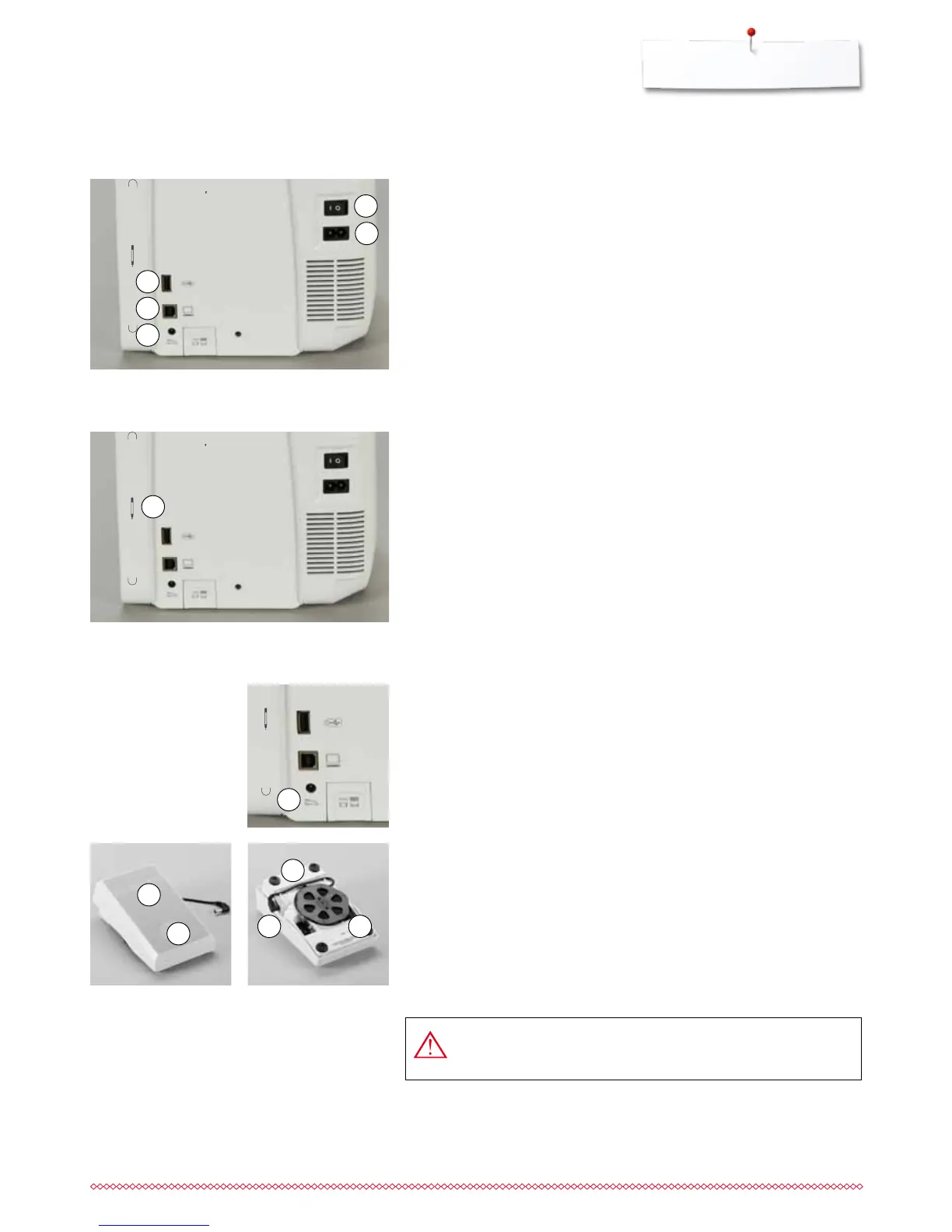
Power Switch/Power Cable
1 Power Switch
The sewing computer is switched on («I») and off («0») with the power switch.
I the sewing computer is switched on
0 the sewing computer is switched off
2 Power plug socket
3 Foot control socket
4 PC-connection
5 USB-connection
Magnetic holder for Touchscreen pen
The Touchscreen pen can be stored easily and securely at the two magnets 1.
Connecting the foot control
⦁
unwind the cable
⦁
plug the cable in the outlet 1
⦁
unwind the cable to the desired length and slip into 4 or 5
Foot control
Sewing speed control
Control the sewing speed by pressing the foot control 2 more or less.
Raising or lowering the needle
⦁
sink the heel back 3 on the foot control
►
the needle adjusts the position up/down
Removing the foot control
⦁
wind the cable around the reel
⦁
plug cable into 6
4
6 5
2
3
1
1
1
2
5
4
3
USA/Canada only: Use only foot controller type LV-1 with
sewing computer B 780.



 To Next Page