148
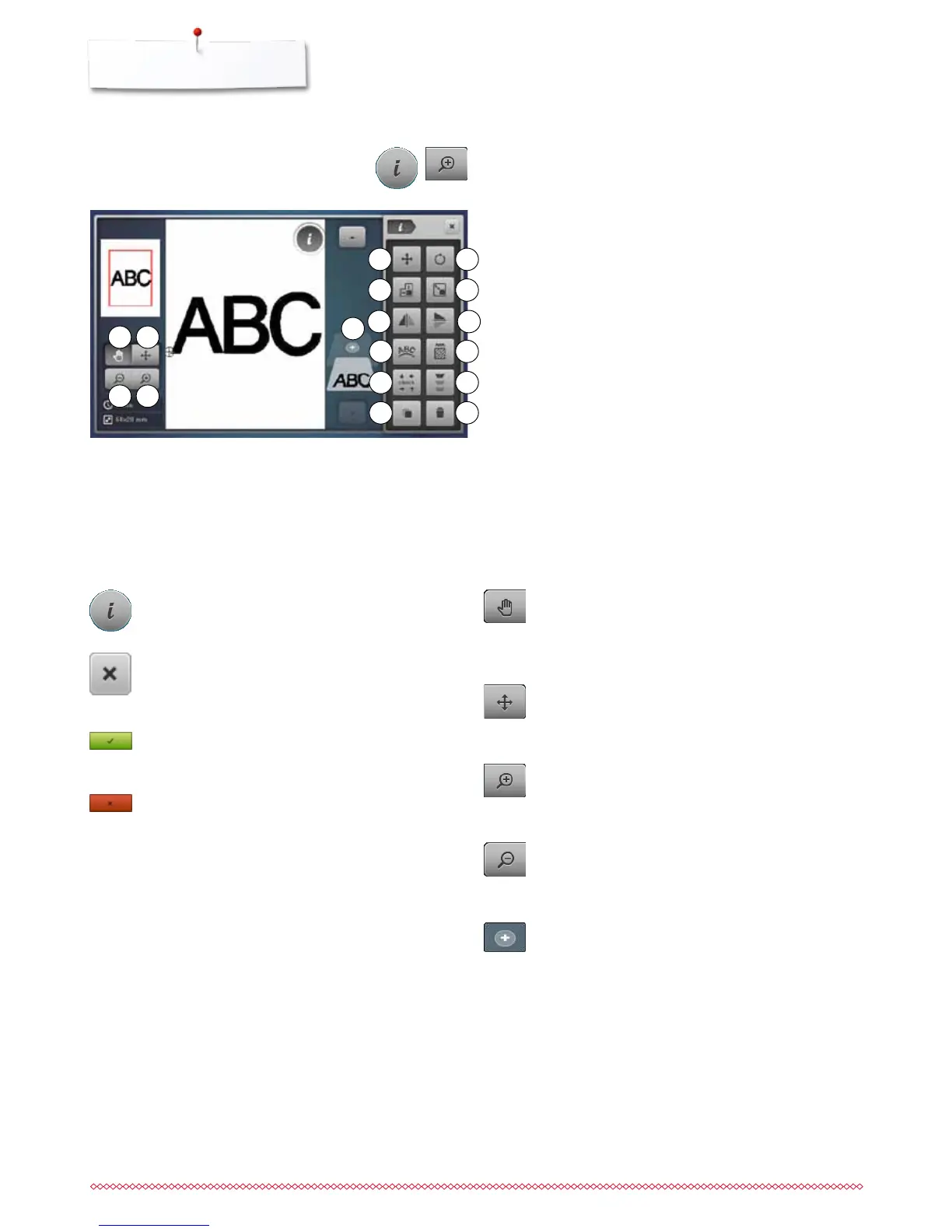
Overview Display
Overview «Edit»-Display
⦁
select alphabet or motif
⦁
touch «i»-icon
⦁
touch «zoom plus»- icon
Some functions feature tips for the operating of the stitch width
and stitch length knobs.
Functions
1 Moving the view of the motif
2 Moving the view of the motif within the hoop
3 Zoom minus
4 Zoom plus
5 Adding embroidery motifs
6 Moving the motif
7 Rotating the motif
8 Altering the motif in height or width
9 Altering the motif proportionally
10 Mirror Image (left/right)
11 Mirror Image (down/up)
12 Altering characters
13 Altering stitch type
14 Check hoop and motif size
15 Endless Embroidery
16 Duplicating the motif
17 Deleting the motif
Information
⦁
touch the icon
►
another Display opens
Back
⦁
touch the icon
►
the previous Display appears
►
any alterations are accepted
Confirming selection
⦁
touch the icon
Alteration/Selection is activated or confirmed.
Leaving the active Display
⦁
touch the icon
►
the Display closes
►
the previous Display appears
Generel functions
Moving the view of the motif within the hoop
The embroidery motif can be moved within the hoop to
any direction using finger or the Touchscreen pen
directly in the Display.
Zoom plus
⦁
touch icon 1-5x
►
the view of the embroidery motif is enlarged by one
step
Zoom minus
⦁
touch icon 1-5x
►
the view of the enlarged motif is reduced by one
step
Moving the view of the motif
The view of the embroidery motif can be moved to
any direction using finger or the Touchscreen pen
directly in the Display. The embroidery position won't
be changed.
Adding embroidery motifs
►
the overview of the previous Display is opened
(Alphabet, Motifs, Stitch patterns, My Designs)
⦁
select the desired motif
2
4
6
9
10
7
8
1
3
11
12
14
16
13
15
17
5



 To Next Page