39
Functions - Display
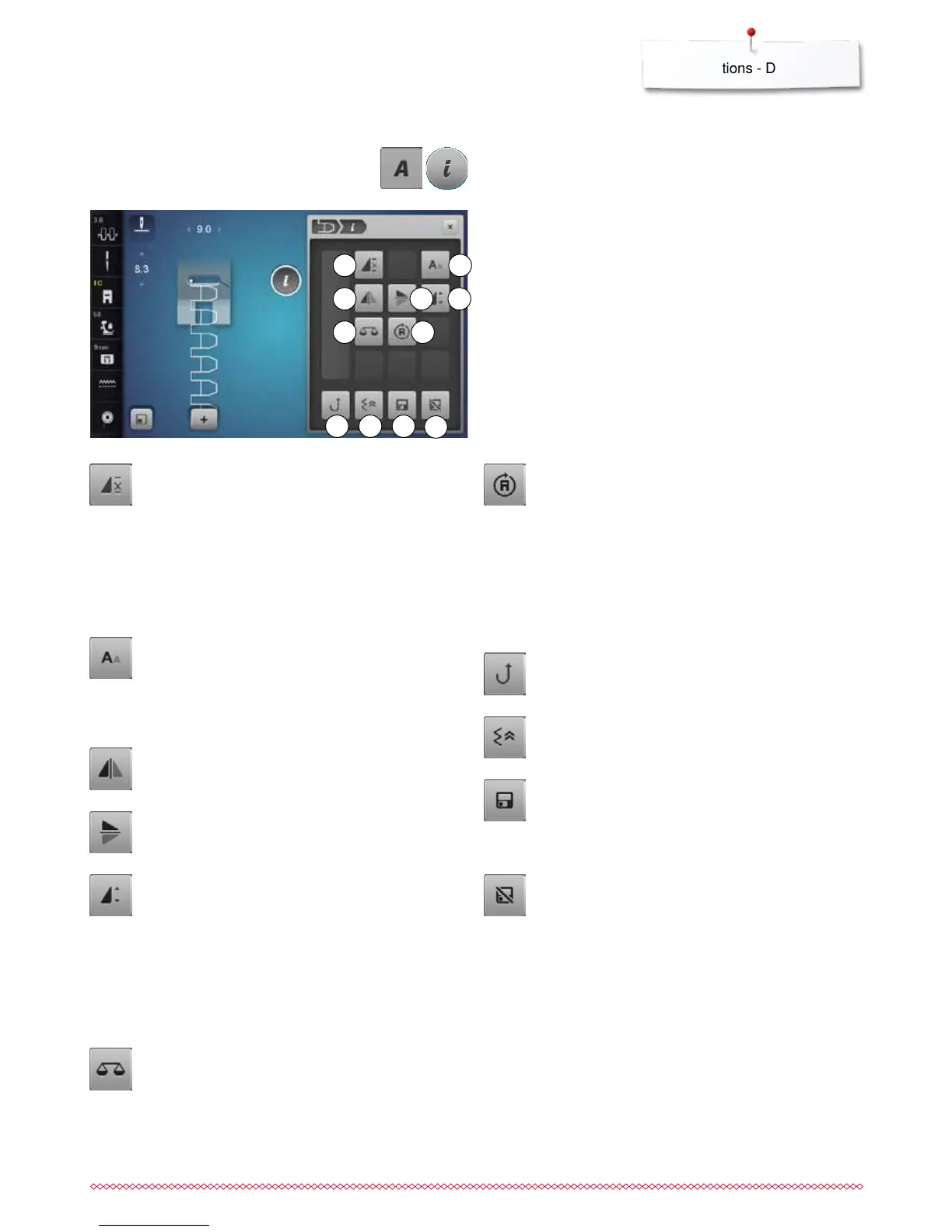
Altering Alphabet
1 Pattern repeat
2 Font size in alphabets
3 Mirror Image left/right
4 Mirror Image up/down
5 Altering the pattern length
6 Balance
7 Multi-Directional sewing
8 Permanent reverse sewing
9 Backstepping
10 Personal memory permanent
11 Back to basic setting
⦁
touch «Alphabet»-button
⦁
select Alphabet
⦁
touch «i»-icon
Overview Functions Alphabets
1
5
9
2
4
6 7
8 10
11
Pattern repeat
⦁
touch icon 1x
►
number 1 appears: the sewing computer stops at
the end of an individual stitch patttern or a stitch
pattern combination
⦁
touch icon 2-9x
►
numbers 2-9 appear: the sewing computer stops at
the end of an individual stitch patttern or a stitch
pattern combination after the number of repeats
selected
Font size in alphabets
⦁
select alphabet
►
letter size is 9 mm
⦁
touch the icon
►
the small «A» is activated
►
the font size is reduced
Mirror Image left/right
The sewing computer sews the stitch pattern mirrored,
left/right referring to the sewing direction.
Mirror Image up/down
The sewing computer sews the stitch pattern mirrored
up/down referring to the sewing direction.
Altering the pattern length
⦁
move the round knob in the Display using the touch
pen or the finger
►
pattern length (Standard = 100%) is infinitely
variable
⦁
extend or shorten in 1%-steps using the
«+»/«-»-icons or
⦁
touch «+100%»-icon
►
the pattern length is extended in 100%-steps
Maximum length is 200%, shortest length is 10%.
Balance
To balance forward and reverse stitches.
Multi-Directional Sewing
►
use the stitch width knob to rotate the stitch pattern
or combination in 0.5°-steps, the stitch length knob
for 1°-steps or the direct-selection buttons for
rotating in 45°-steps into the desired direction
►
the sewing direction is shown in the left part of the
Display
►
the start is marked with a white dot and the end
with a red cross
►
the function only appears if the selected stitch can
be sewn in multiple directions
Permanent reverse sewing
The sewing computer sews the selected stitch pattern
in reverse.
Backstepping
►
the last 200 needle penetrations of a stitch pattern
are retraced, i.e. sewn backwards
Personal memory permanent
⦁
select a stitch pattern and alter e.g. stitch length or
stitch width
⦁
touch the icon
►
the altered stitch pattern is saved
Back to basic setting
⦁
touch the icon
►
any alterations of the selected stitch pattern are
reset to basic setting
3



 To Next Page