50
Setup Program
Personal settings
⦁
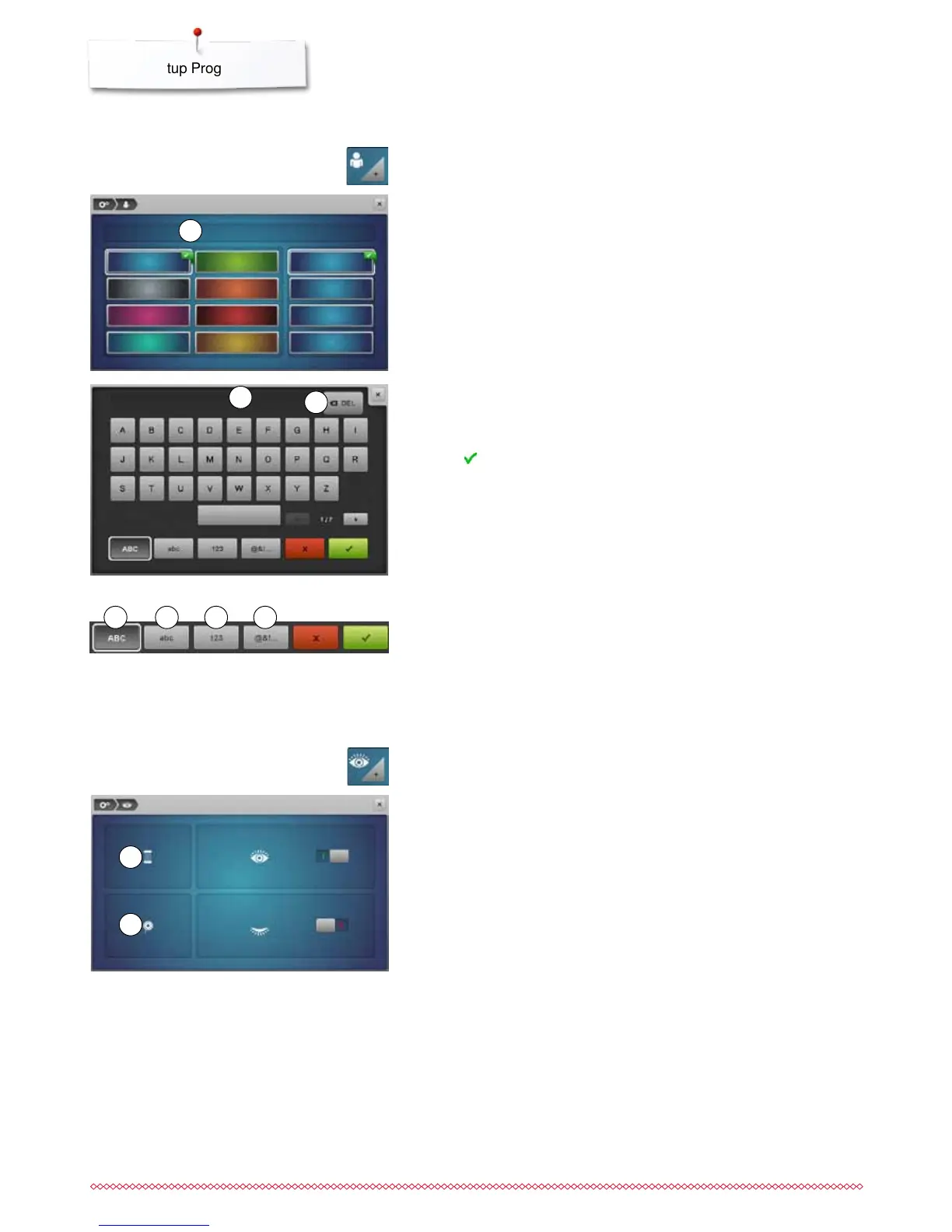
select the desired Display and wallpaper color
Welcome text
⦁
create or change Welcome Text 2
Space bar is at the bottom of the letter keys.
►
Welcome text appears in the text icon 2 above the letter keys
⦁
touch to confirm
Deleting Welcome text
⦁
touch «Text»-icon 2
►
all entered text is deleted
Corrections
⦁
touch icon 3
►
the entered text is deleted from right to left
⦁
select «Personal setting»-icon
⦁
touch «Text»-icon 1
Monitoring
The following monitoring functions can be activated or deactivated:
1 Upper thread indicator
2 Lower thread indicator
Upper-/Lower thread indicator
►
open eye = function active
⦁
touch gray icon
►
closed eye = function inactive
The sound type for the monitoring functions is set in the audio settings of the
functions.
⦁
touch «Monitoring»-icon
1
2
3
1
2
4 «ABC» upper case characters (standard)
5 «abc» lower case characters (standard)
6 «1,2,3» numbers and mathematical characters
7 «@&!...» special characters
4 765



 To Next Page