172
Embroidery motifs
Importing stitch patterns from the sewing mode
Stitch patterns or stitch pattern combinations can be imported from the sewing
mode to the embroidery mode and they can be edited like embroidery motifs.
Therefore e.g. endless embroidery patterns are combined, duplicated, mirrored
etc. quickly and easily. Finally, these combinations can be saved as
embroidery motifs in the folder «My Design».
When an imported stitch pattern is not saved in the embroidery
mode, it will be overwritten by the next selected the stitch pattern.
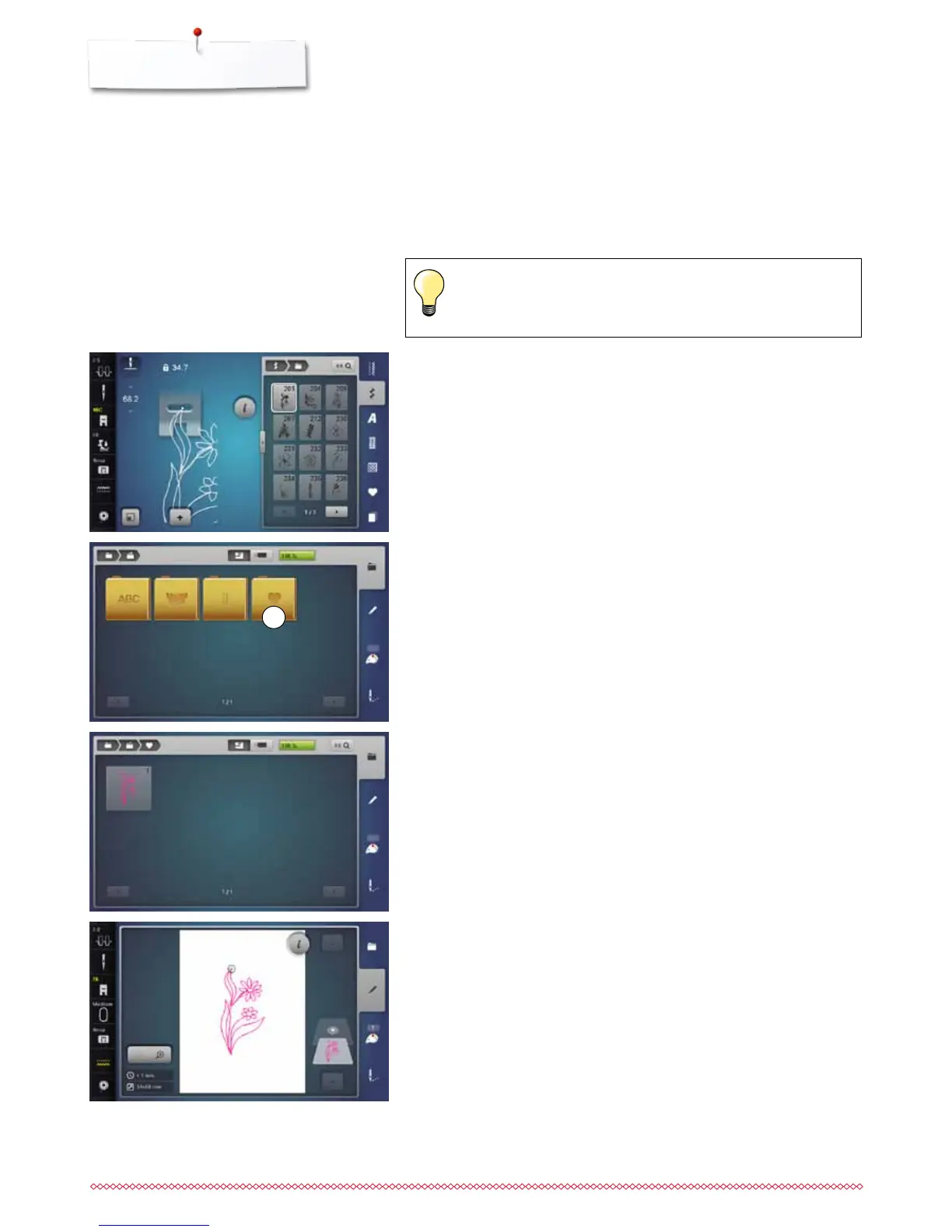
Selecting stitch patterns in the sewing mode
⦁
select the stitch pattern No. 201 in the category 200
⦁
touch the «Home»-button
⦁
touch «Embroidery mode»-icon
Selecting stitch patterns in the embroidery mode
⦁
touch «My Design»-icon 1
►
the stitch pattern has been imported to the folder «My Design»
⦁
select the stitch pattern
►
the stitch pattern appears in the «Edit»-display
►
the stitch pattern can be edited by any available functions and embroidered
like an embroidery motif
►
to remain the stitch pattern in the embroidery mode, it must be saved, see
page 173
1



 To Next Page