BERNINA International AG Seestrasse 161 CH-8266 Steckborn Schweiz Seite 111 von 172
DRAFT – VERSION
5.8 Hall position synchronization
Note: To use the Service Program, the machine must be running (switched on). Refer to the safety
instructions, please.
Check:
• Remove the stitch plate.
• Select Service Program test 6o.
• Bring machine into loop lift position by hand. Hook
tip must be behind needle and flush with left needle
edge.
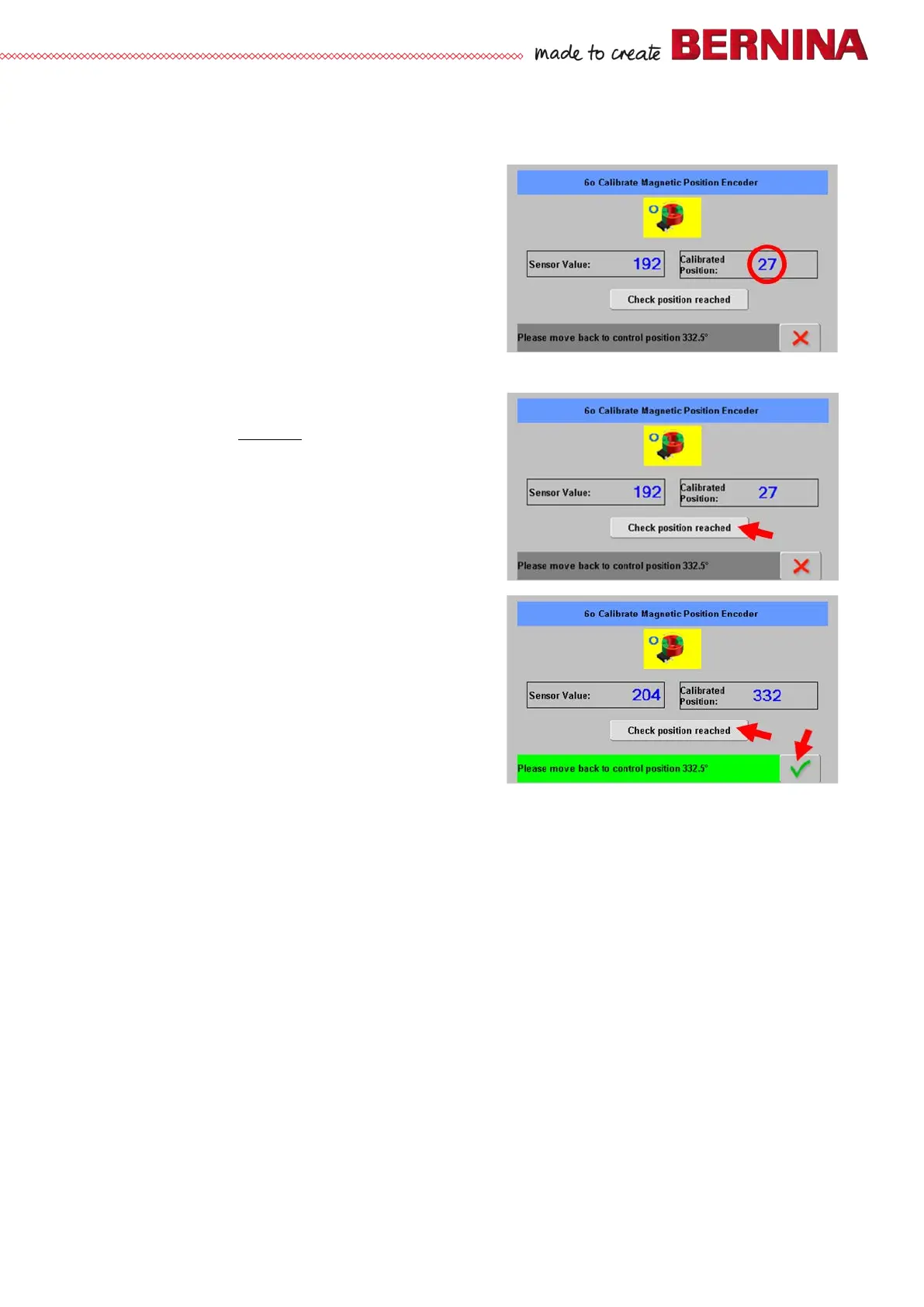
• Service Program test 6o should display a value in
the area of between 27 to 29 degrees.
Adjustment:
• Start Service Program test 6o.
• Adjust loop lift (see 5.5.3
).
• Click ‘Check position reached’ bar.
• Turn handwheel clockwise until loop lift gauge hits
stop again.
• The bottom bar must now change colour from grey
to green.
The area desplayed in green spans from 335 to 330
degrees.
• Click ‘Checked position reached’ bar. A green check
button appears to the right of the bottom bar.
• Click green check button to exit Service Program.



 To Next Page