BERNINA International AG Seestrasse 161 CH-8266 Steckborn Schweiz Seite 44 von 172
DRAFT – VERSION
4.2 Electronics, Sensors, Switches, Magnets
4.2.1 PCBA-Power including PCB housing
Remove power plug to disconnect machine from power supply!
See ESD-related note
Note:
The power supply unit comes complete with housing 036759.70.00 and includes:
o PCBA-Power Supply 101956.70.00
o Power supply housing 036389.50.00
o Protective cover 036390.50.00
o PCBA-Base wire 100720.70.00
o Conductive fabric gasket 100784.50.00
Disassembly:
• Remove the covers (see 4.1
).
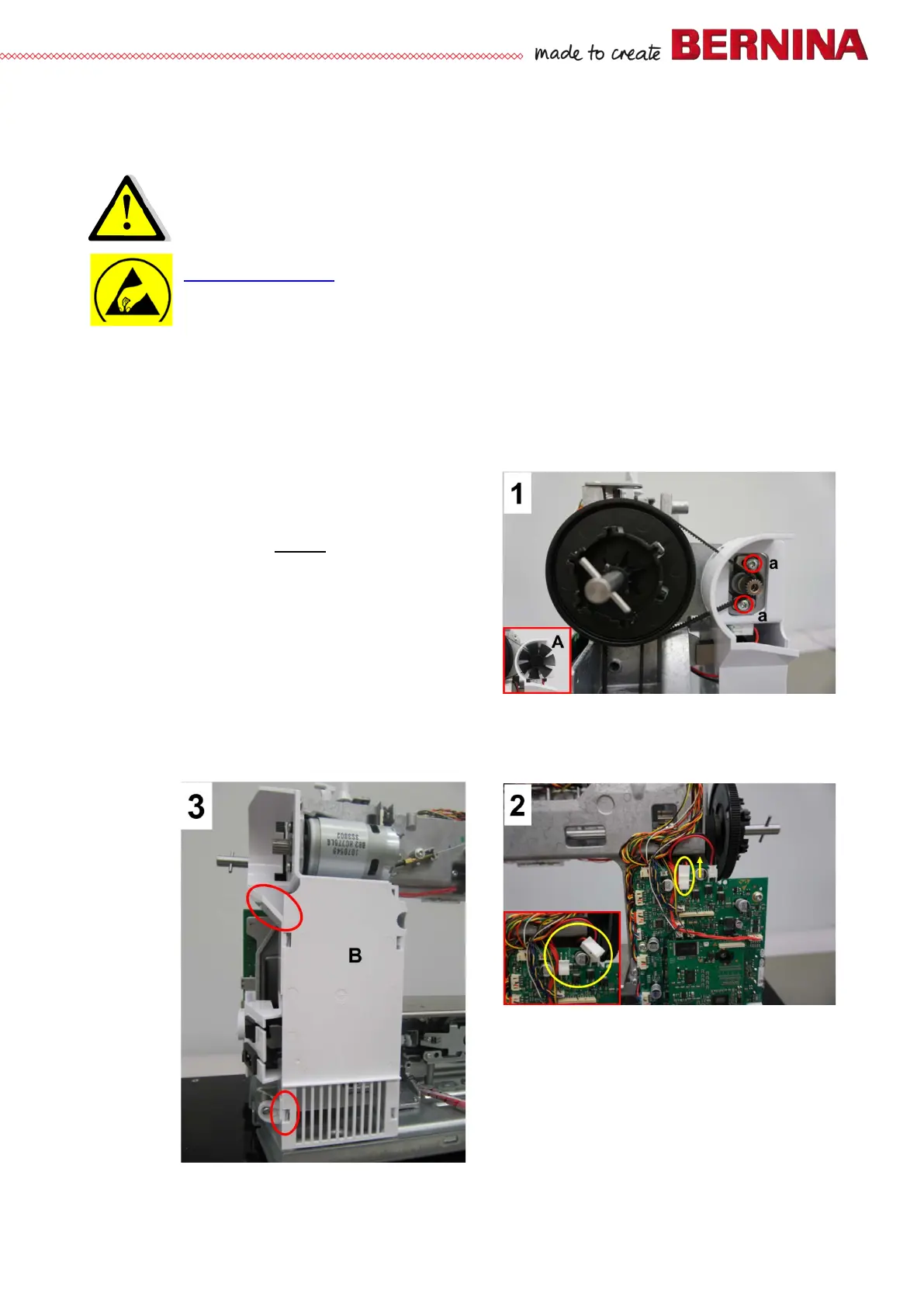
• Picture 1 - Remove wheel A (see small pict
bottom left). Remove fastening screw a (T20
M4X10) from main motor so that the drive belt can
be removed.
• Picture 2 - Unplug power supply unit and PCBA-
Base connecting cable from PCBA-Base.
• Picture 3 - In the yellow-circled areas, pull
housing apart to unlock snap fits. Remove
protective cover.
Note:
It is best to remove the protective cover while the housing is still fastened to the machine.



 To Next Page