KBF P + KBF LQC + KBWF (E6) 11/2016 page 112/189
14.5.3 New password assignment for “service” or “admin” authorization level when the
password function was deactivated
If the password protection for an authorization level has been deactivated, i.e., no password is assigned,
no login for this level is possible. Therefore access to this authorization level is available without login.
If the password for the “Service” or “Admin” authorization has been deleted (chap. 14.5.2), a new pass-
word can be assigned for the current level and the next lower level(s) without user login.
Example: The password for the “Admin” authorization level was deleted, therefore every user without
login has full access to the functions of the “Admin” authorization level. If access to this level shall become
password protected again, the user can assign a new password for the “Admin” authorization level with
the “Password” function.
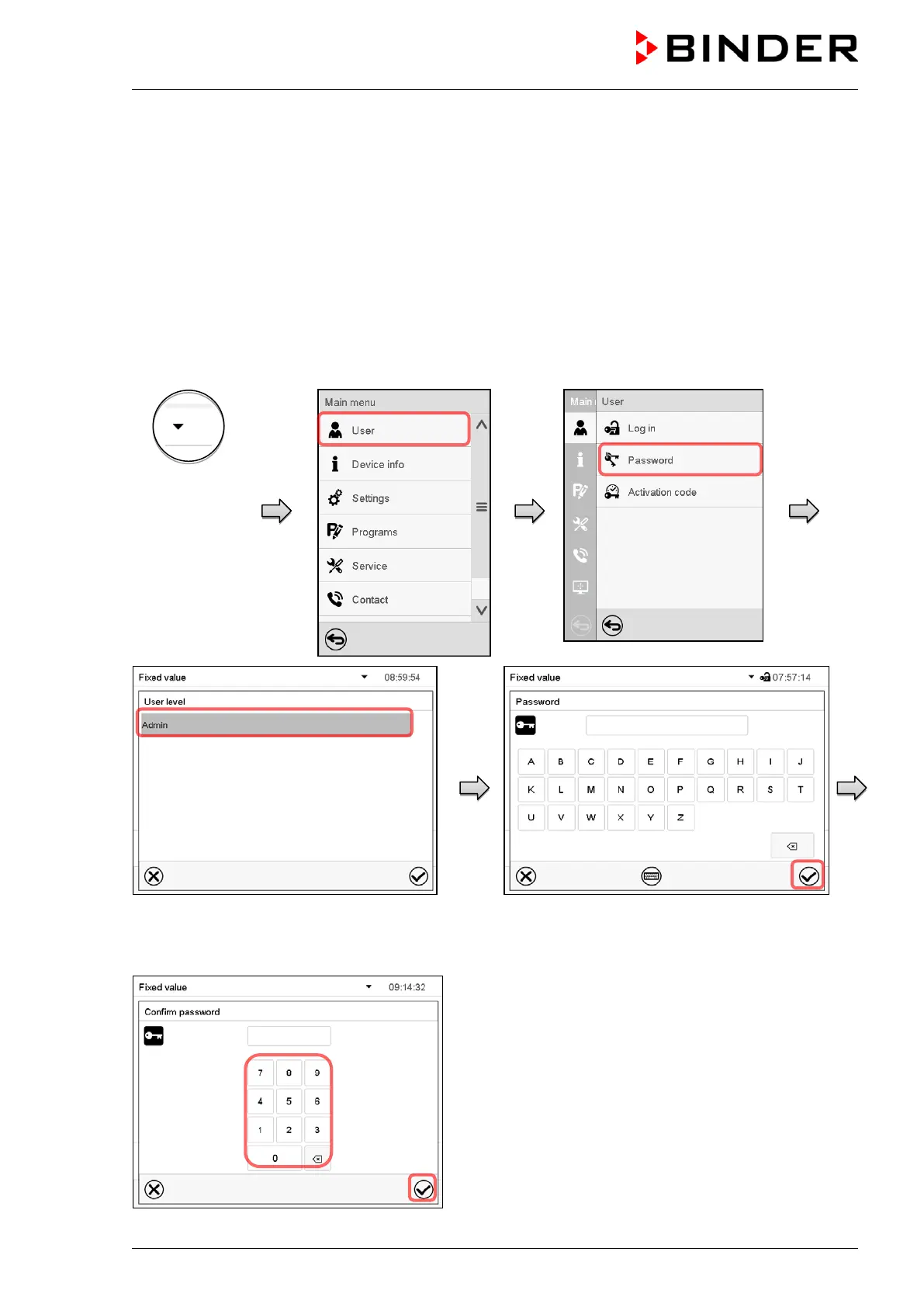
Path: Main menu > User > Password
Controller with
deactivated
password for
“Service” or
“Admin” author-
ization
Select the authorization level, for which you
want to assign a password.
(Example: “Admin” authorization)
Enter the desired password and press the
Confirm icon.
Repeat the password entry for confirmation and press
the Confirm icon.
For each character of the password, the required key-
board appears automatically.











 To Next Page