KBF P + KBF LQC + KBWF (E6) 11/2016 page 60/189
10. Time programs
The MB2 program controller permits programming time programs with real-time reference. It offers 25
program memory positions with up to 100 program sections each.
For each program section you can enter a temperature set-point, fan speed, section duration, type of tem-
perature transition (ramp or step) and the tolerance range.
KBF LQC: Through accordingly programming the operation lines, light integration is possible (chap.
10.7.3).
If the safety controller has been set to “limit” mode, check the setting of the safety controller
when changing the temperature set-point, (chap. 13.2).
Reduce the fan speed only if required, because the spatial distribution of temperature and
humidity will also be reduced.
Technical data refers to 100% fan speed.
Programming remains saved in case of a power failure or after turning off the unit.
Path: Main menu > Programs> Time program
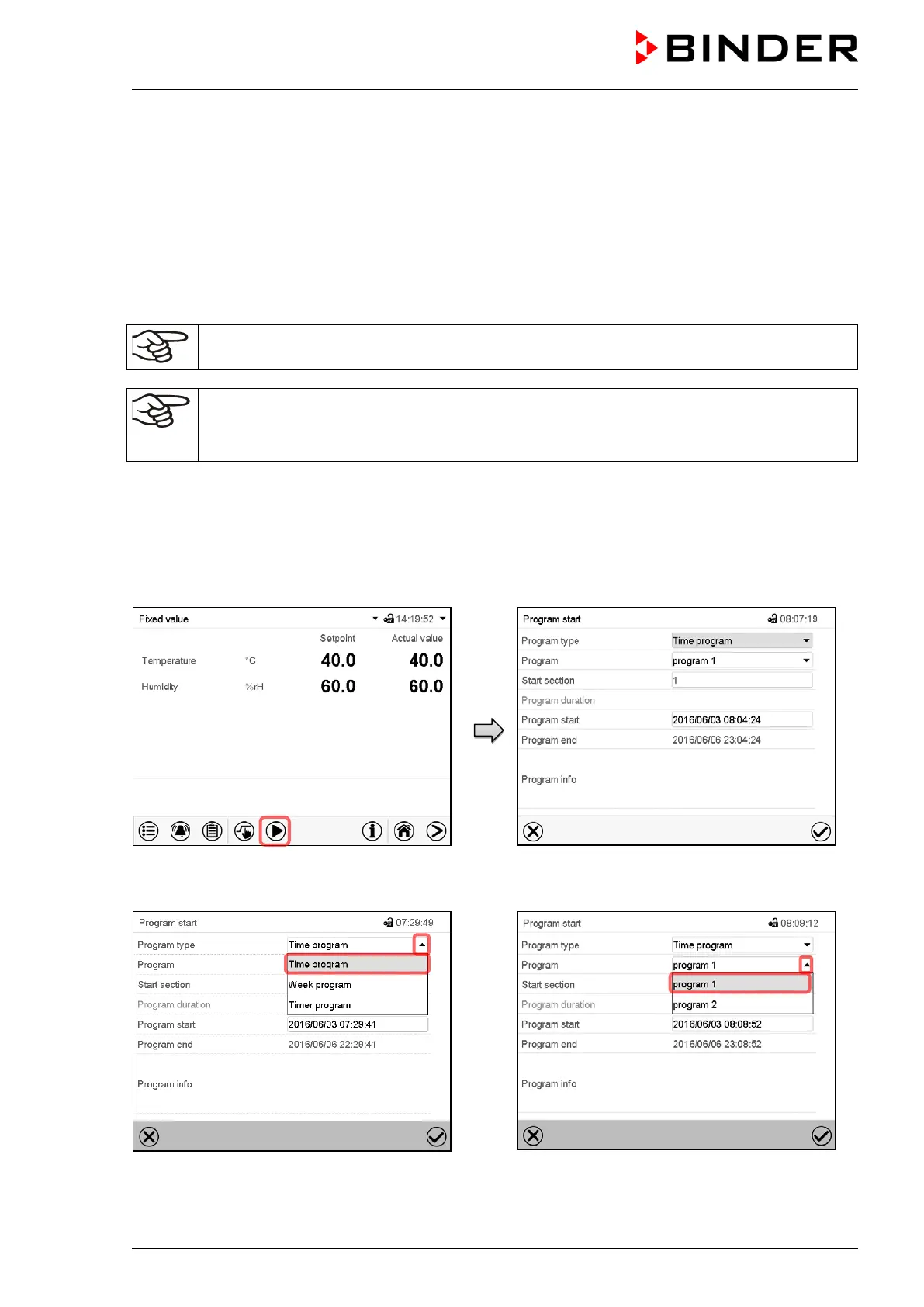
10.1 Starting an existing time program
Normal display.
Press the Program start icon.
“Program start” menu
“Program start” menu.
In the field “Program type” select the setting
“Time program”.
“Program start” menu.
In the field “Program” select the desired pro-
gram.











 To Next Page