KBF P + KBF LQC + KBWF (E6) 11/2016 page 135/189
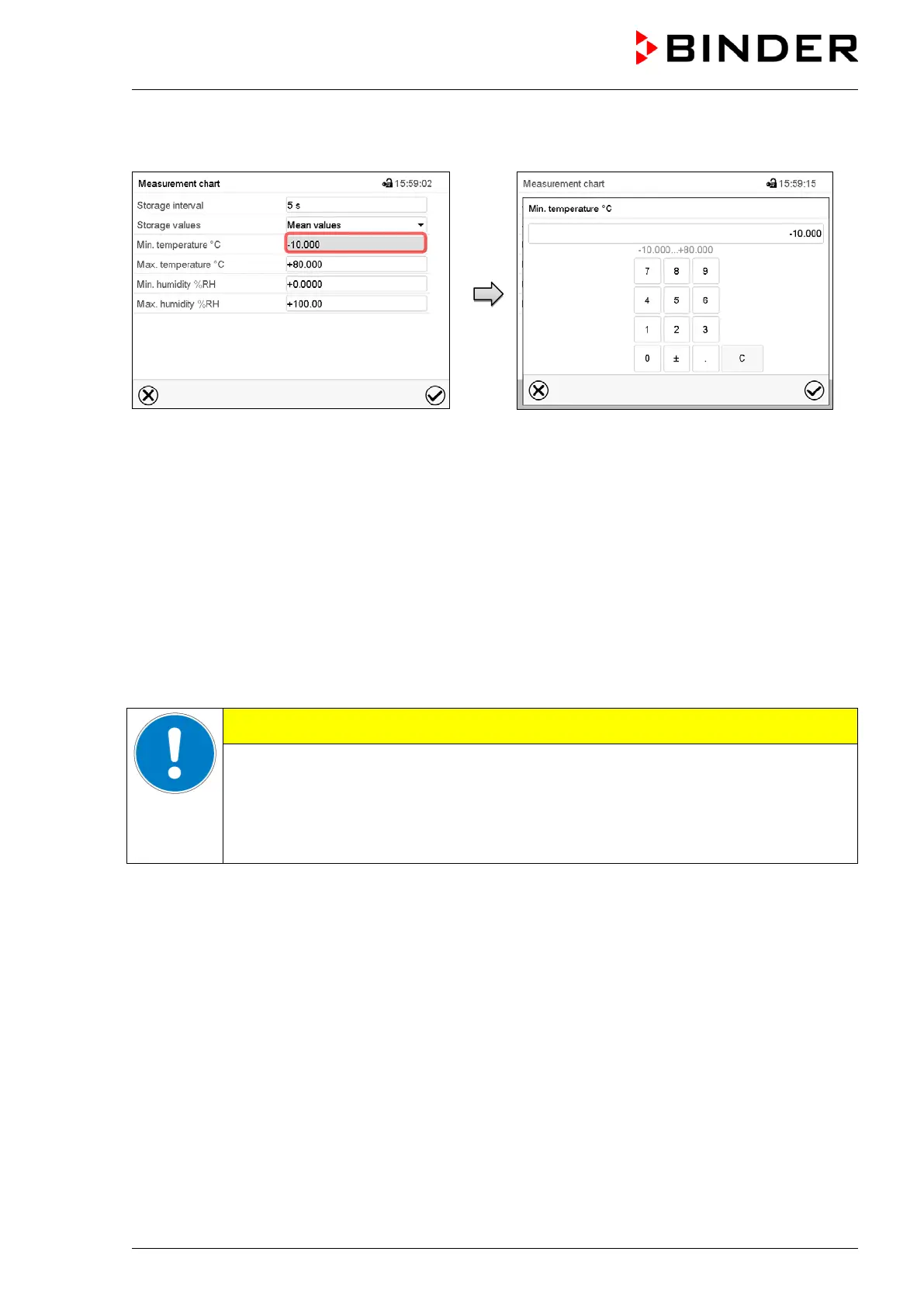
For scaling the representation select the desired temperature or humidity value and, with KBF LQC, the
desired VIS or UVA dose target value.
“Measurement chart” submenu (example)
Example: “Min. temperature” entry menu.
Enter the desired value and press the Confirm
icon.
Display ranges:
• Temperature: -10 °C up to 80 °C
• Humidity: 0% r.H. up to 100% r.H
• VIS dose: 0-99999 MLuxh
• UVA dose: 0-99999 Wh/m2
The available presentation depends on the pre-selected storage rate. Factory setting: 60 seconds. This
means the higher the storage rate, the more precisely but shorter the data representation will be.
Setting the storage rate or rescaling (minimum and/or maximum) will clear the
measured-value memory and the Event list.
Danger of information loss.
Change the storage rate or scaling ONLY if the previously registered data is no longer
needed.



 To Next Page